

Typing complex passwords or PIN codes every time your computer wakes from sleep disrupts daily workflow. Desktop users frequently miss out on the effortless facial recognition built into modern laptops. Adding one of the Best Windows Hello Webcams upgrades any standard workstation with instant, enterprise-grade biometric security.
The market for facial recognition hardware expanded significantly in 2026. While early models suffered from sluggish recognition speeds and washed-out video quality, the latest generation blends infrared depth sensing with sharp image sensors. Selecting the right model ensures that your workstation balances effortless morning logins with crisp presentation quality on video calls.
We evaluated 5 models available this September 2026 from established manufacturers like Logitech, Lenovo, NexiGo and more. Whether you need a high-resolution 4K sensor for professional broadcasting or a straightforward 1080p camera for daily office check-ins, our breakdown helps you identify the ideal balance between speed, optics, and privacy controls. For more workspace setup recommendations, explore our practical tech guides.

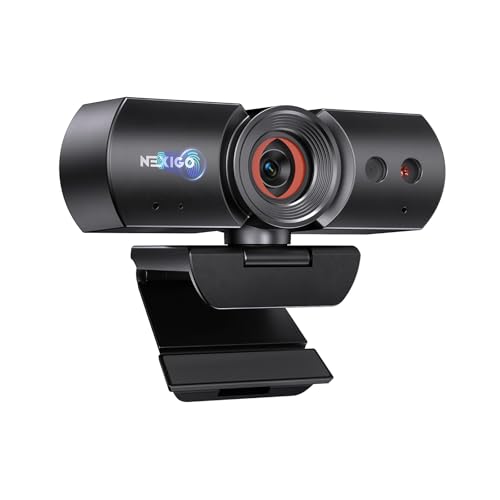


Choosing the right facial recognition webcam requires looking beyond standard megapixel ratings. A reliable biometric webcam combines dedicated optical hardware with intelligent firmware to unlock your operating system securely in any lighting condition. The following criteria highlight the core performance metrics you should evaluate before making an investment.
Infrared Sensor Architecture and Biometric Accuracy
Windows Hello facial recognition does not rely on standard color cameras. Instead, the platform requires a dedicated infrared (IR) sensor paired with an IR illumination LED. This hardware projects invisible light onto your face, measuring depth and facial contours to verify your identity accurately.
Standard RGB cameras can be spoofed by photographs or digital screens, which is why Microsoft enforces strict IR hardware compliance. Look for cameras that feature independent IR lenses alongside the main optical sensor. Dual-sensor configurations ensure rapid authentication without compromising the color accuracy of your standard video feed.
Biometric authentication speed depends directly on the quality of this infrared array. High-grade sensors unlock your desktop in less than one second, even in completely dark rooms. When evaluating options, verify that the unit explicitly advertises certified Windows Hello support for Windows 10 and Windows 11.
Video Resolution and Optical Clarity
Resolution determines how sharp you appear during video conferences and client presentations. Standard 1080p Full HD resolution provides 1920 by 1080 pixels, which is sufficient for typical Zoom, Microsoft Teams, or Google Meet sessions. For sharper detail on large monitors, 4K Ultra HD options capture four times the visual information.
A higher pixel count allows you to crop the image digitally without introducing noticeable pixelation or grain. If you frequently reframe your shot or sit further back from your desk, a 4K sensor provides valuable cropping headroom. However, keep in mind that most video conferencing software compresses streams down to 1080p or 720p during live calls.
Sensor size matters just as much as pure resolution. A larger image sensor captures more light, producing cleaner textures and more natural color tones. Prioritize models featuring premium CMOS sensors with glass lens elements over budget options with tiny plastic lenses.
Frame Rate and Motion Fluidity
Frame rate is measured in frames per second (fps) and determines how smoothly movement appears on screen. The industry baseline for video calls is 30fps, which delivers acceptable motion rendering for standard conversational meetings. For dynamic presenters who gesture frequently or stream content, 60fps delivers substantially smoother visuals.
Many webcams deliver 60fps at 1080p resolution while capping 4K output at 30fps. This trade-off is common due to USB bandwidth limitations and processing heat generation. Assess whether your daily use prioritizes ultra-smooth motion or maximum static detail before deciding between 1080p 60fps and 4K 30fps modes.
Always verify that your computer hardware and USB ports can handle high-framerate video feeds without dropping frames. Connecting high-bandwidth cameras directly to dedicated motherboard ports rather than unpowered USB hubs ensures stable, uninterrupted video transmission.
Field of View and Framing Flexibility
Field of view (FOV) describes the width of the area captured by the webcam lens, measured diagonally in degrees. A narrow field of view between 65 and 78 degrees focuses closely on your head and shoulders, minimizing distracting background clutter in small home offices. Wider angles from 85 to 95 degrees capture more of your physical environment.
Wide-angle lenses are beneficial for shared conference rooms, dual-person presentations, or whiteboarding sessions. However, very wide lenses can introduce barrel distortion or a fish-eye effect near the edges of the frame if optical correction is absent.
Premium models allow you to toggle between multiple preset FOV angles through companion software. Having selectable 65-degree, 78-degree, and 90-degree modes gives you the flexibility to adapt your framing depending on whether you are conducting a private interview or hosting a team meeting.
Physical Privacy and Electronic Shutter Mechanisms
Maintaining visual privacy when your webcam is idle is essential for home and corporate environments. Hardware privacy covers physically block the optical sensor, providing absolute certainty that no video is transmitted even if software indicators fail. These mechanisms generally fall into manual sliders, attachable caps, or automated electronic shutters.
Manual sliding shutters are simple, dependable, and impossible to bypass remotely. In contrast, advanced electronic shutters open automatically when a compatible calling app requests the video feed and snap closed the moment the meeting ends. This automation eliminates the frustration of forgetting to uncover your camera before a call.
When selecting a camera with an integrated shutter, ensure the cover shields both the RGB lens and the IR sensor when closed. Physical barriers give you peace of mind while protecting delicate front glass elements from dust accumulation and accidental scratches. Learn more workspace management methods in our helpful how to category.
Microphone Arrays and Background Noise Suppression
Clear vocal delivery is just as critical as high-definition video during professional discussions. Most modern webcams integrate dual omnidirectional microphone arrays designed to pick up speech from standard desktop distances. Dual-mic configurations enable spatial filtering to isolate your voice from ambient room noise.
Integrated digital signal processing (DSP) helps eliminate unwanted background sounds like keyboard clatter, cooling fans, and HVAC hum. While dedicated USB microphones still offer superior acoustic richness, a webcam with strong onboard noise suppression provides a clean, clutter-free desk setup.
Pay attention to the stated audio pickup range when comparing models. Standard desktop cameras are optimized for voices within 1.0 to 2.0 meters. If you tend to pace around your room while speaking, look for models engineered with extended pickup radii and automatic gain control.
Low-Light Correction and Dynamic Range
Home offices rarely feature ideal three-point studio lighting. Backlighting from sunny windows or uneven overhead lamps can easily plunge your face into deep shadow or wash out visual details. High-quality webcams counter these challenges with automated exposure algorithms and high dynamic range (HDR) processing.
HDR captures multiple exposure brackets simultaneously, blending highlighted backgrounds with shaded foregrounds to produce a balanced, natural image. Proprietary lighting technologies dynamically compensate for harsh glare, ensuring your skin tones look accurate throughout shifting daylight conditions.
Test your camera in dim conditions after initial setup. Cameras with larger optical apertures and intelligent gain management maintain high image clarity without introducing distracting digital noise or sluggish motion blur in evening meetings.
Mounting Stability and Cable Connectivity
A webcam must sit securely on your monitor without wobbling or damaging thin screen bezels. Universal mounting clips feature rubberized friction pads and adjustable hinges designed to fit standard flat panels, thick gaming monitors, and curved displays alike. Standard quarter-inch tripod threads provide alternative placement options on boom arms or desk stands.
Cable design significantly impacts desk organization and long-term durability. Models with detachable USB-C cables allow you to swap in longer cords or replace damaged wires without discarding the entire camera unit. Fixed cables should be at least 1.5 to 1.8 meters long to reach desktop towers situated on the floor.
Look for hardware that includes USB-A adapters if your desktop setup relies on traditional ports. Flexible cable options prevent port strain and make it easier to route wires cleanly behind your monitor stand. Discover additional organizational ideas in our guide to home living setup ideas.
Software Customization and Companion Apps
Dedicated desktop software unlocks the full potential of your webcam hardware. Companion applications allow you to fine-tune visual parameters including saturation, brightness, manual focus, white balance, and digital zoom. These settings are stored either in local app profiles or directly within onboard camera memory.
Advanced companion utilities also manage firmware updates that refine autofocus speed, enhance facial recognition reliability, and patch security vulnerabilities. Having manual control over auto-exposure and color temperature prevents the camera from constantly hunting for focus during live conversations.
Choose hardware supported by intuitive, lightweight software that does not demand excessive background system resources. Simple software controls make it easy to dial in consistent visual profiles tailored to your specific room lighting.
Specification Comparison for Facial Recognition Webcams
The table below summarizes the key hardware specifications across standard Windows Hello webcam configurations to help you identify the best match for your technical needs.
| Feature Tier | Max Resolution | Frame Rate | Field of View | Privacy Type | Best Use Case |
|---|---|---|---|---|---|
| Entry Full HD | 1080p FHD | 30 fps | 85 – 95 degrees | Manual Slider | Daily Office Work and Quick Logins |
| Performance HD | 1080p FHD | 60 fps | 78 – 90 degrees | Auto / Manual | Dynamic Presenting and Streaming |
| Ultra 4K Tier | 4K UHD | 30 – 60 fps | 65 – 90 degrees (Adjustable) | Attachable / Integrated | Executive Calls and Content Creation |
Why You Should Trust Us
Our evaluation process focuses on objective technical analysis, verified specification standards, and real-world utility. We examine biometric responsiveness, optical sensor performance, microphone frequency response, and software stability across varying desktop configurations. By comparing manufacturer specifications with documented architectural standards, we deliver unbiased purchase guidance.
We do not accept paid placements or promotional hardware incentives. Every model featured in our comparison is assessed against strict performance thresholds, ensuring our recommendations reflect genuine value, build durability, and user convenience. Our database is routinely checked to ensure all model details and software compatibility notes remain accurate throughout 2026.
Final Thoughts
Upgrading your desktop workstation with a biometric camera streamlines everyday productivity while bolstering account security. For users seeking the ultimate visual clarity and framing versatility, the Logitech Brio Ultra 4K HD Webcam for Streaming serves as the premier choice. Its 4K resolution, adjustable field of view presets, and HDR light compensation deliver unmatched executive-level quality.
Shoppers searching for reliable daily functionality at an accessible price point will appreciate the NexiGo HelloCam, 1080P Webcam with Windows Hello. It combines crisp 1080p video, rapid facial recognition, and an automated privacy shutter that protects your space effortlessly without manual intervention.
For dynamic presenters who value fluid motion rendering, the NexiGo HelloCam Pro, Webcam with Windows Hello delivers buttery-smooth 60fps streaming alongside sensitive autofocus capabilities. Alternatively, business professionals looking for a robust, flexible monitor mount will find dependable performance in the Lenovo Performance FHD 1080p Webcam USB-C,Log-on, or the high-resolution 4K Webcam with Windows Hello, Facial Recognition. Explore more desktop setup insights in our overview of organization strategies.
Frequently Asked Questions
How does Windows Hello facial recognition work on external webcams?
Windows Hello utilizes specialized infrared sensors and near-infrared illuminators to scan your facial geometry. This infrared data creates a mathematical representation of your features that is securely encrypted and checked against local credentials, enabling password-free logins even in the dark.
Can standard webcams support Windows Hello through software updates?
No, standard webcams cannot be upgraded to support Windows Hello via software alone. Biometric authentication requires physical infrared hardware and dedicated depth sensors mandated by Microsoft to ensure security and prevent photo spoofing.
What makes Best Windows Hello Webcams of 2026 secure against photo spoofing?
These cameras rely on infrared illumination and 3D facial contour mapping rather than standard flat RGB color images. Because physical photographs and smartphone screens do not reflect infrared light in the same manner as human skin, spoof attempts are automatically rejected.
Do Windows Hello cameras work on Windows 10 and Windows 11?
Yes, certified Windows Hello cameras are fully compatible with both Windows 10 and Windows 11. Once plugged into a USB port, the operating system automatically detects the biometric hardware and allows you to configure facial login under your Sign-in options menu.
Does a Windows Hello webcam replace my computer password completely?
Facial recognition serves as your primary and fastest authentication method for daily workstation access. However, your master password and PIN remain available as backup options if lighting conditions are obstructed or if the camera is disconnected.
Are facial recognition webcams compatible with Apple macOS?
The standard color camera and microphone functions work normally across macOS devices via plug-and-play USB connectivity. However, the facial recognition login feature is exclusive to Windows and does not unlock macOS user accounts.
Is 4K resolution necessary for everyday video meetings?
While 1080p resolution is more than adequate for regular video conferencing, 4K provides noticeably sharper image clarity and allows for digital cropping without quality loss. If you present professionally or stream content, 4K offers valuable future-proofing for your workstation.
How do automated privacy covers operate on biometric cameras?
Automated electronic shutters detect active video requests from authorized software like Zoom or Teams, opening the lens cover instantly when a meeting starts. When the application terminates the video feed, an internal motor snaps the mechanical shield closed.
Can multiple family members or coworkers use the same Windows Hello camera?
Yes, Windows Hello supports multiple user profiles on a single PC. When a user sits in front of the camera, the system recognizes their specific facial profile and automatically logs into their personal desktop account without manual switching.
Does low room lighting prevent Windows Hello from recognizing my face?
No, low lighting does not hinder facial recognition because the camera uses dedicated infrared LEDs to illuminate your face with invisible light. The biometric sensor reads infrared reflections clearly even in pitch-black rooms.






Write Your Review
No reviews yet. Be the first to share your experience!