

Smartphones have effectively replaced traditional desktop computers for storing photos, organizing receipts, and managing daily business contracts. Getting those digital files onto actual paper should not require transferring data to a bulky desktop workstation or dealing with tangled wires. Whether you need crisp full-page legal forms in your vehicle or instant snapshot prints at family gatherings, finding the right wireless hardware transforms your handheld workflow.
The market for handheld output devices has split into distinct technologies, ranging from zero-ink thermal hardware to vivid dye-sublimation picture systems. Many shoppers struggle with connection dropouts, high consumable costs, or proprietary mobile applications that fail during critical tasks. In this September 2026 roundup, we examined 7 leading options from notable manufacturers like Liene, Canon, NDYIN and more to ensure reliable operation. If you are also organizing your mobile workspace, check out our How To resources for practical setup advice.






Printing Technology and Output Intent
Choosing the right mobile device starts with understanding the underlying print technology and your primary document needs. Direct thermal units use heat-sensitive paper to create monochrome text and diagrams without requiring liquid ink, toner, or replacement ribbons. Thermal dye-sublimation systems use multi-pass color ribbon cartridges to fuse waterproof, high-density dyes into specialized photo cards for archival pictures.
Portable inkjet units provide traditional full-color printing on standard copy sheets by spraying fine micro-droplets of pigmented or dye-based liquid ink. Each format serves distinct goals, meaning a high-end photo device will never produce letter-size business invoices, and a thermal document printer cannot generate family snapshots. Evaluating your actual daily requirements prevents spending money on consumable formats that do not align with your intended tasks.
As a dependable rule of thumb, choose thermal technology if you print invoices, boarding passes, or travel receipts where running costs matter most. Select dye-sublimation if photo permanence and vibrant color accuracy are your top priorities. If you frequently need standard full-page color charts on plain copy paper, a compact mobile inkjet remains the necessary choice.
Wireless Connectivity Protocols and Pairing Reliability
Wireless connection protocols dictate how smoothly your phone communicates with the printing hardware in remote locations. Bluetooth connectivity is common among compact monochrome thermal units, pairing directly through companion software without needing external network routers. Wi-Fi Direct or independent local hotspot broadcasting is preferred for high-bandwidth color photo printing, allowing faster transmission of heavy image files.
Native protocol support like Apple AirPrint and Mopria allows direct printing from native operating system share sheets without opening third-party utility applications. Proprietary hardware often skips native drivers, requiring users to install brand-specific utilities from official app marketplaces. Inspecting device specifications for local hotspot capabilities ensures you can print in moving vehicles, remote job sites, or trade show booths without local broadband.
When selecting your unit, verify whether the system creates its own ad-hoc wireless network or relies purely on existing local home routers. Standalone hotspot creation prevents connection drops caused by crowded public Wi-Fi networks in hotels and meeting centers. Streamlining your workflow with proper file organization makes wireless sharing effortless, much like implementing smart techniques from our Guides section.
Resolution, Dot Density, and Image Sharpness
Print resolution is measured in dots per inch and directly determines the clarity of text characters and fine graphic elements. Monochrome thermal hardware typically operates at standard 203 DPI, which produces sharp, readable legal contracts, receipts, and line drawings. Advanced photo units achieve continuous-tone output where layered colors blend seamlessly without the visible pixel dot patterns common to basic consumer printers.
Evaluating sharpness requires looking beyond raw numerical DPI claims on marketing packaging. Thermal systems that maintain consistent heating across the print head produce cleaner barcode lines and crisper miniature fonts. Photo devices utilizing four-pass lamination protect delicate color gradations from bleeding into paper fibers over extended storage periods.
For standard document printing, a 203 DPI thermal output is completely sufficient for contracts, study materials, and delivery manifests. If your output includes intricate design mockups or high-resolution family portraits, look for specialized dye-sublimation hardware with dedicated protective overcoat layers. Matching resolution to your typical document complexity avoids paying a premium for unnecessary color rendering engines.
Battery Integration and Power Independence
True mobile productivity depends heavily on the internal power architecture of the printing hardware. Integrated rechargeable lithium-ion battery packs allow complete cordless operation inside vehicles, outdoor worksites, and client meeting spaces. Units designed strictly for home or desktop operation require continuous AC wall socket connections, limiting where you can initiate output jobs.
Battery capacity is commonly listed in milliamp-hours, but total sheet yield per charge provides a far more practical benchmark for field usage. Standard portable thermal units often output between one hundred and two hundred full pages on a single battery charge cycle. Dedicated snapshot picture printers consume more energy to drive thermal heaters and mechanical rollers, generally yielding twenty to forty photos per full battery.
Always inspect the charging interface before purchasing a field-ready model for mobile usage. Units featuring standard USB-C input ports allow convenient recharging via common phone chargers, vehicle adapters, or external power banks. Proprietary barrel plugs force you to carry extra charging bricks, increasing travel bulk and complicating emergency field recharging.
Media Formats and Paper Loading Mechanisms
Paper handling determines the versatility of any mobile output hardware you introduce to your workflow. Document units often support standard US Letter and A4 dimensions, while compact snapshot units focus strictly on standard four-by-six inch photo media. Some ultra-portable thermal devices accept continuous paper rolls, allowing custom receipt lengths or quick task notes.
Continuous paper rolls are exceptionally compact for travel bags but naturally cause printed sheets to curl after exiting the mechanism. Pre-cut flat thermal sheets solve post-print curling issues, providing flat, professional documents ready for immediate client presentation or signature. Enclosed magnetic paper cassettes protect photo paper from ambient dust and pet hair that could cause visual blemishes during active printing passes.
Check the physical loading mechanism to ensure loading replacement media does not require intricate disassembly. Magnetic cassettes and simple top-latch compartments reduce user errors and prevent mechanical jams when loading sheets quickly. Investing in proper storage habits keeps paper flat and clean, just like the tips found in our Home & Living recommendations.
Mobile Specifications Comparison
| Printing Technology | Primary Media Support | Typical Power Source | Primary Advantage |
|---|---|---|---|
| Direct Thermal | US Letter / A4 Thermal Sheets | Rechargeable Battery / USB-C | Zero ink maintenance and ultra-low weight |
| Thermal Dye-Sublimation | 4×6 Inch Photo Paper | AC Power / Optional Battery | Waterproof archival color with protective layer |
| Mobile Inkjet | Standard Copy Paper (Up to 8.5×11) | AC Power / Modular Battery | Full-color charts on standard office copy paper |
Companion Software and Image Editing Ecosystem
The companion application is the primary bridge between your smartphone operating system and the physical printer hardware. Well-engineered software allows users to easily crop photos, apply creative borders, adjust contrast curves, and format documents for proper margin alignment. High-utility apps also integrate passport and visa photo templates that automatically scale portrait shots to exact government dimensions.
Poorly maintained software creates constant connection drops, crashes when handling large PDF files, and presents confusing translation errors. Reading recent mobile application reviews on iOS and Android app stores gives valuable insight into ongoing firmware maintenance and update frequency. Hardware that offers broad operating system support guarantees that future phone upgrades will not render the printer obsolete.
Look for companion apps that provide direct file browsing integration with popular cloud storage services like Google Drive and Dropbox. Built-in print preview tools prevent wasted sheets by identifying formatting cutoffs or incorrect orientation before the job begins. Clean interface design saves valuable time when printing critical documents under strict deadlines.
Long-Term Consumables and Operating Expenses
Evaluating hardware value requires calculating the ongoing cost per page alongside the initial purchase price. Direct thermal hardware eliminates expensive ink cartridges entirely, requiring only specialized thermal paper for continuous operation. Thermal paper packs are economical and simple to store since they never expire or dry out inside a hot vehicle.
Dye-sublimation hardware bundles paper and ribbon cartridges together in matched sets, ensuring you never run out of ink before running out of photo cards. This fixed-bundle system eliminates messy liquid refills but requires using manufacturer-compatible media packs. Mobile inkjet units provide familiar cartridge systems, though replacement tanks can dry out if left unused for extended periods between trips.
To avoid unexpected expenses, calculate your estimated monthly print volume before settling on a specific printing standard. If you print hundreds of text pages monthly, thermal technology delivers the lowest lifetime operational cost. If your volume is limited to occasional high-grade family photos, self-contained dye-sublimation bundles provide predictable, smudge-free results.
Physical Dimensions, Portability, and Weight
Physical footprint dictates whether a device remains comfortably in your daily travel bag or sits neglected at home. Ultra-portable thermal wands often weigh under two pounds and feature slim, cylindrical profiles that slide easily into briefcases. Dedicated color photo printers have deeper square footprints, requiring dedicated storage space on a desk or inside luggage.
Examine the overall construction quality, including latch durability, paper feed guides, and external case materials. Devices designed for travel benefit from impact-resistant polymer shells and magnetic paper cassettes that stay closed during transit. Protective travel cases prevent dust ingress into the mechanical roller assemblies while you travel between client offices.
Balance your portability expectations with the physical format of your intended output media. A two-pound thermal unit offers unmatched travel freedom for full-page documents, whereas desktop photo bases trade mobility for superior color reproduction. Choosing a form factor suited to your daily transit routine ensures you consistently bring the printer where you need it.
Multi-User Support and Simultaneous Connections
Sharing a portable printer among multiple smartphones is essential for collaborative work crews, classrooms, and family gatherings. Some Wi-Fi enabled mobile printers feature built-in hotspot routers that support up to five simultaneous wireless client connections. This capability allows several people to queue photos or documents without disconnecting and repairing their devices repeatedly.
Basic Bluetooth units generally link to one active smartphone at a time, requiring the primary user to disconnect before another device can connect. While single-link Bluetooth is fine for solo mobile professionals, it creates bottlenecks in team environments or party photo booths. Assessing how many people will use the device simultaneously helps identify the right wireless architecture.
For shared environments, prioritize Wi-Fi models that maintain independent network queues and fast data transfer channels. Multi-device support ensures that group events run smoothly without technical disruptions or complicated network setups. Selecting hardware with broad platform compatibility keeps everyone connected regardless of whether they use iOS or Android.
Why You Should Trust Us
Our review process relies on systematic feature analysis, manufacturer specification verification, and extensive data aggregation across leading consumer hardware categories. We examine critical performance metrics including connection protocols, battery endurance, consumable availability, and long-term operating costs. Our team continuously tracks hardware revisions, companion app updates, and firmware stability to deliver reliable recommendations.
We evaluate user-reported experiences to pinpoint common hardware weaknesses such as roller paper jams, print head streaking, and pairing dropouts. By cross-referencing technical datasheets with verified user feedback across $29.98 – $237.95 price tiers, we filter out unreliable hardware. Our editorial recommendations remain completely objective, transparent, and focused on real-world utility.
Final Thoughts
Selecting the best hardware comes down to matching your intended output media with the appropriate wireless technology. For vibrant family keepsakes and waterproof snapshot prints, we recommend the Liene M100 4×6” Photo Printer as our top overall pick. Its built-in Wi-Fi hotspot, thermal dye-sublimation engine, and dust-proof magnetic cassette deliver exceptional image quality with zero complex home network setup.
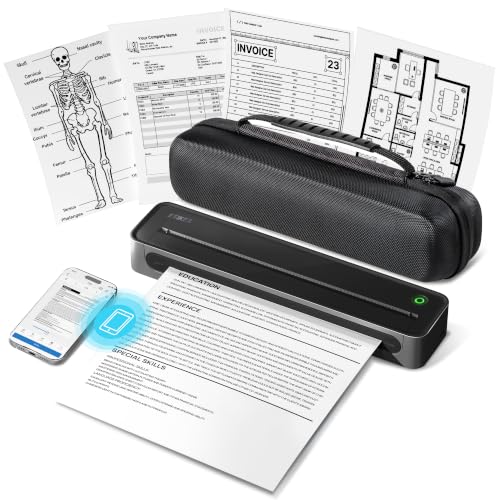
If budget efficiency and ultra-low running costs are your primary objectives, the Rongta Thermal Portable Printers represents the best value choice. This compact thermal unit produces crisp monochrome text for assignments and study materials without requiring expensive ink replacements. Mobile professionals who require complete cordless independence for full-page contracts should turn to the ETIKEZ D90E Inkless Portable Thermal Printer with its protective travel case.
For users who specifically demand traditional full-color printing on standard letter copy paper, the Canon PIXMA TR160 Color Wireless Portable Printer provides hybrid ink performance in a compact body. Alternatively, outdoor photographers who need cordless snapshot printing will appreciate the battery-equipped Liene White M200 4×6” Photo Printer Battery. Compare your daily workflow needs against these options to select the ideal mobile printing companion.
FAQs
Can Best Printers for Mobile Phones print on standard copy paper?
Standard plain copy paper is only supported by mobile inkjet units like portable Canon models. Direct thermal printers require chemically treated thermal paper to produce text and will not print on regular copy sheets. Dye-sublimation photo printers require specific photographic paper matched to their multi-color ribbon cartridges.
Do I need an active home Wi-Fi network to use Best Printers for Mobile Phones in 2026?
Most modern portable printers do not require an active home internet connection or external router to function. Many models broadcast their own private Wi-Fi hotspot, while others communicate directly via local Bluetooth channels. This standalone capability allows seamless printing in vehicles, hotel rooms, and outdoor work environments.
How long do thermal prints last before they start to fade?
High-quality thermal paper prints can last several years when kept away from direct sunlight, extreme heat, and moisture. Standard thermal receipts fade faster when exposed to vehicle dashboards or plastic sleeves containing chemical plasticizers. Storing thermal documents in dark folders preserves contract text and invoice clarity for extended periods.
What is the top-rated option among Best Printers for Mobile Phones in 2026 for snapshots?
For four-by-six inch color photos, dye-sublimation models from Liene rank among the top choices due to their specialized lamination process. The protective topcoat seals pictures against water droplets, fingerprints, and UV fading. This multi-pass system produces studio-quality results that outlast typical instant pocket photo prints.
Are portable mobile phone printers compatible with laptop computers?
Nearly all portable printers can connect to Windows and Mac laptop computers using a standard USB-C data cable. Laptops typically require downloading manufacturer driver software from the official support website before printing documents. While mobile phones pair easily over wireless apps, desktop operating systems generally require direct cable links.
How many sheets can a mobile battery printer produce on one charge?
Monochrome thermal units with rechargeable batteries can typically print between one hundred and two hundred letter-size sheets per full charge. Portable photo printers consume significantly more power per print pass, averaging twenty to forty snapshots per charge. Always check specific battery ratings if you plan to work away from wall outlets all day.
Can I print official ID and passport photos using a mobile printer?
Yes, many companion printer applications feature dedicated templates specifically formatted for passport, visa, and identification card dimensions. The software helps align headshots, adjust background lighting, and crop portraits to meet strict government requirements. Printing these at home saves substantial time and money compared to commercial photo studios.
What causes paper jams in ultra-portable mobile printers?
Paper jams in compact mobile units are usually caused by misaligned paper loading, curled roll paper, or dust on the intake rollers. Forcing sheets into the feed slot at an angle often triggers immediate mechanical feed errors. Using flat thermal sheets and storing photo paper in dust-sealed magnetic cassettes prevents most common jams.
Do portable phone printers support Apple AirPrint?
Select mobile printers support native Apple AirPrint, allowing direct printing from iPhone share menus without extra utility apps. Many specialized thermal and dye-sublimation units rely instead on proprietary brand applications to handle layout scaling and connection pairing. Checking the product specifications confirms whether your preferred native wireless protocol is supported.
Is thermal paper safe for everyday document handling?
Modern commercial thermal paper manufactured for mobile printers is designed for safe daily handling by students, teachers, and mobile professionals. Many leading paper brands now produce BPA-free thermal media for added safety and environmental peace of mind. Keeping organized records in your mobile workspace is simple when combined with ideas from our budget storage guide.






Write Your Review
No reviews yet. Be the first to share your experience!