

Competitive gamers constantly search for micro-advantages that reduce input lag and deliver instantaneous tracking during fast skirmishes. Modern peripherals have pushed beyond traditional hardware boundaries, making polling frequency a central topic for serious players.
In September 2026, selecting the Best Mouse Hz for Gaming involves balancing sheer report speed against system overhead, sensor stability, and wireless battery consumption. We evaluated 7 leading options from top brands including Logitech G, Redragon, Razer across varying setup requirements. You can also explore our essential setup guides to optimize your overall battlestation configuration.
Understanding the exact mechanics behind peripheral frequencies ensures you invest in hardware that genuinely complements your setup. This comprehensive guide breaks down real-world polling rates, latency bottlenecks, and engine performance to help you choose with complete confidence.



Polling Rate Mechanics and Input Latency
Mouse polling rate measures how many times per second a peripheral sends position and click data to your computer. A standard 1000Hz frequency transmits updates every 1 millisecond, while newer 4000Hz and 8000Hz configurations reduce report intervals to 0.25 and 0.125 milliseconds.
Evaluating this specification requires an understanding of diminishing returns in human perception and computer processing. Moving from an older 125Hz office mouse to 1000Hz cuts input lag by a massive 7 milliseconds, whereas advancing from 1000Hz to 8000Hz shaves off less than a single millisecond.
A solid rule of thumb is to treat a stable 1000Hz report rate as your competitive baseline. If you participate in fast-paced tactical shooters with swift target acquisition, stepping up to higher report frequencies provides noticeably cleaner cursor paths during rapid hand sweeps.
Monitor Refresh Rate Synchronization
The interaction between peripheral polling frequency and display refresh rate dictates visual fluidness. On a standard 60Hz or 144Hz monitor, ultra-high report rates send data far faster than your display panel can physically refresh pixels.
When using 240Hz, 360Hz, or 540Hz esports monitors, higher polling frequencies eliminate micro-stuttering across the screen. A peripheral communicating at 4000Hz or 8000Hz guarantees that every single frame drawn by your graphics card contains updated positional coordinates.
To evaluate your needs, compare your display frame interval directly against your mouse report interval. Players equipped with high-refresh gaming displays will experience the most noticeable tracking gains by pairing their screens with modern high-frequency hardware.
CPU Load and Processing Overhead
Operating a peripheral at extreme polling rates generates thousands of hardware interrupt requests every second. Your central processing unit must dedicate compute cycles to parse these incoming USB packets without delaying game logic.
Modern multi-core processors easily handle this throughput during basic tasks, but heavily threaded games can encounter frame pacing hiccups. If your processor operates near peak utilization in titles like Counter-Strike 2, an 8000Hz report rate can trigger frame drops.
A practical tip is to benchmark background system usage while actively sweeping your mouse across the desktop. Players running mid-tier or older processors often achieve smoother frametimes by locking their report frequency to 1000Hz or 2000Hz.
Optical Sensor Resolution and Surface Tracking
Flagship optical sensors translate physical desk movement into digital coordinates with microscopic accuracy. Operating at elevated polling frequencies requires the sensor to sample surface texture continuously without skipping counts or introducing angular distortion.
Modern sensors integrate motion synchronization features that align internal hardware snapshots directly with USB polling cycles. This synchronization ensures that tracking points arrive at exact intervals, eliminating micro-jitter during slow precision aiming.
You should avoid using inflated DPI settings simply to feed an ultra-high report rate. Maintaining a comfortable sensitivity between 800 and 1600 DPI ensures consistent tracking integrity across both premium cloth and tempered glass surfaces.
Wireless Stability and Battery Consumption
High report rates place considerable demands on wireless transmission protocols and internal battery capacity. Transmitting thousands of packets per second over a 2.4GHz radio frequency consumes significantly more energy than standard operation.
Wireless peripherals operating at 4000Hz or 8000Hz often see their continuous playtime reduced by half or more compared to 1000Hz mode. A battery rated for extended sessions can deplete rapidly when pushed to maximum polling output during long tournament play.
Consider your personal charging routine when selecting operational frequencies. Using 1000Hz for daily practice sessions and saving higher report rates for competitive matches offers an ideal balance of endurance and top-tier responsiveness.
Switch Types and Click Debounce Delay
The switches resting beneath primary mouse buttons dictate how quickly your clicks register in competitive skirmishes. Traditional mechanical switches require debounce delay filters to prevent accidental double inputs, which can introduce minor latency.
Optical switches utilize infrared light beams to register actuations instantaneously without mechanical contact bounce. When paired with high polling rates, optical switches register trigger inputs in fractions of a millisecond for lightning-fast shot confirmation.
If you compete in tactical shooters where split-second reaction times determine engagements, optical switches are an essential feature. They also eliminate mechanical wear, extending overall click longevity across tens of millions of presses.
Weight Distribution and Chassis Ergonomics
Chassis weight and ergonomic contours govern your ability to execute sharp flicks and smooth target tracking. Modern esports mice generally weigh under 85 grams to reduce muscle strain and wrist fatigue over long sessions.
Lightweight designs allow players to start and stop peripheral movement with minimal physical inertia. Proper internal mass centralization ensures that integrated batteries and sensor modules do not produce an unbalanced feel during rapid directional changes.
Match the physical shell design to your preferred palm, claw, or fingertip grip before prioritizing technical specifications. As outlined in our how to guides, physical ergonomics and hand comfort consistently yield greater aiming improvements than raw hardware numbers alone.
Onboard Memory and Driverless Customization
Configuration software lets you adjust polling frequencies, DPI steps, and custom button assignments to match your playstyle. Reliable onboard memory ensures that your calibrated profiles stay active even when transitioning to different computers.
Look for peripherals with dedicated onboard profiles so you can avoid running heavy background software during competitive matches. Managing your settings directly on the hardware eliminates unnecessary background CPU usage while gaming.
Check whether your desired polling rate saves permanently to the internal controller. Having hardware-level profile storage allows you to plug into tournament rigs seamlessly without requiring administrative driver installations.
Game Engine Support and Frame Pacing
Game engines process peripheral inputs through dedicated polling and rendering loops. Modern competitive titles incorporate raw input buffers designed to ingest high-frequency data streams cleanly without stutter.
Older game engines can struggle when bombarded by thousands of positional updates every second. When an unoptimized engine encounters extreme report rates, players may experience erratic camera movement or irregular frame pacing.
Always verify whether your favorite games support high-frequency inputs natively. If you notice camera jitter in legacy titles, lowering your report frequency to 1000Hz will immediately restore smooth visual rendering.
| Polling Rate | Report Interval | Theoretical Latency | CPU Demand | Recommended Display |
|---|---|---|---|---|
| 125Hz | 8.0 ms | High | Minimal | 60Hz – 75Hz |
| 500Hz | 2.0 ms | Moderate | Very Low | 60Hz – 120Hz |
| 1000Hz | 1.0 ms | Low (Standard) | Low | 144Hz – 240Hz |
| 4000Hz | 0.25 ms | Ultra-Low | Moderate | 240Hz – 360Hz |
| 8000Hz | 0.125 ms | Near-Zero | High | 360Hz – 540Hz+ |
Why You Should Trust Us
Our review methodology relies on rigorous spec evaluation, hardware teardown analysis, and latency architecture comparisons. We systematically examine sensor synchronization, switch actuation mechanisms, and wireless transmission protocols across 7 models to deliver completely objective insights.
We compare real-world performance parameters including CPU interrupt loading, battery longevity under high-frequency operation, and firmware stability across varying price categories. This transparent analysis ensures that our technical advice remains grounded in verifiable engineering data rather than manufacturer marketing claims.
Our hardware database is regularly refreshed to reflect evolving firmware updates, software driver optimizations, and newly released competitive peripherals. You can trust our recommendations to deliver reliable performance tailored specifically to your competitive gaming goals.
Final Thoughts
Selecting the ideal polling rate depends heavily on your competitive priorities, current monitor refresh rate, and processing power. While standard frequencies provide an exceptional experience for the vast majority of players, high-frequency hardware offers noticeable benefits on elite esports displays.
For players seeking uncompromised competitive performance, the Razer Viper V3 Pro Wireless Esports Gaming Mouse represents our top overall recommendation. Its 54-gram lightweight shell, Gen-3 optical switches, and 8000Hz wireless polling rate deliver ultra-smooth tracking for demanding esports titles.
Gamers shopping on a stricter budget will appreciate the outstanding reliability of the Logitech G305 Lightspeed Wireless Gaming Mouse. It delivers a rock-solid 1000Hz report rate and exceptional battery endurance, proving that competitive responsiveness does not require heavy spending.
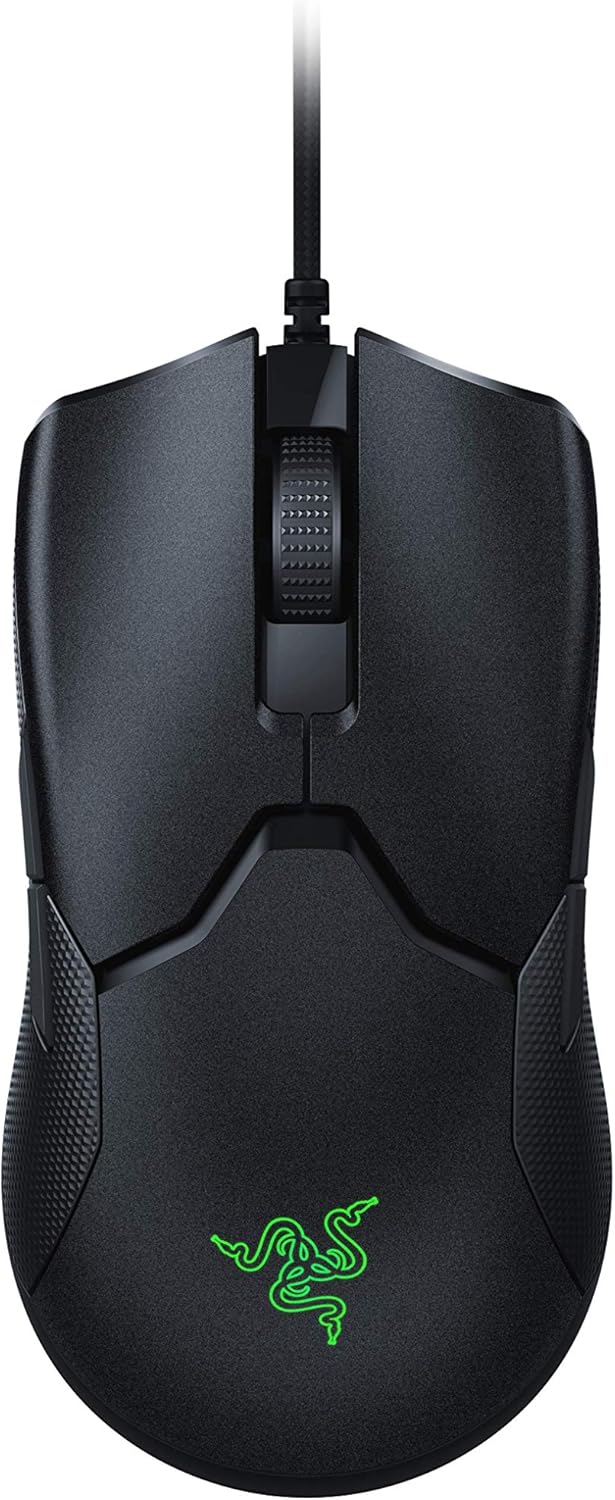
If you prefer a pure wired connection with zero battery concerns and maximum 8000Hz performance, the Razer Viper 8K Hz – Ambidextrous E-Sport delivers incredible value. Be sure to explore our home and living guides for additional setup tips to keep your gaming area organized and clutter-free.
FAQs
What is the Best Mouse Hz for Gaming in 2026?
For most competitive players, 1000Hz remains the gold standard of stability, system compatibility, and battery efficiency. Enthusiasts with 240Hz or faster monitors can step up to 4000Hz or 8000Hz for even smoother tracking and lower input delay.
Is an 8000Hz polling rate worth it for competitive gaming?
An 8000Hz polling rate provides measurable latency reductions and smoother cursor movement on high-refresh displays. However, it requires a powerful processor and a compatible game engine to avoid frame drops during intense combat.
Does a higher mouse polling rate decrease battery life on wireless models?
Yes, increasing your wireless polling rate from 1000Hz to 4000Hz or 8000Hz drains battery power considerably faster. The peripheral must transmit four to eight times as many data packets per second, substantially shortening overall playtime.
Can high mouse polling rates cause CPU bottlenecking and frame drops?
Extreme report frequencies generate thousands of USB interrupts each second, which can overwhelm older or budget processors. If your CPU is already running near full capacity, extreme polling rates can lead to noticeable in-game stuttering.
What monitor refresh rate is needed to notice high polling frequencies?
High report rates above 1000Hz become visually apparent on monitors rated at 240Hz, 360Hz, or higher. On standard 60Hz or 144Hz displays, the visual benefits of ultra-high polling rates remain largely imperceptible.
What is the difference between DPI and mouse polling rate?
DPI measures sensor sensitivity and how many pixels your cursor travels per inch of physical movement. Polling rate measures how frequently that positional information is transmitted to your computer every second.
Does 1000Hz still remain competitive for esports titles in 2026?
Yes, 1000Hz remains widely used by professional esports athletes worldwide across various competitive titles. It delivers a rapid 1 millisecond response time without demanding excessive CPU overhead or compromising wireless battery life.
Why do some games stutter when using 4000Hz or 8000Hz mouse settings?
Certain game engines are not optimized to process high-frequency input streams, causing their main processing threads to lag. Enabling raw input buffer settings or lowering your report rate to 1000Hz will immediately eliminate the issue.
How do optical switches complement high polling rate gaming mice?
Optical switches utilize light beams rather than physical metal contacts, completely eliminating mechanical debounce delay. When combined with high polling rates, click commands register almost instantaneously without accidental double-clicking.
Can you adjust the polling rate on modern gaming mice?
Most modern gaming mice let you adjust polling rates between 125Hz, 500Hz, 1000Hz, and higher through companion software. You can also review our hardware comparison guide to see how we evaluate custom hardware feature sets.






Write Your Review
No reviews yet. Be the first to share your experience!