

Compact flash memory continues to power everyday electronics, ranging from automobile dash cameras and home security monitors to portable retro consoles. Many modern buyers mistakenly buy larger storage standards that their legacy or budget equipment cannot read, resulting in format errors and corrupted footage.
Our guide compares 7 Best MicroSDHC Cards for September 2026 to eliminate that guesswork. We break down the real differences in continuous write performance, thermal resistance, and transfer speeds across major brands like Sandisk, INLAND, KEXIN and more.
Investing in reliable digital storage requires the same methodical planning as arranging your home workspace. Exploring our practical setup guides can help you build an efficient system where every device functions without unexpected technical hurdles.


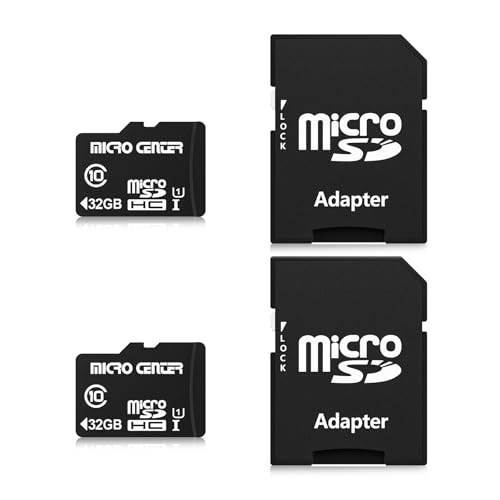


Capacity Limitations and File Systems
The SDHC specification stands for Secure Digital High Capacity and specifically covers storage volumes between 4GB and 32GB. Devices that require this standard operate on the FAT32 file system, which cannot address single files larger than 4GB. Knowing this boundary prevents you from buying a card that your specific gadget cannot initialize.
Many microcontrollers, older handheld gaming devices, and simple dash recorders lack support for the exFAT file system used on higher capacity cards. Inserting an unsupported format into a legacy slot often leads to card errors or infinite formatting loops. Sticking within the official 32GB boundary ensures universal plug-and-play functionality across budget electronics.
When planning your storage setup, calculate how many hours of footage or how many audio tracks you need before offloading data. A standard 32GB card holds approximately five hours of continuous 1080p video or several thousand high-resolution photos. For dedicated offline devices, this capacity often provides the exact balance between utility and hardware stability.
Speed Class vs UHS Ratings
Speed classifications printed on memory cards describe minimum guaranteed sustained write speeds rather than peak burst speeds. A legacy Class 10 rating guarantees a baseline write floor of 10MB per second, which prevents dropped frames during standard video capture. The newer UHS-I Class 1 (U1) designation matches this 10MB per second floor while utilizing a faster bus interface for data transactions.
Examining card packaging requires looking for both the circled 10 mark and the U-shaped bucket containing the number 1. These markings certify that the memory controller can keep up with incoming data streams without bottlenecking the recording pipeline. For basic surveillance and audio recording, cards carrying these dual ratings provide consistent throughput.
Never rely solely on manufacturer advertising that highlights maximum transfer numbers without verifying the sustained class rating. A card boasting fast burst read speeds might drop below necessary write floors during long recording sessions. Always confirm the presence of Class 10 or U1 symbols before finalizing your purchase for video monitoring systems.
| Speed Rating Symbol | Minimum Sustained Write Speed | Primary Intended Use |
|---|---|---|
| Class 4 | 4 MB/s | Standard definition video and basic audio files |
| Class 10 | 10 MB/s | Full HD 1080p video recording and fast burst photography |
| UHS Speed Class 1 (U1) | 10 MB/s | Full HD streaming, real-time dashcam footage, drone capture |
| Application Class 1 (A1) | 10 MB/s (1500 Read / 500 Write IOPS) | Direct mobile app execution and rapid random access tasks |
Sequential Read Speeds and Workflow Efficiency
Sequential read speeds determine how quickly your computer or tablet can pull stored files from the memory card. While entry-level options deliver around 48MB per second, higher-end alternatives achieve up to 100MB per second over a standard USB 3.0 card reader. Faster read capability significantly reduces waiting time when offloading hundreds of images or video clips to an external hard drive.
If you routinely backup trail cameras or security recorders, a card operating near 80MB to 100MB per second saves valuable minutes every week. Moving a full 32GB archive takes roughly five minutes on a premium card, compared to twelve minutes on an older module. That efficiency adds up quickly for users managing multiple remote monitoring stations.
Keep in mind that read performance depends heavily on the interface of your card reader and computer port. Connecting a fast card through an outdated USB 2.0 hub bottlenecks the transmission to roughly 40MB per second regardless of the card rating. Match your card reader hardware to your memory cards to unleash their full bandwidth potential.
Sustained Write Performance for Video Capture
Continuous video capture places high thermal and computational demands on the internal flash storage controller. If a card suffers sudden write throttling, your security camera will skip frames or abruptly terminate the active video file. Reliable memory models maintain write stability between 10MB and 15MB per second without overheating during uninterrupted loops.
Dash cameras present the most severe challenge because they constantly overwrite old blocks while recording brand new video streams. This cyclical writing generates significant internal heat that degrades cheaper silicon over time. Selecting cards engineered with resilient flash architecture prevents unexpected recording failures at critical moments on the road.
As a practical rule, never deploy an unrated card in any hardware responsible for personal security or safety monitoring. Look specifically for models tested for continuous 1080p Full HD recording pipelines. Solid write persistence ensures that every driving incident or surveillance trigger remains cleanly preserved on the storage partition.
Application Performance Class (A1 Considerations)
The Application Performance Class rating measures random read and write input/output operations per second (IOPS). Cards carrying an A1 badge deliver a minimum of 1500 random read IOPS and 500 random write IOPS. This specialized architecture allows budget smartphones and tablets to open mobile applications and process game assets directly from removable storage.
Standard memory cards focus strictly on sequential data transfer, which works well for video but struggles with fragmented application files. When an uncertified card handles app data, users frequently encounter frozen screens, delayed touch inputs, and sluggish multitasking. The A1 specification guarantees that random file fragments load smoothly without bogging down the host operating system.
If you plan to use an Android tablet or single-board computer like a Raspberry Pi, selecting an A1-rated card is essential. It prevents micro-stutters during everyday computing tasks and ensures smooth app launches. For pure surveillance or audio capture, however, standard Class 10 performance remains completely adequate.
Host Device Compatibility and Legacy Constraints
Hardware manufacturers design memory slots around specific technical standards outlined by the SD Association. When an older device manual specifies microSDHC support, inserting an SDXC card will generally cause initialization errors. Matching your card selection to the exact hardware label avoids the frustration of unreadable drives and data loss.
Consulting our technical resource library helps users understand how consumer electronics evolve over different hardware generations. Many early GPS systems, digital voice recorders, and handheld radios explicitly require the 32GB maximum ceiling. Using genuine SDHC media keeps these dependable legacy tools working smoothly for years to come.
Check the physical exterior of your host device or inspect its battery compartment for the official SDHC logo before purchasing storage. If the device documentation excludes SDXC terminology, stay firmly within the 16GB or 32GB microSDHC category. This simple check eliminates compatibility doubts and guarantees stable hardware communication.
Durability and Environmental Protections
Flash memory cards frequently operate in hostile outdoor environments where temperature swings and moisture threaten sensitive components. Leading manufacturers construct these miniature cards using solid-state molding that shields internal circuits from water submersion, mechanical shocks, and magnetic fields. This rugged construction protects your critical data even if the host camera suffers an impact.
Outdoor trail cameras and automotive dash cameras routinely endure extreme summer heat behind windshields followed by freezing winter nights. Lower-grade memory cards can suffer housing warping or flash cell degradation when exposed to extreme thermal cycling. Premium options carry operational temperature ratings ranging from minus 13 degrees to 185 degrees Fahrenheit.
Look for explicit manufacturer testing covering waterproof, shockproof, temperature-proof, and X-ray-proof durability metrics. Airport security scanners can occasionally scramble poorly shielded flash cells, making X-ray protection a valuable feature for traveling photographers. Built-in physical protection ensures your media remains intact across unpredictable field conditions.
Multi-Pack Value and Storage Logistics
Purchasing flash memory in multi-card bundles significantly reduces the per-card cost for home surveillance networks. Equipping four window cameras and a vehicle recorder individually can become expensive when buying single blister packs at retail stores. Multi-packs containing two, three, or five cards provide an economical way to outfit multiple monitoring hubs simultaneously.
Managing spare physical cards requires organized physical storage to avoid losing these fingernail-sized accessories. Much like organizing small household items with advice from our home organization guide, labeling your media prevents costly mix-ups. Keeping formatted spares in protective cases ensures you can swap full cards without delay.
Always verify whether multi-packs include full-size SD adapters in the package. An included adapter turns a micro card into a full-sized media card compatible with standard desktop readers and digital SLR cameras. Having multiple adapters on hand simplifies the process of migrating footage across diverse household computers.
<nFirmware Reliability and Brand Authenticity
Counterfeit flash memory remains widespread across online marketplaces, often masquerading as high-capacity units from premium brand names. Disreputable sellers hack the onboard memory controller to display incorrect capacity numbers while silently overwriting existing data blocks. Purchasing recognized brands from certified distributors protects you against these fraudulent products.
Authentic cards feature clean laser etching on the casing, correct trademark typography, and stable serial registration numbers. Established manufacturers also supply proprietary management utilities that monitor drive health and assist with clean partition formatting. Software tools like SanDisk Memory Zone make organizing mobile directories straightforward for novice users.
When your new cards arrive, run a quick baseline verification using free diagnostics software to confirm genuine sector capacity. Legitimate cards will pass complete read and write sweeps without corrupting test data packets. Establishing drive authenticity immediately gives you total confidence when deploying cards into unattended surveillance systems.
Why You Should Trust Us
Our product evaluations rely on meticulous analysis of published technical specifications, controller architecture, and real-world hardware compatibility reports. We cross-examine manufacturer claims against industry-standard flash benchmarks to understand how cards behave under sustained write loads. Our focus centers on long-term data integrity, thermal tolerance, and consistent bus communication.
We do not accept sponsored placements or allow brands to alter our ranking criteria. Every recommendation reflects a rigorous comparison of speed classes, warranty periods, and structural durability ratings across multiple usage scenarios. We continually update our findings to account for revisions in memory controller fabrication and packaging changes.
By prioritizing transparent specifications over marketing hype, we provide clear recommendations for everyday electronics users. Whether you are maintaining older electronics or setting up security peripherals, our data-backed methodology guides you toward stable flash storage solutions.
Final Thoughts
For everyday devices that demand dependable speed and broad app support, the Lexar E-Series 32GB Micro SD Card microSDHC UHS-I earns our top recommendation. Its combination of up to 100MB per second transfer speeds and A1 application performance makes it exceptionally versatile across smartphones, tablets, and digital cameras. The robust 10-year warranty provides unmatched long-term peace of mind.
Shoppers seeking proven reliability for single-camera installations should look toward the SanDisk Ultra microSDHC 32GB 100MB/s Class 10. This card pairs responsive 100MB per second read speeds with SanDisk’s dedicated Memory Zone application, simplifying storage management on Android devices. It delivers dependable Full HD capture without unnecessary technical complexity.
If you need to outfit a whole home surveillance setup or multiple vehicle cameras, the KEXIN 3 Pack 32GB Micro SD Card Memory Card delivers outstanding multi-card utility. Each card features U1 write performance, comprehensive environmental resistance, and pre-formatted FAT32 partitions ready for instant deployment. Equipping several gadgets simultaneously keeps your budget efficient while securing dependable baseline coverage.
Upgrading your home electronics with proper storage peripherals pairs naturally with general interior upgrades explored across our home and living resources. Selecting the correct memory class ensures your home monitoring gear remains reliable year after year.
Frequently Asked Questions
What is the difference between microSDHC and microSDXC cards?
MicroSDHC cards cover capacities from 4GB up to 32GB and utilize the FAT32 file system by default. In contrast, microSDXC cards range from 64GB up to 2TB and use the exFAT format. Older hardware designed strictly for the SDHC standard cannot recognize SDXC cards without specialized software modifications.
Why do Best MicroSDHC Cards top out at 32GB capacity?
The SD Association established formal capacity boundaries to ensure consistent electrical signaling and file system standards across hardware generations. By definition, any card built larger than 32GB transitions into the newer SDXC classification. This fixed limit guarantees that any certified SDHC slot will correctly read the card without firmware conflicts.
Can I use Best MicroSDHC Cards in devices that require 4K recording?
Most Best MicroSDHC Cards carry U1 or Class 10 ratings, which guarantee 10MB per second write speeds suited for 1080p Full HD capture. High-bitrate 4K video recording generally requires a U3 or V30 rated card to avoid buffer underruns. While some low-bitrate 4K cameras can function on U1 cards, checking your device bitrate manual is strongly recommended.
What makes a card qualify as Class 10 or U1?
Both designations certify that the memory card sustains a continuous write speed of at least 10MB per second. Class 10 uses the standard high-speed bus, while U1 utilizes the faster UHS-I bus architecture for improved communication efficiency. Modern cards frequently feature both icons to demonstrate wide compatibility across older and newer host devices.
What is the top-rated option among Best MicroSDHC Cards in 2026?
The Lexar E-Series 32GB Micro SD Card microSDHC UHS-I stands out among Best MicroSDHC Cards for its balanced read speeds reaching 100MB per second and durable multi-proof construction. Its A1 app performance rating ensures smooth operation when running programs directly from the card. Combined with a 10-year manufacturer warranty, it delivers outstanding overall dependability.
Do older dash cameras require specific formatting for microSDHC?
Standard 32GB microSDHC cards arrive pre-formatted in the FAT32 file system, which matches the native requirements of most vehicle dash cameras. However, initializing the card directly inside the camera menu before first use is always best practice. In-camera formatting establishes the exact directory structure needed for automated loop recording.
How long will a 32GB microSDHC card record Full HD video?
A 32GB memory card typically holds roughly 4 to 5 hours of compressed 1080p video recorded at standard bitrates. If your camera records at very high bitrates or higher frame rates, that duration drops to around 3 hours. For security cameras and dashcams, continuous loop recording automatically overwrites the oldest footage once the card fills up.
Can an included full-size SD adapter reduce read and write speeds?
A passive SD card adapter contains direct copper traces that bridge the micro contacts to full-size SD pins without modifying electrical signals. Because there is no active processing chip inside the adapter, it does not reduce data transfer performance. Speed bottlenecks usually originate from the host card reader rather than the mechanical adapter itself.
What causes file corruption on budget flash memory cards?
File corruption most commonly occurs when a device loses power while actively writing data blocks to the flash controller. Sudden card ejections, overheating in unventilated camera housings, and counterfeit memory chips also trigger data errors. Using reputable branded cards with stable firmware dramatically reduces the likelihood of unreadable sectors.
Are microSDHC cards backward compatible with standard microSD slots?
Legacy devices that only support the original microSD standard (capacities under 2GB) cannot read newer microSDHC cards. However, any device labeled with the microSDHC or microSDXC logo fully supports 32GB SDHC media. Checking your host equipment specifications ensures you do not run into backwards compatibility boundaries.




Write Your Review
No reviews yet. Be the first to share your experience!