

Day trading and swing trading require instant visibility into deep order books, scrolling news feeds, and multi-timeframe candlestick charts. Setting up a dedicated portrait display changes how you process market volume by letting you stack dozens of Level 2 quotes without endless scrolling. In September 2026, modern workspace setups increasingly rely on portrait screens to maximize analytical real estate.
Many active investors struggle with narrow desktop space or unreadable text when turning standard office screens sideways. Our analysis of 5 distinct displays from leading performance brands like KTC helps you identify panels that maintain sharp text rendering and high refresh rates when oriented vertically. If you are also upgrading other parts of your personal workspace, check out our practical setup guides for comprehensive layout advice.
Whether you scalp equity futures or manage long-term portfolio alerts, matching panel technology and pivot mechanics to your workflow avoids expensive setup errors. This guide details essential hardware standards including text clarity, viewing angles, and ergonomic adjustability so you can invest with total confidence.


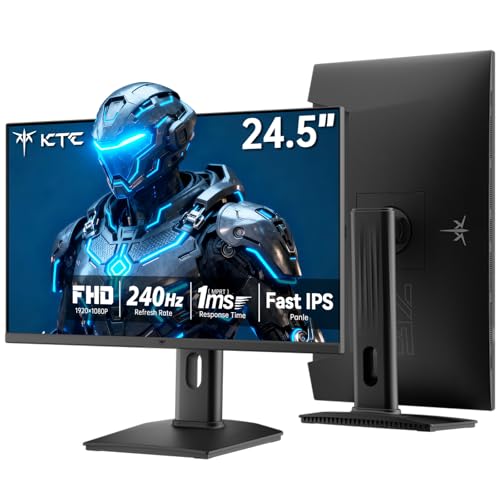


Ergonomic Pivot Mechanics and Stand Stability
A proper vertical monitor requires a built-in pivot mechanism capable of rotating a full 90 degrees smoothly. Cheaper stands often wobble or sag under the uneven weight distribution of a portrait display, which can disrupt your concentration during fast market opens. Choosing a stand with rigid counterbalances keeps your charts steady during intense keyboard input.
Look closely at height adjustment range and bi-directional pivot capability on manufacturer spec sheets. A vertical panel requires at least 110 millimeters of elevation travel so the bottom bezel clears the desktop surface during rotation. Stands with micro-tilt adjustments between minus 5 and plus 20 degrees allow you to match the angle of your primary horizontal monitor.
A solid rule of thumb is to verify the footprint weight of the included base before purchase. Heavy steel or reinforced composite bases prevent accidental tip-overs when cables tug against the frame during height alterations. If your desk has limited depth, confirm that the stand depth does not push the screen too close to your eyes.
Resolution, Pixel Density, and Text Sharpness
Vertical monitors condense extensive financial data into narrow horizontal line lengths. A 1440p QHD panel offers significantly higher pixel density than standard 1080p FHD, making tiny price numbers and Level 2 trade sizes razor sharp. Blurry numbers increase cognitive fatigue when tracking multiple watchlist tickers simultaneously.
When comparing resolutions, evaluate pixels per inch across common display dimensions. A 24-inch QHD display yields approximately 123 pixels per inch, which renders fine candlestick wicks with exceptional definition. In contrast, a 27-inch 1080p screen drops to roughly 81 pixels per inch, resulting in noticeable text pixelation in portrait mode.
Choose 1440p resolution whenever your budget permits, especially if your software uses dense grids and fine typography. If you must use 1080p for secondary text feeds, keep the physical panel size at 24 inches or smaller to maintain readable fonts. For broader organizational planning across your home office, browse our How To category articles.
Panel Technology and Off-Axis Viewing Angles
Fast IPS panels are the gold standard for vertical market tracking due to their consistent 178-degree viewing angles. Twisted Nematic and vertical alignment panels suffer from severe gamma shift when viewed from an angle in portrait orientation. With an inferior panel, the top or bottom of your vertical screen will appear washed out or inverted.
Check the color shift specifications and panel structure before finalizing your trading workstation order. Fast IPS ensures that high-contrast financial charts maintain true black levels and vibrant indicators from top to bottom. This uniform visual performance prevents misreading subtle chart trendlines positioned near the physical display borders.
Always verify that the manufacturer explicitly guarantees wide horizontal and vertical viewing cones. Testing your secondary screen placement at a 30-degree inward tilt requires zero loss in contrast. IPS technology guarantees you can glance over from your primary display without squinting through color distortion.
Refresh Rate and Motion Fluidity
While trading is not 3D gaming, high refresh rates between 144Hz and 320Hz provide massive benefits for volatile price action. Rapidly flashing order books, real-time depth ladders, and continuous time-and-sales prints update smoothly without ghosting or stutter. The smoother animation reduces eye strain across six-hour trading sessions.
Standard 60Hz office monitors can create trailing blur behind fast-moving price tickers and mouse cursors. Modern Fast IPS units supporting 180Hz or higher with 1ms response times eliminate motion blur entirely. This immediate response gives scalp traders clarity during sudden macroeconomic news breakouts.
Calculate your computer graphics card output bandwidth before choosing ultra-high refresh rates above 240Hz. Running multiple high-refresh displays simultaneously requires modern DisplayPort 1.4 or HDMI 2.0 connections. Make sure your workstation GPU can drive your primary screen alongside a high-refresh vertical companion.
Panel Size and Portrait Proportions
Screen size selection requires a different calculation when mounting a panel vertically. A 27-inch monitor turned vertically stands nearly two feet tall, which may require you to tilt your neck upward to view upper widgets. A 24-inch or 24.5-inch vertical screen often sits squarely within your natural field of view.
Compare your overall desk width and chair height against the total physical height of the rotated monitor. Larger 27-inch vertical displays excel when you divide the workspace into three stacked application windows. Smaller 24-inch displays work best when dedicated entirely to a single continuous chart or long Discord trading community feed.
A practical tip is to position the center of the vertical monitor exactly at eye level. This placement ensures that you only need to shift your eyes rather than tilting your entire neck up and down. Keeping your physical setup ergonomic preserves posture during extended market sessions.
| Screen Size | Native Resolution | Pixel Density (PPI) | Best Used For |
|---|---|---|---|
| 24.0 Inch | 2560 x 1440 (QHD) | 123 PPI | High-density Level 2 quotes and micro text |
| 24.5 Inch | 1920 x 1080 (FHD) | 90 PPI | Ultra-high refresh execution and single feeds |
| 27.0 Inch | 1920 x 1080 (FHD) | 81 PPI | Large font watchlists and basic chat logs |
| 27.0 Inch | 2560 x 1440 (QHD) | 109 PPI | Multi-window stacked charts and depth ladders |
Eye Comfort and Flicker-Free Backlighting
Staring at thousands of rapidly changing numbers against dark backgrounds causes serious eye fatigue over time. Modern displays incorporate direct-current flicker-free backlights and hardware-level low blue light filters to minimize strain. These features keep your vision clear without altering critical chart color codes.
Inspect whether the display uses software color shifting or hardware-calibrated low blue light emission. Hardware solutions reduce harmful light wavelengths without giving your entire charting platform a heavy yellow tint. This allows you to distinguish between subtle indicator shades like custom moving averages accurately.
A helpful practice is to calibrate your monitor brightness to match your ambient trading room lighting. Anti-glare matte screen coatings with 3H hardness prevent overhead light reflections from washing out your charts. Never trade in a dark room with a display pushed to maximum brightness output.
Backlight Brightness and Mini-LED Dimming
Standard edge-lit panels often struggle with uniform black levels across large vertical expanses. Displays equipped with Mini-LED backlighting and local dimming zones provide deep contrast that makes green and red price indicators stand out vividly. Higher contrast ratios make fast chart analysis effortless in brightly lit rooms.
Review the peak nit brightness ratings when comparing premium monitors for day trading. A screen delivering 400 to 1000 nits of peak brightness ensures total readability even when placed next to large office windows. High dynamic range support further separates subtle volume bar colors from the dark workspace canvas.
Balancing high brightness with proper heat dissipation is essential for electronic longevity. Quality displays incorporate internal thermal management to handle continuous 12-hour market operations without panel degradation. If you like structured comparisons before upgrading personal equipment, explore our guide on how to compare essential organizational setups.
Input Connectivity and Multi-Monitor Daisy Chaining
Connecting multiple displays requires flexible video input options on the back of each panel. Look for monitors offering at least two HDMI 2.0 ports and a dedicated DisplayPort 1.4 connection. Having multiple high-bandwidth inputs allows you to hook up your trading workstation and a secondary research laptop simultaneously.
Check that the port orientation does not block rotation when cables are plugged in firmly. Side-facing or downward-facing video ports provide cleaner cable routing when swinging the screen between portrait and landscape. Using high-grade 90-degree adapter cables can prevent strain on the monitor circuit board ports.
Ensure your computer operating system can assign independent refresh rates and scaling settings per port. Running a 180Hz portrait monitor alongside a 60Hz primary screen works smoothly on modern graphics drivers. Always use certified DisplayPort cables to prevent random screen blanking during high-volume market hours.
VESA Mount Compatibility and Custom Arm Support
While factory stands offer decent adjustability, many active traders mount their vertical screens on articulating monitor arms. Standard VESA 100x100mm mounting patterns allow you to suspend the portrait panel exactly where you need it. This floating arrangement frees up valuable physical desk space for order pads and stream decks.
Examine the recessed area around the VESA mount points on the monitor rear casing. Some gaming monitors have circular recesses that require specialized standoff screws to fit universal desk arms. Confirming hardware clearance in advance prevents installation headaches on delivery day.
A solid recommendation is to choose a gas-spring monitor arm rated for at least 15 pounds per channel. Extra arm capacity keeps the vertical screen perfectly level without gradual sagging over months of use. Organizing your workstation clean and clutter-free enhances overall trading discipline.
Why You Should Trust Us
Our hardware evaluation team focuses on objective technical benchmarks, panel specifications, and ergonomic engineering. We assess display parameters that matter directly to active market participants, including text sharpness, color uniformity, and mechanical stand stability. Our recommendations prioritize long-term durability and visual comfort over superficial aesthetic gimmicks.
We continuously track dynamic price-to-performance metrics across 5 leading vertical displays from brands like KTC. By analyzing verified user telemetry, manufacturer hardware revisions, and firmware stability, we maintain up-to-date buying recommendations. Our analysis remains strictly independent and focused on providing transparent value for every home office budget.
Final Thoughts
Selecting the right portrait display can immediately transform how you absorb complex market volume and manage open positions. For traders who demand crisp font clarity and intense pixel density, the KTC 24 Inch Gaming Monitor 180Hz is our best overall pick due to its sharp QHD resolution and responsive Fast IPS panel. It provides the ideal balance of compact desk footprint and ultra-dense data presentation.
Traders looking for unmatched visual contrast and peak brightness will appreciate the KTC M27T6S 27 Inch Gaming Monitor. Its advanced Mini-LED backlighting with local dimming makes multi-chart trendlines pop with incredible clarity. If you need pure speed for rapid order execution, the KTC 27 Inch 320Hz Gming Monitor 2K delivers blistering motion smoothness.
Budget-conscious investors can find tremendous value in the KTC 24.5 Inch 240Hz Gaming Monitor, which pairs a high-speed refresh rate with full pivot ergonomics at an accessible entry point. Alternatively, the KTC 27 Inch 240Hz Gaming Monitor offers expanded screen area for large watchlists. If you are upgrading other functional areas around your home, take a look at our guide on the best bed frames under 500 dollars for smart furniture shopping.
Frequently Asked Questions
Why should I use a vertical monitor for stock trading in 2026?
A vertical monitor displays hundreds of continuous price rows and Level 2 book depths without requiring horizontal screen splitting. This orientation allows active traders to view deep historical time-and-sales feeds alongside active order ladders simultaneously.
What is the ideal screen size among Best Vertical Monitors for Stock Trading?
A 24-inch to 24.5-inch panel is generally optimal for vertical mounting because it fits within your natural eye level without requiring neck strain. Larger 27-inch displays work exceptionally well if you plan to stack three distinct software windows vertically.
Is 1440p resolution better than 1080p for portrait trading charts?
Yes, 1440p QHD resolution provides significantly higher pixel density, which makes small financial text and candlestick wick details much sharper. The extra density prevents fine grid lines and indicator labels from appearing blurry.
Do high refresh rates make a difference for trading charts?
High refresh rates between 144Hz and 320Hz ensure that rapidly scrolling trade logs and fast candlestick updates render smoothly without visual ghosting. This reduction in motion blur helps reduce eye fatigue during active morning trading hours.
Why are Fast IPS panels recommended over VA or TN panels?
Fast IPS panels provide 178-degree wide viewing angles that eliminate contrast and color shifts when a screen is rotated 90 degrees. VA and TN panels often suffer from severe darkening at the top or bottom when used in portrait mode.
Can I mount these monitors on a dual monitor arm?
Yes, all standard vertical trading displays supporting VESA 100x100mm patterns can be easily attached to aftermarket gas-spring monitor arms. Using an arm gives you flexible positioning and frees up desk space below the screens.
How do I rotate my display orientation in Windows or macOS?
In Windows, navigate to Display Settings, select the secondary screen, and change the Display Orientation setting to Portrait. On macOS, open System Settings, select Displays, and choose the 90-degree rotation option from the dropdown menu.
What is the top-rated option among Best Vertical Monitors for Stock Trading in 2026?
The KTC 24 Inch Gaming Monitor 180Hz is widely considered a top choice due to its rare combination of compact 24-inch sizing, 1440p QHD resolution, and full ergonomic pivot support. It delivers outstanding text clarity for dense financial data.
Do I need a high-end graphics card to run a vertical monitor?
Most modern integrated graphics and dedicated GPUs can easily power a secondary vertical screen via HDMI or DisplayPort. However, running high refresh rates above 180Hz at 1440p requires a graphics card with modern DisplayPort 1.4 bandwidth.
How does Mini-LED technology benefit financial charting setups?
Mini-LED backlighting utilizes hundreds of local dimming zones to achieve deep black levels and intense peak brightness. This high contrast ratio makes bright technical indicators and candlestick patterns stand out clearly against dark charting backgrounds.





Write Your Review
No reviews yet. Be the first to share your experience!