

Outfitting a guest room, college dorm, home office, or compact kitchen with dedicated entertainment does not require a massive investment. Modern manufacturing improvements allow display makers to produce vibrant panels and responsive smart interfaces at surprisingly accessible prices. Shoppers no longer need to sacrifice essential features like voice navigation, wireless casting, or digital audio output when seeking an economical television.
Finding the Best Inexpensive HD TVs requires balancing panel clarity, operating system stability, and everyday connectivity. Many buyers mistakenly assume all small screens perform identically, only to end up with sluggish navigation menus or washed-out colors. This comprehensive guide compares 5 leading options for September 2026 to help you identify the ideal screen size and platform for your specific living space.
Whether you need a secondary screen for watching morning news or a reliable platform for streaming movies in bed, knowing which technical specifications genuinely matter will save you time and frustration. Explore our practical tips and related home entertainment advice in our dedicated Home & Living resource section before finalizing your setup.



1. Display Resolution: 720p Versus 1080p Full HD
Screen resolution determines the total number of pixels creating your image, directly impacting text sharpness and fine visual details. On compact screens, manufacturers typically offer standard high definition at 720p or Full HD at 1080p. While 720p remains sufficient for casual viewing on smaller displays, 1080p delivers more than double the pixel density for noticeably crisper picture clarity.
When evaluating panel specifications, compare the native horizontal and vertical pixel grids listed by the manufacturer. A 1080p display contains 1920 by 1080 pixels, rendering sharp menu text, clean sporting graphics, and distinct video game environments. In contrast, a 720p panel contains 1280 by 720 pixels, which can appear slightly softer when viewed from closer distances.
As a practical rule of thumb, prioritize 1080p resolution whenever choosing a forty-inch screen or sitting closer than six feet from the display. For a modest thirty-two-inch television placed across a guest bedroom or mounted above a kitchen counter, a 720p panel can still deliver perfectly adequate everyday viewing while keeping costs minimal.
2. Smart TV Operating System and App Support
The built-in operating system dictates how quickly you can browse channels, launch streaming applications, and discover new content. The two dominant platforms in budget televisions are Roku OS and Amazon Fire TV. Both platforms provide direct access to major subscription apps, live television broadcasts, and extensive libraries of ad-supported free entertainment.
Roku OS features a straightforward grid interface that emphasizes simple navigation and unbiased universal search across multiple streaming services. Fire TV integrates tightly with Prime Video and personal Amazon preferences, placing content recommendations front and center on the home screen. Review the layout style to ensure it aligns with the streaming habits of everyone in your household.
Consider the learning curve for family members or guests who will interact with the television regularly. Roku OS often proves easier for non-technical users due to its uncluttered remote and customizable app grid. Fire TV excels if your household already relies heavily on Alexa smart home routines and voice-activated media searching.
3. Color Technology and Backlight Uniformity
Affordable televisions primarily utilize standard LED backlighting, but select modern budget displays now feature advanced color technologies like quantum dot enhancement. Quantum dots allow the panel to display a wider color spectrum, producing deeper reds, richer greens, and more natural skin tones. This enhancement prevents scenes from appearing flat or overly desaturated under ambient room lighting.
Direct-lit and full-array LED backlights distribute light evenly across the back of the LCD panel, improving contrast consistency compared to edge-lit alternatives. Look for noise reduction processing and automatic picture optimization features in the technical specifications. These smart processing routines clean up incoming compressed signals and enhance dynamic range automatically.
If you plan to place the screen in a brightly illuminated room with large windows, prioritize displays offering quantum color enhancements or high peak brightness. Enhanced color saturation helps the picture retain visual impact even when ambient daylight competes directly with the screen output.
4. Audio Decoding and Integrated Speaker Performance
Compact cabinet dimensions inevitably limit the physical size of internal speaker drivers, making audio processing algorithms crucial for clear dialogue. Technologies like DTS Virtual-X and Dolby Audio process multi-channel soundtracks to create an expanded soundstage using only two internal stereo speakers. These virtual surround formats elevate spoken voices while balancing loud background music and sound effects.
Check the total speaker wattage and available sound presets in the audio settings menu. Most budget units output between ten and sixteen total watts of power, which works adequately in small bedrooms or quiet home offices. Built-in dialogue enhancement modes are especially helpful for late-night watching without constantly adjusting volume levels.
For larger master bedrooms or open spaces, verify whether the television includes HDMI ARC or optical audio output. These connections let you connect an external soundbar effortlessly, routing all television audio through a higher-powered external system using a single remote control for volume adjustments.
5. Input Connectivity and Peripheral Versatility
Physical ports determine how many external sources you can connect simultaneously, including gaming consoles, streaming sticks, cable boxes, and digital antennas. An ideal budget television should offer at least two or three HDMI inputs along with a USB media port. Having ample ports prevents the tedious chore of swapping cables behind the unit.
Look specifically for an HDMI port labeled ARC (Audio Return Channel), which transmits digital audio directly to soundbars and receivers. Additional legacy connections, such as composite AV jacks and coaxial RF antenna inputs, provide valuable compatibility for retro gaming hardware or local over-the-air broadcasts. Headphone jacks and optical digital outputs offer further private listening flexibility.
Before purchasing, count the exact number of devices you intend to connect on day one. If you plan to attach a gaming console and a Blu-ray player while reserving an audio connection for a soundbar, ensure the model provides at least three dedicated HDMI jacks to avoid port shortages.
6. Voice Remote Capabilities and Smart Home Integration
Modern budget smart displays increasingly include voice-enabled remote controls that simplify finding specific titles, actors, or genres. Instead of typing out letters with directional arrows on a slow on-screen keyboard, you can hold a microphone button and speak natural search phrases. This capability dramatically reduces menu navigation time across multiple streaming apps.
Evaluate which smart home platforms the television natively supports, such as Amazon Alexa, Google Assistant, or Apple AirPlay and HomeKit. Comprehensive platform support allows you to control power, input switching, and volume directly from external smart speakers or smartphone apps. AirPlay integration is particularly valuable for effortlessly casting personal photos and videos directly from Apple devices.
If voice convenience is a major priority for your family, look for models featuring bundled voice remotes rather than basic infrared clickers. Pairing a voice remote with smart home routines lets you automate your bedroom entertainment alongside lights and climate controls. Check our Bedroom & Sleep setup guides for creative ways to organize your restful space.
7. Screen Sizing and Viewing Distance Dynamics
Selecting the right screen size requires balancing physical space constraints against your intended seating distance. In the budget category, thirty-two-inch and forty-inch models represent the most popular choices for compact living areas. A thirty-two-inch display fits neatly inside narrow armoires, while a forty-inch panel provides a significantly more immersive experience from bed.
To calculate the optimal viewing distance for a 1080p screen, multiply the diagonal screen size by 1.5 to 2.5 times. For a forty-inch television, an ideal viewing distance spans roughly five to eight feet from the screen surface. For a thirty-two-inch screen, viewing distances between four and six feet maintain visual comfort without causing eye fatigue.
Measure your furniture dimensions carefully before finalizing your display choice. Consider whether the television will rest on its included side feet or attach to a wall bracket. If using a dresser or shelf, verify that the surface width exceeds the stance of the included stand feet with room to spare.
8. Wall Mounting Standards and Physical Chassis Design
Mounting an inexpensive television on a wall bracket frees up valuable tabletop space in bedrooms, dorms, and home workshops. Most lightweight budget displays adhere to standardized VESA mounting hole patterns on their rear chassis panels. Common patterns for small screens include 100x100mm and 200x200mm configurations, ensuring wide compatibility with low-profile tilting or articulating wall mounts.
Examine the orientation of rear input ports before securing the television flush against a wall surface. Side-facing or downward-facing HDMI and power ports allow for much cleaner cable routing compared to straight rear-facing jacks. Slim bezel designs also maximize the active screen area while maintaining a modern, unobtrusive physical appearance.
Always verify the weight of the television alongside the weight capacity of your selected wall bracket and wall anchor hardware. Because modern thirty-two and forty-inch displays weigh very little, installation is straightforward and manageable for a single person. You can learn more about arranging bedroom fixtures in our guide on how often should you replace your nightstands with open shelves.
9. Budget Display Specifications Comparison
Understanding how primary specifications compare across standard budget tiers helps you balance cost against visual performance. The comparison table below highlights key differences across common configurations found in the Best Inexpensive HD TVs category.
| Feature Tier | Screen Resolution | Color Technology | Smart OS Platform | Best Suited For |
|---|---|---|---|---|
| Entry Compact | 720p HD | Standard LED | Fire TV / Roku | Kitchens, workshops, compact guest rooms |
| Enhanced Compact | 720p / 1080p | Hi-QLED / Quantum | Roku OS | Dorms, brightly lit bedrooms, vibrant media |
| Full HD Mid-Size | 1080p Full HD | Direct-Lit LED | Fire TV / Roku | Master bedrooms, small living spaces, console gaming |
Choosing between these configurations comes down to your primary use case and placement environment. If vibrant color in a sunlit room is your main priority, enhanced color panels deliver noticeable benefits. For maximum image sharpness and screen real estate on a modest budget, full 1080p panels represent the sweet spot for everyday entertainment.
Why You Should Trust Us
Our review process relies on systematic analysis of technical specifications, verified product capabilities, and long-term operating system performance. We evaluate manufacturer hardware architecture, panel backlighting standards, wireless connectivity stability, and audio format decoding. By cross-referencing published technical data against standard real-world usage scenarios, we deliver unbiased, actionable buying advice.
We do not accept paid manufacturer sponsorships or promotional product placements. Every screen highlighted in this guide is selected purely based on feature quality, interface responsiveness, construction reliability, and overall consumer value. Our software tracking systems monitor market changes and firmware updates continuously to ensure our recommendations remain accurate and dependable throughout 2026.
Our commitment to transparent, data-driven comparisons ensures you receive objective advice tailored to your practical lifestyle needs. Explore our comprehensive collection of buying guides and tutorials across our extensive Guides hub for additional helpful shopping resources.
Final Thoughts
Selecting among the Best Inexpensive HD TVs comes down to matching your available room dimensions with your preferred smart interface and display clarity. For shoppers seeking the best overall balance of screen size, crisp 1080p clarity, and an intuitive operating system, the Roku 40-Inch Select Series Smart TV 2026-1080p stands out as a superb all-around performer. Its straightforward home screen, fast Wi-Fi performance, and seamless Apple AirPlay support make it an exceptional addition to bedrooms and apartments.
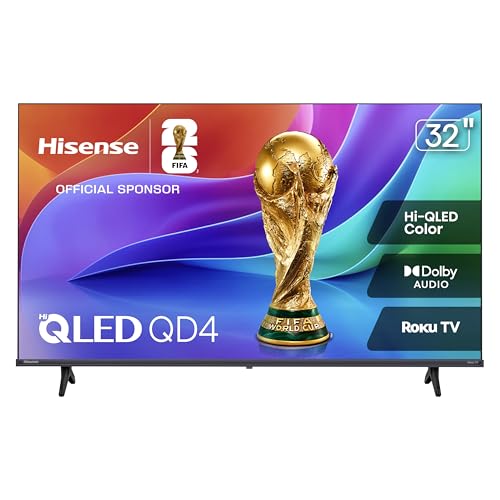
If you want maximum color depth and rich contrast in a compact footprint, the Hisense 32″ Inch QD4SR Series Hi-QLED HD delivers impressive visual performance. The inclusion of quantum dot technology and Dolby Audio decoding provides an elevated audiovisual experience rarely found at this price point, making it great for bright spaces and casual gaming.
For budget-conscious shoppers needing an ultra-affordable secondary screen, the INSIGNIA 32″ Class F20 Series LED HD Smart Fire offers incredible value. With hands-free Alexa voice navigation and DTS Virtual-X sound processing built right in, it handles kitchen news, podcast streaming, and guest entertainment with ease. Review your spatial requirements and choose the model that fits seamlessly into your daily living routine.
Frequently Asked Questions
What makes a model one of the Best Inexpensive HD TVs in 2026?
The top models balance sharp high-definition panel quality with responsive smart software and durable hardware construction. Reliable wireless connectivity, built-in voice remotes, and modern audio decoding further distinguish standout budget displays from sluggish entry-level alternatives.
Is 720p resolution sufficient for a small bedroom television?
Yes, 720p resolution is perfectly suitable for thirty-two-inch screens viewed from a distance of five feet or more. Because human eyes struggle to resolve individual pixels on smaller panels at standard viewing distances, 720p delivers clear, enjoyable video for casual watching.
What is the difference between Roku OS and Fire TV on budget screens?
Roku OS features a clean, app-centric grid that allows quick access to channels without heavy promotional clutter. Fire TV focuses heavily on content recommendations, integrating closely with Prime Video and Amazon Alexa smart home automations.
Can I connect a modern soundbar to an inexpensive HD television?
Most modern budget televisions include an HDMI ARC port or an optical digital audio output designed specifically for external soundbars. Using HDMI ARC lets you power on the soundbar and adjust volume levels directly using your main television remote.
Do inexpensive smart televisions include free streaming channels?
Yes, both Roku and Fire TV platforms provide thousands of free live streaming channels and on-demand movies without requiring paid subscriptions. Services like The Roku Channel, Freevee, Pluto TV, and Tubi come pre-installed or easily downloadable.
Can I use an over-the-air digital antenna with these displays?
All standard smart televisions feature a built-in RF coaxial tuner capable of receiving free local broadcast channels from a digital antenna. The smart operating systems integrate these antenna channels seamlessly into their electronic program guides alongside streaming options.
Are inexpensive smart televisions suitable for video game consoles?
Budget high-definition televisions work well with popular gaming consoles like Nintendo Switch, PlayStation, and Xbox for casual gaming. While they typically operate at a standard 60Hz refresh rate, their input lag is low enough for responsive everyday gameplay.
Do I need a high-speed internet connection for smart TV streaming?
Streaming high-definition video smoothly requires a reliable internet connection with download speeds of at least 5 to 10 Mbps per active screen. Ensure your television is positioned within good range of your home Wi-Fi router to prevent buffering interruptions.
How do I mount an inexpensive television onto a drywall surface?
You will need a VESA-compatible wall mount bracket and appropriate mounting hardware secured directly into wooden wall studs or heavy-duty drywall anchors. Because thirty-two and forty-inch screens are relatively light, mounting is quick and straightforward with basic household tools.
Can I cast video content from my smartphone to a budget television?
Most modern smart televisions support wireless screencasting via Apple AirPlay, Miracast, or native app-casting protocols like YouTube and Netflix. This feature allows you to send photos, personal home videos, and web streams directly from your phone to the display.






Write Your Review
No reviews yet. Be the first to share your experience!