

Modern multi-core processors generate substantial heat during intensive gaming, video rendering, and heavy multitasking sessions. Choosing the right thermal hardware prevents thermal throttling and unlocks consistent boost clocks across demanding workloads. We evaluated 7 Best High-Performance CPU Coolers for September 2026 to identify thermal solutions that balance raw dissipation with acoustic comfort.
Many system builders struggle with socket compatibility, memory clearance, and bulky case dimensions when upgrading their hardware. An inadequate cooler can limit your processor performance, while an oversized model might block essential expansion slots. You can browse our comprehensive expert hardware guides to understand how different components integrate cleanly inside standard desktop chassis.
Leading hardware manufacturers like Noctua, PCCOOLER, Thermalright and more have engineered innovative fin arrays and liquid loops to handle high thermal design power targets. This guide examines thermal performance, installation ease, and fan acoustics to help you choose the ideal cooler for your desktop build.





Thermal Dissipation and TDP Ratings
Thermal Design Power indicates the maximum amount of heat a cooler can continuously dissipate under sustained processing loads. Modern flagship desktop processors frequently exceed their baseline power envelopes during short-duration burst operations and sustained rendering tasks. Matching your cooler capacity to realistic peak power draws ensures your processor maintains stable boost clocks without encountering thermal limits.
When evaluating thermal ratings, look beyond baseline wattage metrics to check real-world heatpipe architecture and contact plate materials. Dual-tower air heatsinks and 360mm liquid radiators typically offer sufficient thermal headroom for power-hungry chips. High-end processors pulling upwards of 250 watts require multiple sintered heatpipes or dense radiator arrays to prevent sudden heat saturation.
As a practical rule of thumb, select a cooler rated at least twenty percent above your processor peak consumption. This extra headroom keeps cooling fans spinning at lower speeds during extended gaming sessions. If you enjoy building and organizing home setups, check our guide on comparing home storage gear for smart workspace organization tips.
Air Cooling vs All-in-One Liquid Radiators
Air coolers rely on copper heatpipes to transfer heat away from the processor cold plate into aluminum fin stacks. Liquid coolers circulate coolant through flexible tubing into a remote radiator mounted against your computer chassis walls. Both thermal designs offer distinct advantages depending on your space constraints, aesthetic goals, and maintenance preferences.
Premium dual-tower air heatsinks provide exceptional long-term reliability because they eliminate liquid pumps, internal fluid permeation, and potential leak hazards. All-in-one liquid units distribute heat dissipation directly to the case exhaust, keeping internal motherboard temperatures cooler overall. Liquid coolers also create a clean look around the central socket area, simplifying memory access.
Air cooling remains the preferred choice for set-and-forget builds that require minimal maintenance over five to ten years. Liquid cooling shines in compact cases or high-heat environments where airflow paths around the motherboard are otherwise restricted. Consider your willingness to monitor pump acoustics and mechanical wear before committing to either cooling platform.
Heatsink Height and Case Clearance
Physical cooler clearance dictates whether your computer chassis side panel will close properly after completing hardware installation. Massive dual-tower air coolers often stand between 155mm and 165mm tall from the processor surface. Liquid radiators require adequate top or front panel mounting depth along with sufficient clearance for cooling fans.
Always verify your computer case specifications for maximum supported cooler height and radiator bracket thickness before purchasing. A cooler that measures 165mm tall requires a chassis with at least 167mm of dedicated vertical clearance. Liquid radiators with pre-attached fans generally demand 52mm to 65mm of total mounting depth inside the chassis frame.
Measure your internal chassis dimensions carefully if you are building inside compact mid-tower or small form factor enclosures. Failing to account for motherboards with raised VRM heatsinks can also lead to clearance issues during final assembly. Double-checking manufacturer dimensions saves you the frustration of returning incompatible components.
RAM and PCIe Slot Clearance
Overhanging heatsink fins and front-mounted cooling fans can interfere with tall RGB memory modules and primary expansion slots. Standard memory sticks measure roughly 32mm in height, while tall decorative heat spreaders can exceed 45mm. Dual-tower air coolers frequently position their front fan directly above the primary motherboard memory channels.
Many modern heatsinks incorporate asymmetric heatpipe offsets or stepped lower fin cutouts to improve memory module accessibility. Some dual-fan designs allow you to slide the front fan upwards along dedicated mounting clips to clear taller memory. However, raising the front fan increases the overall cooler height, which may interfere with your case side panel.
Check the distance between your central processor socket and the first PCIe expansion slot on compact micro-ATX boards. A wide heatsink body might sit uncomfortably close to the backplate of your dedicated graphics card. Look for offset mounting brackets or slim tower designs if you use high-profile memory modules.
Fan Quality, Static Pressure, and Noise Levels
Cooling fan design directly determines thermal efficiency, acoustic volume, and long-term mechanical reliability under daily usage. Heatsinks and radiators require high static pressure fans capable of pushing air through tightly spaced aluminum fin arrays. Standard airflow-optimized case fans struggle to move air effectively through dense radiator matrices.
Premium fans utilize advanced fluid dynamic bearings that minimize rotational friction and eliminate annoying motor hum. PWM speed control allows your motherboard to automatically modulate fan speeds based on real-time processor temperatures. Low-noise adapters and anti-vibration rubber corner pads further dampen harmonic resonance inside your computer chassis.
Compare maximum decibel ratings alongside airflow volume metrics to find balanced acoustic performance during heavy workloads. A fan that delivers 65 CFM below 26 dBA operates quietly while maintaining steady heat dissipation. For more practical shopping tips across different categories, see our how to resource center.
Cold Plate Material and Contact Frame Design
The base plate serves as the primary thermal interface transferring heat from the processor integrated heat spreader to the cooler. Nickel-plated copper cold plates provide superior thermal conductivity and resist surface oxidation over years of continuous operation. Precision-machined flat or slightly convex bases maximize surface contact across the central processor die area.
Modern processor sockets feature elongated rectangular geometries that can experience subtle bending under standard socket retention pressure. Specialized contact frames replace factory latching mechanisms to distribute mounting force evenly across the entire processor surface. This even pressure prevents thermal interface paste migration and improves overall heat transfer efficiency.
Offset mounting hardware shifts the cold plate center directly over asymmetric hotspot locations on current desktop processors. Concentrating contact force directly over primary compute cores yields measurable temperature reductions during full multi-threaded utilization. Ensure your chosen cooler includes updated mounting brackets tailored to your specific socket layout.
Cooler Architecture Comparison
The table below summarizes key structural characteristics and clearance considerations across common performance cooling form factors.
| Cooler Form Factor | Typical Height / Depth | RAM Clearance | TDP Dissipation Capability | Maintenance Profile |
|---|---|---|---|---|
| Slim Single Tower Air | 155mm to 158mm | Full 100% Unobstructed | 180W to 220W | Zero Fluid Maintenance |
| Dual-Tower Dual-Fan Air | 160mm to 165mm | 32mm to 45mm Adjusted | 240W to 300W | Zero Fluid Maintenance |
| 240mm Liquid Radiator | 52mm (Rad + Fans) | Full Clearance at Socket | 220W to 260W | Occasional Pump Check |
| 360mm Liquid Radiator | 52mm to 65mm Depth | Full Clearance at Socket | 280W to 350W+ | Occasional Pump Check |
Socket Compatibility and Future-Proof Mounting
Desktop processor sockets evolve across generations, requiring robust mounting hardware that adapts to updated motherboard layouts. High-quality cooling kits include sturdy metal backplates and reinforced spring-loaded screws for both Intel and AMD sockets. Flimsy plastic brackets should be avoided because they can warp over time under continuous thermal cycling.
Leading cooler manufacturers offer dedicated upgrade kits when new processor socket form factors arrive on the market. Buying from established brands ensures you can carry your premium cooler forward into future hardware builds. Look for coolers that support modern sockets including Intel LGA1851, LGA1700, and AMD AM5 out of the box.
Check whether the mounting system requires access to the rear of your motherboard tray during installation. Pre-assembled backplates and captive screw mechanisms significantly reduce assembly time and prevent accidental motherboard damage. A dependable mounting kit maintains consistent contact pressure across changing ambient temperature conditions.
Aesthetic Finishes and Lighting Controls
Visual customization allows you to coordinate your cooling hardware with your case color palette and interior lighting. Premium air coolers offer sleek all-black ceramic coatings, polished aluminum top covers, and subtle addressable RGB accents. Liquid cooling blocks frequently incorporate integrated pump illumination, magnetic decorative plates, or real-time temperature displays.
Standard three-pin ARGB headers connect directly to your motherboard, enabling software synchronization across all system components. Magnetic top plates and integrated cable channels hide fan wiring, creating a neat interior presentation behind tempered glass. If you prefer stealthy minimalist aesthetics, matte black heatsinks provide a clean look without distracting illumination.
Consider how lighting cables route through your case grommets before completing your final component layout. Integrated fan-to-fan daisy chaining minimizes cable clutter and reduces the need for external hub controllers. If you are also styling your living space, explore our guide on bedroom setup ideas for cohesive interior organization.
Why You Should Trust Us
Our hardware evaluations rely on rigorous specification comparisons, acoustic analysis data, and mechanical clearance assessments. We examine thermal baseplate construction, heatpipe density, static fan pressure, and socket mounting mechanisms across competing brands. By cross-referencing engineering documentation with published acoustic profiles, we provide objective recommendations tailored to real desktop environments.
We continuously monitor hardware socket updates, motherboard layout revisions, and thermal requirements across consumer desktop platforms. Our comparative criteria focus on real-world usability factors like memory clearance, case compatibility, and mounting durability. We do not accept sponsored product placements, ensuring our analysis remains grounded strictly in verified hardware data.
Final Thoughts
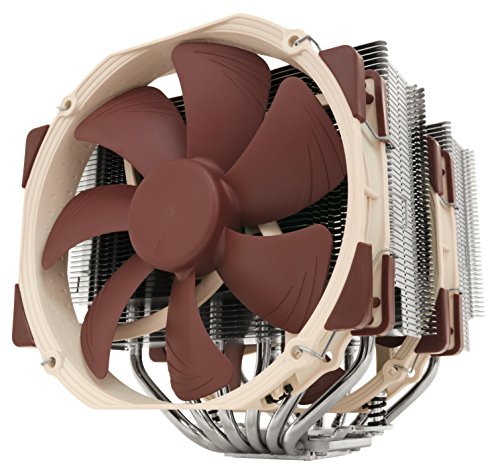
Selecting the right cooler depends on your processor thermal output, chassis dimensions, and personal noise tolerance. For builders seeking unmatched air cooling reliability and whisper-quiet acoustics, the Noctua NH-D15 chromax.Black delivers exceptional dual-tower heat dissipation backed by proven fan engineering. Its durable mounting hardware and high thermal headroom make it an outstanding long-term investment for enthusiast workstations.
Budget-conscious builders will find extraordinary value in the Thermalright Peerless Assassin 120 SE CPU Cooler, which provides dual-tower cooling at an accessible entry price point. It utilizes six copper heatpipes and twin PWM fans to deliver dependable thermal control across mainstream gaming processors. If you want maximum liquid cooling potential with integrated VRM airflow, the ARCTIC Liquid Freezer III Pro 360 A-RGB offers dedicated contact frame engineering and generous 360mm radiator capacity.
For compact chassis requiring zero RAM interference, the slim single-tower Noctua NH-U12A chromax.Black offers top-tier 120mm performance without blocking adjacent memory slots. Ensure you verify your case height clearance and socket hardware before finalizing your purchase. For additional practical shopping advice, check our guide on budget storage and setup planning.
FAQs
What makes Best High-Performance CPU Coolers in 2026 superior to stock coolers?
High-performance aftermarket coolers feature larger copper contact plates, multiple sintered heatpipes, and larger PWM fans that dissipate heat rapidly. Stock boxed coolers generally use basic aluminum blocks that struggle under sustained boost loads, resulting in higher fan noise and thermal throttling.
How does cooler height impact case compatibility?
Cooler height determines whether your computer chassis side panel can close cleanly without contacting heatsink heatpipe caps. Premium dual-tower coolers often reach 165mm in height, requiring mid-tower or full-tower cases with generous interior clearance.
Is liquid cooling better than dual-tower air cooling for gaming?
Dual-tower air coolers and 240mm liquid coolers offer comparable thermal performance during standard gaming workloads. Liquid coolers excel at absorbing sudden burst temperatures, while air coolers provide mechanical simplicity with zero risk of pump failure or coolant evaporation over time.
How often should thermal paste be replaced on high-performance coolers?
Quality thermal interface compound typically maintains optimal thermal conductivity for three to five years under regular desktop usage. You should reapply paste if you remove your heatsink or notice gradual temperature increases under identical processing workloads.
What is the purpose of an offset mounting bracket?
Offset mounting hardware positions the cooler copper base directly over the hottest core compute areas of modern multi-chip processors. This targeted contact improves thermal transfer efficiency, lowering peak core temperatures by several degrees under heavy multi-threaded loads.
How do I prevent memory clearance conflicts with large air coolers?
You can choose coolers with cutaway lower fins, slide the front fan higher on its bracket, or install standard-height memory modules without tall heatspreaders. Slim single-tower designs also keep the front fan entirely clear of all four motherboard memory channels.
What does static pressure mean for radiator and heatsink fans?
Static pressure measures a fan ability to push air through dense physical obstructions like aluminum cooling fins and radiator matrices. Fans with high static pressure ratings maintain strong airflow through tight spaces, ensuring effective heat dissipation under load.
Do Best High-Performance CPU Coolers in 2026 include mounting brackets for new sockets?
Leading cooler manufacturers bundle multi-socket hardware compatible with current Intel LGA1851/1700 and AMD AM5/AM4 platforms. Many reputable brands also provide complimentary or low-cost bracket upgrade kits when new CPU generations launch.
What role does a CPU contact frame play during installation?
A contact frame replaces the motherboard factory retention clamp to apply even downward pressure across the integrated heat spreader. This uniform pressure prevents subtle processor bending, ensuring consistent thermal compound contact across the entire cooler base plate.
How noisy are premium CPU coolers during daily desktop operation?
Premium coolers equipped with fluid-dynamic bearing PWM fans remain virtually silent during idle and light productivity tasks, often operating below 20 dBA. Under maximum computing load, high-end models rarely exceed 28 to 32 dBA, producing a smooth, low-pitched acoustic profile.






Write Your Review
No reviews yet. Be the first to share your experience!