

Modern drivers rely on tablets for commercial fleet navigation, electronic logging devices, and family road trip entertainment. Standard phone brackets cannot handle large screens, especially when protected by rugged, shockproof armor cases.
Choosing the right mount requires careful attention to clamp width, cradle depth, and rigid chassis vibration dampening. For more organization tips on road trips and gear storage, explore our How To guides to optimize your vehicle setup.
In this comprehensive September 2026 roundup, we analyze 7 leading options across top brands like OHLPRO, eSamcore, Keuvirya and more. Whether you drive a compact sedan, commercial semi-truck, or recreational vehicle, these selections provide dependable, hands-free device positioning.

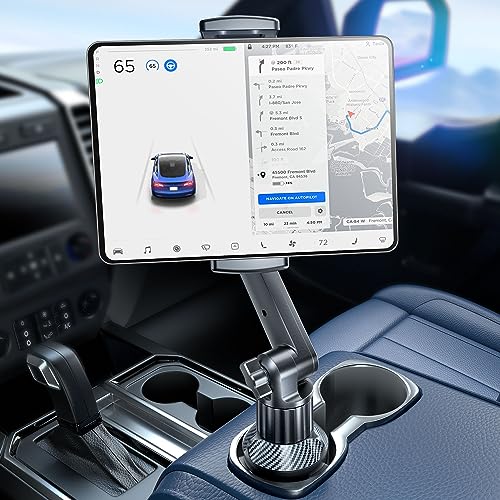


Maximum Clamp Width and Extension Range
Clamp width determines the exact screen sizes your vehicle bracket can hold securely without slipping out. Most standard vehicle brackets open only wide enough for standard smartphones, leaving larger screens completely unsupported.
When measuring your device, always verify the screen diagonal alongside the physical exterior dimensions in inches or millimeters. A tablet with a 12.9-inch diagonal display typically measures over nine inches in actual physical width across its frame.
Look for clamping mechanisms that provide dual-sided spring tension or ratcheting lock arms that expand past ten inches. This wide clearance ensures seamless transitions between compact phones, intermediate tablets, and oversized commercial displays.
Cradle Depth and Rugged Case Clearance
Clamp depth is frequently overlooked by shoppers until their armored tablet case fails to seat properly in the bracket. Standard mounts often feature shallow retention lips under half an inch deep, which eject thick protective cases during sharp turns.
Heavy-duty protective enclosures with integrated hand straps, kickstands, and silicone bumpers demand cradle depths of at least 0.8 inches. Premium wide-clamp hardware can accommodate depths reaching up to 1.57 inches for extreme heavy-duty commercial casings.
Before purchasing, measure the thickest section of your encased device including any protruding rear attachments. Matching your case thickness to an appropriately deep cradle prevents unexpected falls and keeps your valuable electronics completely secure on rough roads.
Base Mounting Mechanism and Vehicle Integration
The mounting base serves as the foundational anchor for your entire hardware setup. Different vehicle cabins and driving environments require specific mounting styles ranging from permanent drill bases to flexible console solutions.
Semi-trucks, fleet vans, and off-road work trucks benefit most from four-hole drill bases screwed directly into flat dashboard panels. Daily passenger cars often work better with expanding cup holder bases or industrial suction cups that leave no permanent holes in vehicle trim.
When selecting a mounting style, consider whether you need temporary portability between vehicles or unyielding structural rigidity. For additional ideas on balancing permanent fixtures with flexible organization, see our expert shopping guides.
| Mounting Style | Primary Advantage | Ideal Vehicle Type | Installation Effort |
|---|---|---|---|
| Drill-Down Metal Base | Zero wobble, permanent maximum stability | Commercial trucks, work vans, boats | Moderate (drilling required) |
| Expanding Cup Holder | No tools needed, avoids windshield obstruction | SUVs, sedans, rental cars | Very quick (plug-and-twist) |
| Sticky Suction Cup | Flexible windshield or dashboard placement | Passenger cars, light delivery vans | Simple (press-and-lock) |
Arm Construction and Vibration Dampening
The extension arm bridges the base anchor and the clamping cradle, dictating overall positioning flexibility. Cheap plastic arms or thin flexible goosenecks tend to bounce violently under the weight of heavier modern tablets.
Heavy-duty metal construction utilizing aircraft-grade aluminum, cast iron, or reinforced PTFE polymers eliminates dangerous road oscillations. Stiff, articulating dual-arm joints maintain clean visibility of your map apps without vibrating out of focus while cruising on highways.
Keep your arm length as compact as your dashboard layout allows to minimize the leverage exerted on the base. Shorter, thicker mechanical arms naturally dampen road vibrations far more effectively than excessively long extended levers.
Ball Joint Articulation and Threaded Locking
Articulated ball joints enable swift switching between landscape navigation mode and portrait logging orientation. The quality of the ball joint surface directly dictates whether your device maintains its angle over hours of continuous driving.
Standard smooth plastic ball joints frequently slip downward when driving over bumpy pavement or railroad crossings. Upgraded designs feature textured or threaded ball heads with heavy-duty tension collars that grip tightly once tightened by hand.
Standardized 17mm and 20mm ball joint systems also allow you to swap clamp brackets across different modular mounting arms. This modularity means you can upgrade your clamping cradle without needing to reinstall an entirely new vehicle base.
Thermal Resistance and Sun Exposure Durability
Vehicle cabins experience extreme temperature fluctuations, from freezing winter nights to scorching summer dashboard heat. Intense solar radiation combined with trapped greenhouse heat can quickly soften low-grade plastics and melt cheap suction adhesives.
Mounts built with military-grade polymers, cast metals, and heat-resistant silicone maintain structural strength in extreme weather. Cup holder mounts provide a distinct advantage in hot southern climates by keeping electronics out of direct windshield sunlight.
If you choose a suction mount for windshield use, look for washable polyurethane gel bases that can be refreshed with water. Periodically inspecting the mounting surfaces helps prevent sudden adhesive releases when temperatures peak during summer months.
Cable Routing and Open Port Architecture
Continuous screen use for GPS navigation and fleet tracking rapidly depletes tablet battery reserves during long road trips. Your mounting bracket must offer unobstructed access to charging ports without requiring awkward cable bends.
Well-engineered wide clamps feature hollowed side brackets or open center channels that accommodate standard charging cables. This open design allows you to keep high-output power cables connected securely while your tablet remains locked in place.
Before finalizing your cockpit setup, check that the clamp arms do not block device buttons, speaker grilles, or auxiliary jacks. Thoughtful cable management keeps your cabin clutter-free and avoids snagging wires during emergency vehicle maneuvers.
Grip Cushioning and Device Scratch Protection
Strong mechanical clamping pressure is necessary for road stability, but it should never mar your expensive electronics. Quality brackets incorporate soft, grooved silicone or thermoplastic polyurethane padding along all inner contact points.
These specialized rubberized cushions serve two essential functions during your daily travels. First, they dramatically increase surface friction to prevent lateral slippage, and second, they absorb minor road shocks that could scuff tablet bezels.
Avoid mounts that rely on bare hard plastic or thin foam pads that compress and disintegrate after brief sun exposure. Durable silicone padding maintains its resilient elasticity and grip strength through thousands of insertion cycles.
Driver Sightline Safety and Ergonomic Positioning
Positioning a wide-screen tablet inside a vehicle cockpit requires careful consideration of road visibility laws. An improperly positioned mount can obstruct critical forward sightlines or interfere with steering wheel hand clearance.
Multi-jointed articulating arms allow you to lower the screen below the dashboard horizon line while keeping it in your peripheral vision. This ergonomic positioning allows you to glance at route guidance without taking your focus completely away from oncoming traffic.
Always perform a test fitting from the driver seat before securing your mounting base permanently. Make sure your hands can operate all dashboard climate controls, gear shifters, and infotainment switches without bumping the tablet.
Why You Should Trust Us
Our evaluation methodology centers on rigorous technical analysis of material composition, mechanical joint engineering, and verified physical dimensions. We cross-reference manufacturer specifications with real-world driving demands across commercial, off-road, and passenger vehicle categories.
We systematically compare cradle expansion ranges, clamp depths, joint locking mechanisms, and base retention systems across all price tiers. Our focus remains entirely on identifying durable hardware that eliminates common user frustrations like wobbling arms and slipping clamps.
To keep our guides fresh and actionable, our editorial system updates product data and availability dynamically. We emphasize objective mechanical criteria so you can confidently select the exact hardware setup tailored to your specific vehicle cockpit.
Final Thoughts
Choosing the right tablet bracket transforms your driving experience by keeping vital navigation and work applications right within your natural line of sight. Evaluating your vehicle dashboard layout and the total thickness of your encased device will quickly narrow down your options.
For heavy commercial drivers and rough terrain, our top overall recommendation is the Aluminum Heavy Duty Drill Base Tablet Holder, thanks to its 304 stainless steel hardware and threaded anti-slip ball head. Drivers who need a rugged bolt-down setup with extended reach can also rely on the OHLPRO Tablet Mount for Truck for rock-solid stability.
If you prefer a tool-free setup that avoids drilling holes, the eSamcore Tablet Holder for Car delivers an impressive 1.57-inch clamp depth and a robust cup holder base. For drivers seeking an ultra-deep clamp replacement for existing modular systems, the YTDSUP Enlarge Tablet Clamp With Depth stands out as an exceptional value choice.
For windshield or dash mounting versatility, the Tablet Holder for Car iPad Holder provides strong suction retention and swift 360-degree rotation. Pair your cockpit hardware with other smart storage solutions by reading our guide on how to compare storage bins and cubes for organized road trips.
Frequently Asked Questions
What are Best Car Tablet Mounts with Wide Clamp Range designed to accomplish?
These heavy-duty vehicle mounts are engineered with wide opening jaws and deep retention lips to securely hold full-sized tablets inside cars, trucks, and commercial fleets. They prevent large screens from wobbling or dropping, even when protected by thick armor cases.
Will a wide clamp mount fit an iPad Pro with a thick protective case?
Yes, models engineered with clamp depths between 0.8 inches and 1.57 inches easily accommodate heavy-duty cases like OtterBox Defender and silicone child-proof bumpers. Always verify your total case thickness against the cradle depth specification before purchasing.
How do drill-base tablet mounts compare to cup holder mounts?
Drill-base brackets provide permanent, zero-shake stability suitable for commercial trucking, off-road vehicles, and boat consoles. Cup holder mounts require zero tools to install and can be transferred between vehicles in seconds without leaving permanent screw holes.
Can suction cup mounts hold heavy 12.9-inch tablets reliably?
Industrial suction mounts with sticky polyurethane gel bases and mechanical pressure locks can securely hold large screens on clean glass or smooth dashboards. For maximum reliability, clean both the mounting surface and the suction pad before installation.
Are these tablet mounts legal to use while driving on highways?
Vehicle mounting hardware is generally legal when positioned outside your direct line of sight through the windshield. Always check local state regulations regarding windshield obstructions and ensure your tablet is used strictly for navigation or hands-free functions.
What should I do if my tablet mount ball joint begins to sag?
Ensure the locking collar ring is tightened securely over the ball socket. Upgraded mounts featuring threaded or textured ball surfaces resist slipping under heavy screen weights much better than smooth plastic joints.
How do I protect my car cup holder from scratches when installing a mount?
Most premium cup holder tablet brackets feature expanding base pads wrapped in soft silicone or rubber. These non-slip pads protect your vehicle interior trim from abrasions while locking the cylindrical base firmly in place.
Can I charge my tablet while it remains clamped in the holder?
Quality tablet brackets feature open side profiles or dedicated hollow channels that grant clear access to USB charging ports. This allows you to run high-speed power cables uninterrupted during long cross-country hauls.
What makes Best Car Tablet Mounts with Wide Clamp Range ideal for 2026 commercial drivers?
Modern commercial drivers must maintain compliance with electronic logging device mandates while monitoring route conditions in real time. Sturdy wide-clamp brackets keep these critical display devices locked at eye level without taking up essential cab space.
Do high summer dashboard temperatures damage vehicle tablet mounts?
Extreme heat can cause inferior adhesives to melt and low-grade plastics to warp over time. Selecting hardware made with cast aluminum, military-grade PTFE, and heat-resistant silicone ensures long-lasting durability in hot southern climates.







Write Your Review
No reviews yet. Be the first to share your experience!