

Finding a dependable slate used to require spending flagship money or settling for laggy hardware. Today, the mid-tier category delivers desktop-grade web browsing, responsive digital pens, and sharp high-resolution displays. Our detailed overview highlights options that balance portability, everyday processing speed, and sustained software support.
Shoppers often assume that lower price brackets mean compromising on screen quality or dealing with poor battery life. Manufacturers now equip these models with vivid high-refresh panels, capable multi-core chips, and stereo speaker systems. For more hardware comparisons, explore our practical How To category for clear technology and setup guidance.
We analyzed 5 top contenders in September 2026 to see how they perform during daily workloads. Whether you require a digital notebook for university lectures or an entertainment hub for long flights, this breakdown explains what matters most. You will learn how each device handles modern apps, active styluses, and split-screen multitasking.




Processor Architecture and Everyday Performance
The system processor dictates how quickly apps launch, how smoothly video streams render, and whether user interfaces stutter under pressure. Modern mid-range mobile chips utilize power-efficient manufacturing nodes that keep thermal throttling low during intensive study sessions. Looking closely at chip architectures helps you understand real-world longevity before making a final purchase.
Chips like the Apple A16 Bionic deliver remarkable single-core speed, making everyday task switching and image manipulation feel instantaneous. Meanwhile, multi-core workhorses like the MediaTek Dimensity 8300 provide stable gaming frame rates and high-bandwidth wireless connectivity. In contrast, chips such as the Helio G99 focus strictly on daily efficiency rather than heavy 3D rendering tasks.
As a practical rule of thumb, prioritize modern silicon fabrication architectures if you plan to keep your slate for multiple years. Checking benchmark comparisons will clarify how well an architecture handles heavy background scripts and large local media files. A strong processor prevents interface lag from degrading your overall daily satisfaction over time.
Display Resolution and Refresh Rates
Screen clarity directly impacts reading comfort, visual immersion, and how much content fits comfortably on your workspace. Resolution determines pixel density, ensuring tiny fonts remain razor-sharp while reviewing technical documents or complex digital spreadsheets. A higher pixel density eliminates jagged text edges and reduces eye strain during lengthy viewing periods.
Standard displays often operate at a standard 60Hz refresh rate, which suffices for streaming standard video files. Panels offering 90Hz or higher present visibly smoother page scrolling, fluid stylus strokes, and reduced motion blur across system menus. Higher resolutions, such as 2.4K or 3K screens, allow you to read small PDF print without constantly zooming inward.
When selecting a screen, check if the panel supports dynamic brightness controls like Samsung Vision Booster or Apple True Tone. These automated color systems adjust your panel temperature to ambient room lighting for effortless reading. Balancing resolution and fluid refresh rates provides an optimal visual experience without drastically draining your internal battery reserves.
Operating System Ecosystem and App Optimization
The operating platform determines your available application ecosystem, multitasking workflows, and long-term security update cycle. Apple iPadOS provides an extensive library of tablet-native applications designed specifically for touch inputs and active stylus navigation. Android-based platforms offer exceptional file-system management flexibility, intuitive desktop modes, and diverse interface customization tools.
Consider how easily a tablet syncs with your current smartphone, laptop, and cloud storage subscriptions. Galaxy ecosystem features allow clipboard sharing and phone calls to transfer across devices seamlessly without third-party utilities. Android tablets with Google Gemini integration allow fast contextual queries, automated summarizing, and immediate search capabilities directly from your display.
Select an operating system that mirrors the tools you already rely upon daily for personal organization. Much like organizing everyday home spaces efficiently, as covered in our budget organization guide, software synergy keeps tasks structured. Evaluating your digital routine early prevents unexpected app incompatibilities down the line.
Screen Surface Finishes and Eye Health Features
Glossy glass displays look vibrant indoors but reflect harsh overhead office bulbs and bright sunlight quite severely. Matte surfaces scatter incident light rays to minimize visual reflections, which makes extended document review considerably more pleasant. If you read digital books or edit notes for hours, surface finish deserves serious evaluation.
TCL NXTPAPER technology utilizes specialized hardware filtering to diffuse glare and eliminate blue light at the source. This approach mimics the physical texture of real paper while preserving rich color representation for comics and illustrations. Dedicated reading modes convert color displays into paper-like grayscale outputs, saving visual energy during study marathons.
If you prefer glossy screens for high-contrast movie playback, inspect the panel for certified low blue light ratings. Anti-reflective coatings vary widely, so reading ambient light test reports can save you significant frustration outdoors. Choosing the correct surface finish ensures comfortable daily reading without persistent headaches or squinting.
Stylus Compatibility and Note-Taking Precision
An active stylus transforms a standard media slate into a versatile digital sketchpad, notebook, and document signing station. Latency between the pen tip and the drawn line must remain minimal to replicate an authentic ballpoint pen feel. Pressure sensitivity levels determine how accurately stroke thickness adapts to hand pressure while drawing or writing.
Some tablets bundle an active pen in the packaging, saving you from purchasing expensive aftermarket accessories separately. The Samsung S Pen requires no external battery charging for basic note taking, offering reliable pressure detection and palm rejection. Meanwhile, options compatible with Apple Pencil or proprietary active styluses provide excellent precision for fine art projects.
Check if the tablet software supports automatic handwriting conversion to editable text inside native note applications. Palm rejection algorithms must ignore your resting wrist reliably so you can write naturally without creating stray marks. Selecting a model with seamless stylus integration elevates your digital productivity instantly.
System Memory and Background Multitasking
Random Access Memory dictates how many browser tabs and productivity applications stay suspended without reloading constantly. Tablets with 4GB of RAM frequently refresh heavy background pages, disrupting your workflow during complex research tasks. Stepping up to 6GB or 8GB of system memory provides a far smoother multi-window working environment.
Modern Android interfaces rely heavily on split-screen viewing and floating pop-up windows for productive multi-tasking routines. Having ample RAM ensures that video conferences remain smooth while simultaneously running a browser and reference document. Devices featuring virtual RAM expansion allocate unused flash storage to hold dormant apps, improving overall system stability.
If your daily work involves running demanding split-screen apps, avoid configurations offering less than 6GB of RAM. The performance overhead gained by having additional memory keeps the tablet responsive through upcoming annual operating system upgrades. It is always wise to prioritize higher memory configurations over minor cosmetic design variations.
Internal Storage Capacity and Expandability
Local storage requirements can expand surprisingly fast once you begin downloading offline videos, high-resolution textbooks, and mobile games. Modern operating systems and pre-installed application packages easily occupy upwards of 20GB of internal drive space alone. Starting with at least 128GB of internal storage prevents constant storage management warnings.
MicroSD card expandability remains a massive benefit on select Android hardware, allowing affordable storage additions up to 2TB. This capability lets you maintain massive collections of offline audio, educational lectures, and family photos easily. Conversely, devices without memory expansion slots require careful planning to avoid filling up non-upgradeable internal storage.
Before purchasing, calculate how much media you realistically intend to store locally without relying on continuous cloud access. Evaluating storage choices works much like comparing modular organization pieces in our storage comparison guide. Ensuring sufficient capacity upfront guarantees your device will not grind to a halt when installing software patches.
Battery Endurance and Rapid Recharging Capabilities
A portable device loses its primary appeal if it requires tethering to an electrical wall outlet every few hours. Battery capacity is measured in milliampere-hours, with larger screens generally demanding higher-capacity internal cells to maintain longevity. Energy-efficient display panels and optimized processors can dramatically stretch actual run times between full charge cycles.
Charging speed determines how quickly you can recover several hours of operation before catching a commuter train or flight. Fast charging protocols ranging from 25W to 45W can replenish massive batteries within a couple of hours. Some innovative devices even offer reverse charging, letting the tablet function as an emergency power bank for smartphones.
Always verify whether the manufacturer includes the compatible high-speed power adapter inside the physical retail box. Missing charging bricks require an extra purchase to achieve advertised quick-charging speeds, impacting your overall setup investment. Prioritizing efficient battery designs guarantees uninterrupted performance throughout busy travel days.
Audio Architecture and Speaker Implementation
Audio performance matters immensely whether you are following remote classroom lectures or relaxing with high-definition action films. Single bottom-firing speakers sound hollow and easily get blocked by your hand when holding a device horizontally. Quad-speaker arrays deliver wider sound stages and much clearer vocal dialogue without requiring external headphones.
Acoustic tuning from established audio brands paired with Dolby Atmos processing provides immersive directional sound effects. This virtual spatial positioning enhances movies, music tracks, and gaming environments by distributing frequencies evenly across four corners. Clean high frequencies combined with balanced midrange tones prevent harsh distortion when listening at louder volume settings.
If you regularly join teleconferences, consider front-facing microphone arrays that incorporate background noise cancellation algorithms. High-quality microphones ensure your speech stays legible even when typing notes on the desk beside the slate. Reliable audio components transform a modest screen into an engaging personal entertainment theater.
| Feature | Apple iPad 11-inch | Lenovo Idea Tab Pro | TCL NXTPAPER 14 | Samsung Galaxy Tab S10 Lite |
|---|---|---|---|---|
| Screen Size | 11.0 Inches | 12.7 Inches | 14.3 Inches | 10.9 Inches |
| Display Tech | Liquid Retina | 3K LCD (90Hz) | 2.4K Paper-Like | LCD Vision Booster |
| Processor | Apple A16 | Dimensity 8300 | Helio G99 | Exynos 1380 |
| Base RAM | Optimized Unified | 8GB | 8GB | 6GB |
| Stylus Support | Apple Pencil USB-C | Tab Pen Plus (Included) | T-PEN (Included) | S Pen (Included) |
| Expandable Memory | No | Yes (MicroSD) | No | Yes (Up to 2TB) |
Why You Should Trust Us
Our editorial approach centers around thorough specification analysis, benchmark verifications, and cross-referencing reliable consumer operational feedback. We evaluate mobile chip capabilities, screen technologies, and software longevity directly against everyday user requirements. Rather than accepting manufacturer marketing claims blindly, we dissect hardware limitations to provide realistic buying guidance.
We systematically compare technical dimensions, battery discharge benchmarks, and real-world audio implementations across each shortlisted model. Our team monitors ongoing firmware update patterns to ensure recommended devices continue receiving essential security enhancements. For additional equipment buying methodology, visit our comprehensive guides section.
Transparency drives our entire research framework, ensuring you receive objective product overviews based on tangible features. We highlight missing accessories, charging speeds, and display limitations clearly so you can choose confidently. Our mission is to eliminate confusion by translating complex mobile hardware specifications into practical everyday purchasing advice.
Final Thoughts
When selecting from the Best 400 Dollar Tablets, your daily workflow dictates the ideal hardware configuration. For power users seeking maximum longevity, swift performance, and refined applications, the Apple iPad 11-inch: A16 chip, 11-inch Model represents our best overall recommendation. Its rapid processor and intuitive operating system handle diverse tasks effortlessly.
If you prioritize expansive screen space, gaming performance, and included accessories, the Lenovo Idea Tab Pro with Google Gemini delivers exceptional value. Packing a sharp 3K display, fast Dimensity silicon, quad JBL speakers, and an included stylus, it accommodates demanding student coursework without extra expense.
Shoppers who spend considerable hours reading sheet music, annotating documents, or sketching will appreciate the specialized TCL NXTPAPER 14 Android Tablet. Its paper-like anti-glare finish dramatically reduces eye strain, while the massive 14.3-inch canvas provides unmatched digital drawing real estate.
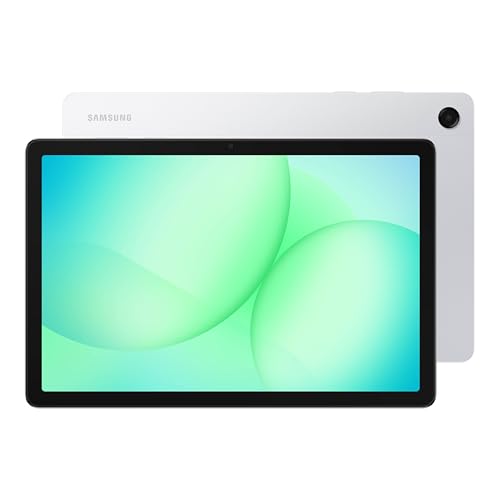
For versatile family entertainment or balanced office productivity, the Samsung Galaxy Tab S10 Lite, 6GB RAM, 128GB and Samsung Galaxy Tab A11+ 8GB RAM, 256GB Storage offer expandable storage and dependable Galaxy ecosystem features. Take time to consider which physical attributes matter most before choosing your next digital companion.
Frequently Asked Questions
What are the standout features of the Best 400 Dollar Tablets in 2026?
Modern mid-range tablets now frequently include high-resolution panels, multi-speaker Dolby Atmos audio systems, and modern multi-core processors. Many top options also feature active stylus integration, fast wireless connectivity, and all-day battery efficiency for productivity on the move.
Can a mid-range tablet completely replace an everyday laptop?
A mid-tier tablet can easily replace a laptop for document editing, web research, video calls, and media streaming. However, tasks requiring specialized desktop operating systems, complex local coding environments, or heavy video rendering still benefit from dedicated laptops.
Is 128GB of internal storage sufficient for general tablet use?
For streaming media, cloud document management, and regular web browsing, 128GB provides plenty of space for apps and cached files. Users who download large offline video libraries or install numerous heavy 3D games should consider 256GB or expandable memory options.
Do all mid-tier tablets include a stylus in the box?
Not every manufacturer bundles a pen inside the package, meaning some devices require an additional accessory purchase. Models like the Lenovo Idea Tab Pro and Samsung Galaxy Tab S10 Lite include their active pens, saving you considerable extra expense.
How does NXTPAPER screen technology differ from standard LCD screens?
NXTPAPER technology integrates multiple filtering layers to diffuse harsh glare and reduce harmful blue light directly at the hardware layer. This results in a paper-like, matte texture that significantly lessens eye fatigue during marathon reading sessions.
What is the difference between iPadOS and Android for everyday tablet work?
iPadOS provides an expansive selection of apps tailored specifically for large touch displays, delivering smooth gestures and reliable software updates. Android offers greater file management freedom, seamless widget customization, and versatile multi-window split-screen workspace layouts.
Why is a 90Hz refresh rate better than a standard 60Hz display?
A 90Hz panel updates images 50 percent faster every second, making scrolling through social feeds and web documents noticeably smoother. It also decreases visual latency when sketching with an active stylus, creating a more responsive writing feel.
How much RAM is necessary for smooth multitasking on an Android slate?
We recommend choosing at least 6GB to 8GB of RAM for modern Android tablets to prevent aggressive app closures. Having sufficient RAM ensures split-screen apps, browser tabs, and video calls run concurrently without sluggish system interruptions.
Can I use these tablets as a secondary display for a computer?
Yes, many contemporary devices support wireless display mirroring or wired secondary screen functionality with Windows and Mac machines. Apple features Sidecar for instant Mac pairing, while Android models use third-party tools or integrated second-screen modes.
Does fast charging harm the internal tablet battery over time?
Modern battery management hardware controls heat and current flow dynamically to preserve lithium-ion cells during rapid charging cycles. Using certified power adapters ensures fast charging remains safe, efficient, and reliable over years of daily usage.






Write Your Review
No reviews yet. Be the first to share your experience!