

Competitive aiming relies heavily on raw hardware consistency and pixel-perfect tracking. Modern optical sensors have eliminated classic hardware flaws like cursor drift, positive acceleration, and sudden spinouts during rapid swipes. Choosing the right device requires understanding how sensor specifications translate into practical hand movement across your desk.
In this comprehensive September 2026 guide, we analyze 5 top options from leading manufacturers such as Logitech G, Razer, ASUS. Whether you compete in high-stakes tactical shooters or manage complex macros in strategy games, selecting the right sensor configuration makes an immediate difference. You can also explore our broader setup tutorials on our How To category hub.
Many players mistake raw maximum sensitivity numbers for true tracking quality. Real performance comes from consistent tracking speed, zero artificial smoothing, and customizable lift-off behavior. This breakdown will help you navigate technical sensor metrics so you can invest in gear that complements your unique grip style and sensitivity preferences.




Maximum DPI and Resolution Granularity
Dots per inch, or DPI, measures how many digital cursor pixels register for every physical inch the mouse travels. While marketing materials frequently advertise extreme values above 20,000 DPI, most competitive players operate between 400 and 1,600 DPI. High ceiling numbers matter primarily because they indicate a high-resolution optical module capable of exceptional fidelity at standard working ranges.
Resolution granularity refers to the incremental steps available when configuring your tracking sensitivity. Premium hardware allows adjustments in increments of 50 DPI or smaller, ensuring you match your exact muscle memory across different games. Budget sensors often force large steps of 400 or 800 DPI, limiting precise calibration.
When evaluating DPI, prioritize sensor linearity over inflated headline numbers. A sensor operating at 800 DPI must track consistently regardless of whether you swipe slowly across a sniper angle or flick instantly across the mousepad. Look for sensors that maintain identical counts per inch across your full tracking velocity spectrum.
Tracking Speed (IPS) and Acceleration Limits
Inches per second, or IPS, represents the maximum physical speed a sensor can travel before it loses tracking fidelity. When a fast arm movement exceeds the IPS rating, the cursor can stall, freeze, or aim toward the ground in an error known as a spinout. Competitive first-person shooters demand an IPS rating of at least 300 to survive aggressive reset swipes.
Acceleration ratings, measured in standard gravitational units (G), indicate how much sudden velocity change the tracking engine can handle. Top-tier optical units withstand 40G to 50G of acceleration without dropping frames or skipping position updates. This ensures that violent flick shots register with total fidelity on screen.
To test if your setup needs higher IPS headroom, calculate your mousepad width and your physical turn rate. Low-sensitivity arm aimers require significantly higher IPS ceilings than high-sensitivity wrist players because their physical hand travels much farther in milliseconds. Aim for sensors offering at least 400 IPS if you play low-sensitivity tactical shooters.
Zero Hardware Smoothing and Filtering
Sensor smoothing is an algorithmic process that averages out raw tracking data to create visually clean cursor lines. While smoothing hides hand jitter on desktop tasks, it introduces microscopic input lag that damages fine motor control in competitive games. Flawless tracking engines deliver raw 1:1 motion data straight to the operating system without artificial software filtering.
Modern advanced sensors maintain zero smoothing across their most common DPI brackets. However, some units activate internal filtering automatically once you exceed specific thresholds, such as 3,200 or 6,400 DPI, to mask sensor noise. Understanding at what sensitivity level smoothing engages is vital for maintaining responsive hand tracking.
A reliable rule of thumb is to operate optical hardware within its native, unfiltered DPI range. Keeping your native sensitivity between 400 and 1,600 DPI ensures you capture raw positional frames with sub-millisecond responsiveness. Always disable angle snapping and pointer precision options inside your operating system settings as well.
Lift-Off Distance (LOD) and Surface Tuning
Lift-off distance determines the physical height at which the sensor stops tracking when you lift the mouse to reposition it. A high lift-off distance causes the cursor to jitter or wander whenever you pick up the mouse to recenter on your pad. Competitive players generally prefer a short, predictable lift-off distance of 1.0 to 1.5 millimeters.
Surface tuning allows the optical sensor to analyze the texture, weave, and reflectivity of your mousepad. High-end configuration software provides automatic or manual calibration routines to optimize the focal point of the sensor lens. This step ensures consistent tracking across cloth pads, hybrid surfaces, and hard composite mats alike.
Look for hardware that features independent asymmetric cut-off adjustments. This functionality lets you set different landing and lift-off heights, preventing cursor shift during frantic vertical repositioning. You can review more hardware optimization techniques in our collection of Guides.
Polling Rate and Transmission Latency
Polling rate measures how frequently your mouse sends positional packets to your computer, expressed in Hertz (Hz). A standard 1,000 Hz polling rate delivers updates every 1.0 millisecond, which provides smooth tracking for standard refresh monitors. High-end competitive designs now push polling frequencies to 2,000 Hz, 4,000 Hz, or even 8,000 Hz for sub-millisecond packet delivery.
While ultra-high polling rates reduce input latency on high-refresh displays, they place greater demands on your computer processor. Transmitting 8,000 updates every second requires substantial single-core CPU throughput and can slightly reduce frame rates in unoptimized game titles. Balancing polling rate with system capabilities prevents performance bottlenecks.
For most competitive players, a stable 1,000 Hz report rate represents the ideal balance between input responsiveness, system stability, and wireless battery conservation. If you use a 240 Hz or 360 Hz monitor, upgrading to higher polling frequencies provides subtle benefits in visual smoothness during high-velocity camera pans.
Optical Switch Integration vs Mechanical Contacts
The primary switch mechanism underneath the left and right buttons directly impacts click latency and long-term durability. Traditional mechanical switches rely on metal contacts that can degrade over time, leading to unintentional double-clicking errors. Optical switches use an infrared light beam to register clicks instantly with zero physical debounce delay.
Optical switch actuation typically clocks in around 0.2 milliseconds, eliminating the debounce buffer required by mechanical switches to stabilize contact bounce. This provides an immediate competitive advantage when firing semi-automatic weapons in shooters. Furthermore, optical switches often boast lifespans exceeding 70 million clicks due to fewer wearing mechanical parts.
Consider your personal tactile preferences when choosing switch types. Mechanical switches often offer a crisper, deeper click feel, while optical designs focus on raw actuation speed and resistance to electrical wear. Test both types to determine which click resistance suits your trigger finger cadence.
Ergonomic Shell Form and Grip Compatibility
Even the most accurate sensor in the world fails if the mouse body causes hand fatigue or prevents stable grip control. Mouse designs fall into two main categories: asymmetrical ergonomic shells that contour to right-handed anatomy, and symmetrical ambidextrous shells that favor versatile fingertip or claw grips. Your hand size and natural grip orientation dictate the optimal shape.
Palm grip users require a higher rear hump and generous thumb rests to support the full palm surface during extended sessions. Claw grip players benefit from a pronounced rear taper that anchors the base of the palm while keeping fingers arched. Fingertip aimers require compact, low-profile shells that maximize vertical adjustment range inside the hand.
Measure your hand from the base of the palm to the tip of your middle finger before selecting a chassis. If your hand measures under 17 centimeters, target compact shells under 120 millimeters in length. Larger hands over 19 centimeters require substantial ergonomic bodies to prevent finger dragging on the mousepad.
Wireless Reliability and Power Management
Modern proprietary 2.4 GHz wireless protocols match the latency and reliability of traditional wired connections. Advanced frequency hopping scans local wireless spectrums to avoid interference from home Wi-Fi routers and nearby wireless peripherals. High-efficiency sensors can operate for hundreds of hours on a single battery charge.
Battery architecture represents a key design trade-off between total weight and maintenance convenience. Some mice use internal rechargeable lithium-ion cells charged via USB-C or inductive charging mats, while others utilize swappable AA or AAA alkaline batteries. Swappable cells allow instantaneous battery replacement without tethering to a charging cable.
When selecting wireless hardware, examine the positioning of the wireless receiver dongle on your desk. Placing the receiver within twenty centimeters of your mousepad via an extension cable eliminates signal dropouts. For neat desk cord management, you can read our tips on organizing accessories across modern workstations.
Onboard Memory and Driver Customization
Dedicated configuration software lets you adjust DPI stages, remap auxiliary buttons, record macro sequences, and fine-tune RGB lighting effects. However, the best peripherals allow you to save these settings directly to onboard hardware profiles. This allows you to plug your mouse into a tournament computer or secondary laptop without running background software.
Evaluate the depth of button remapping capabilities offered by the manufacturer software suite. Advanced tools let you assign secondary function layers to single buttons, effectively doubling your input choices. This capability is particularly valuable for complex strategy games, productivity workflows, and multimedia control.
Make sure your chosen peripheral supports at least three onboard profile slots if you switch regularly between competitive gaming, casual browsing, and work tasks. Storing sensor DPI levels directly onto hardware flash memory ensures consistent sensitivity across different operating systems without driver conflicts.
Glides and Skate Materials
The friction generated between your mouse feet and the mousepad surface directly impacts micro-adjustment accuracy in competitive shooters. Pure virgin-grade PTFE (polytetrafluoroethylene) skates provide a smooth, low-friction glide with minimal initial static resistance. Standard dyed black Teflon feet often contain impurities that create drag during fine tracking corrections.
Skate geometry and edge profiling also determine glide consistency across different pad textures. Rounded, chamfered skate edges prevent the mouse feet from digging into thick, plush cloth pads during sudden downward pressure. Larger corner skates distribute downward force evenly across the baseplate.
Inspect your mouse skates regularly for dust accumulation, deep gouges, or edge wear. Replacing worn factory glides with aftermarket virgin PTFE skates can completely revitalize the handling of an older gaming mouse. Keeping your desk surface clean ensures your glides maintain consistent kinetic friction over long gaming cycles.
| Sensor Spec | Competitive Standard | Enthusiast Ceiling | Primary Benefit |
|---|---|---|---|
| Maximum DPI | 6,400 – 12,000 DPI | 26,000 – 36,000 DPI | High resolution granularity |
| Max Tracking Speed | 300 – 400 IPS | 650+ IPS | Prevents spinouts on quick flicks |
| Acceleration | 35G – 40G | 50G+ | Maintains tracking during rapid turns |
| Polling Rate | 1,000 Hz (1 ms) | 4,000 – 8,000 Hz (0.125 ms) | Smoother cursor motion on high-Hz panels |
| Lift-Off Distance | 1.0 – 2.0 mm | Under 1.0 mm (Customizable) | Reduces cursor drift during resets |
Why You Should Trust Us
Our evaluation process focuses on empirical hardware specifications, optical architecture, switch latency data, and long-term chassis durability. We cross-examine manufacturer documentation, technical tracking benchmarks, and community tear-down reports to verify that internal sensor implementations deliver true 1:1 motion tracking without hidden smoothing filters.
We categorize each peripheral based on ergonomic shell suitability, button tensioning mechanisms, wireless transmission stability, and software versatility. By comparing real-world performance metrics across entry-level, mid-range, and flagship price tiers, we ensure our recommendations address different play styles and budget limits transparently.
Our comparative database updates dynamically throughout 2026 to reflect firmware revisions, optical sensor upgrades, and hardware refreshes. We maintain independent editorial standards focused entirely on delivering objective, data-backed buying guidance for competitive gamers and desktop enthusiasts alike.
Final Thoughts
Selecting the top mouse hardware comes down to matching your primary gaming genre with the right shell shape and tracking engine. For power users seeking maximum flexibility, the Razer Basilisk V3 Customizable RGB Wired Ergonomic delivers an exceptional 26K DPI optical sensor alongside 11 programmable macro inputs and an intelligent dual-mode scroll wheel. Its ergonomic thumb shelf and optical switch setup make it an incredible all-around performer.
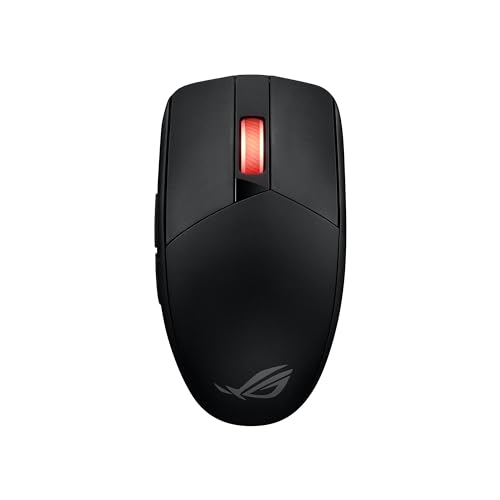
If you prefer an ultra-precise wireless platform built for competitive agility, the ASUS ROG Strix Impact III Wireless Gaming Mouse stands out with its industry-leading 36K DPI optical tracker and featherweight chassis. Its dual-mode wireless connectivity and hot-swappable switch sockets offer unmatched customization for discerning players who prioritize low-latency flick aiming.
Gamers shopping on a strict budget who still demand flawless reliability will find remarkable value in the Logitech G305 Lightspeed Wireless Gaming Mouse. Its renowned HERO optical engine provides lag-free 12K DPI tracking alongside exceptional single-battery longevity. For classic ergonomic palm grip support, the Razer DeathAdder Essential Ergonomic Wired and the high-end Logitech G703 Lightspeed Wireless Gaming Mouse provide reliable handling for marathon sessions.
Make sure to pair your new peripheral with a clean, high-grade tracking pad to preserve sensor accuracy. For additional home workstation advice and equipment upkeep recommendations, feel free to read our guide on maintaining home setups for lasting performance.
Frequently Asked Questions
What makes an optical sensor better than a laser sensor for gaming?
Optical sensors use LED illumination to take thousands of surface pictures per second, delivering accurate 1:1 motion tracking without built-in acceleration. Older laser sensors frequently tracked microscopic surface dust particles and mousepad imperfections, resulting in unwanted cursor jitter and inconsistent tracking speeds during competitive play.
Does a higher DPI make you a more accurate gamer?
Higher DPI does not automatically improve aiming accuracy because extreme sensitivity makes tiny involuntary hand tremors move the cursor too far. Most professional players use moderate settings between 400 and 1,600 DPI combined with lower in-game sensitivity to maximize fine motor control and muscle memory consistency.
What is the top-rated option among Best Sensor Mouse for Gaming in 2026?
The top-rated peripheral depends on your grip style, but flagship models featuring modern 26K to 36K optical sensors offer the best tracking fidelity available. Peripherals with raw optical switches, customizable lift-off distances, and zero smoothing deliver the most consistent aiming performance across competitive titles.
What does IPS mean on a gaming mouse spec sheet?
IPS stands for inches per second, indicating the maximum physical movement speed the sensor can track accurately before losing position data. A higher IPS rating ensures that rapid arm flicks across large mousepads will not cause tracking spinouts or dropped positional frames in intense matches.
Are wireless gaming mice as responsive as wired models today?
Modern 2.4 GHz proprietary wireless protocols match and sometimes exceed the response times of standard wired connections. High-end wireless gaming peripherals maintain a steady 1.0 millisecond report rate with zero detectable transmission latency or signal lag during competitive gameplay.
Why is low lift-off distance important for tactical shooter games?
A low lift-off distance stops sensor tracking the moment you elevate the mouse slightly off the mousepad to reposition your hand. This prevents your crosshair from drifting or shaking off target during rapid repositioning maneuvers in fast-paced shooter rounds.
How does polling rate affect computer CPU usage?
Higher polling rates send more positional data packets to your operating system every second, requiring your processor to handle thousands of hardware interrupts. While 1,000 Hz polling requires minimal processing power, ultra-high rates like 8,000 Hz require substantial single-core CPU throughput to avoid frame pacing drops.
What are the benefits of optical switches over mechanical switches?
Optical switches trigger clicks using light beams rather than physical metal contact plates, eliminating electrical debounce delays. This design provides near-instantaneous actuation speeds and prevents accidental double-clicking problems over millions of button actuations.
Should I use angle snapping when playing competitive games?
You should always disable angle snapping for gaming because it artificially straightens out curved hand movements into horizontal or vertical lines. While helpful for drafting architectural diagrams, artificial line correction prevents accurate diagonal aiming corrections when tracking moving targets.
How often should I clean my optical mouse sensor lens?
You should inspect and clean the sensor lens cavity every few weeks using compressed air or a soft dry cotton swab. Dust fibers or stray pet hairs trapped in the lens aperture can reflect optical light incorrectly and cause sudden cursor tracking stutters.






Write Your Review
No reviews yet. Be the first to share your experience!