

Trimming stacks of paper, fine art prints, or heavy cardstock should never result in ragged edges or shredded corners. Standard craft trimmers lose their edge after just a few dozen cuts, forcing you to purchase costly replacement cartridges continuously. Finding the right tool from our curated selection of the Best Paper Trimmers with Self-Sharpening Blades ensures your cutting edge stays razor-sharp automatically during daily use.
Self-sharpening mechanisms work by running hardened steel cutting wheels or bypass blades against a precision-ground counter edge. Every stroke removes micro-imperfections from the steel, keeping your cuts perfectly straight whether you slice thin tracing paper or dense chipboard. If you want to streamline your studio or organize workspace supplies, check out our practical guides for more workshop setups.
We evaluated 10 top-tier models for September 2026, analyzing cutting capacity, base rigidity, and guide rail tolerances across leading brands like Dahle, Fiskars, LuckyNov and more. This comprehensive guide breaks down the essential performance criteria so you can choose a reliable trimmer that handles your specific volume without tearing materials.

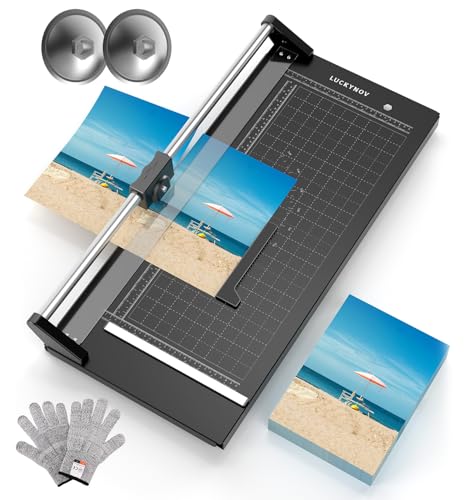
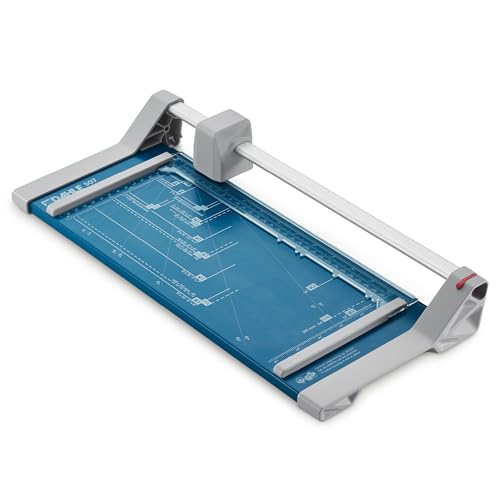


Choosing the right cutting tool requires understanding how blade geometry, clamping pressure, and guide alignment interact under load. A premium trimmer must maintain tight tolerances over years of continuous slicing. Below are the key engineering factors you should evaluate before making your investment.
1. Blade Style and Self-Sharpening Mechanics
The primary choice in self-sharpening cutters lies between rotary wheel systems and bypass guillotine arms. Rotary trimmers use a circular ground steel blade that rolls inside an enclosed carriage against a fixed lower flat blade. Guillotine bypass trimmers utilize a curved pivoting steel arm that creates a scissor-like shearing action against a stationary base edge.
Rotary systems excel at micro-precision cuts, delicate photo paper, and continuous bi-directional slicing. The rolling wheel hones its circular edge constantly against the lower ground steel bar as it moves across the track. Bypass guillotines provide significantly more leverage, making them better suited for slicing through thicker multi-sheet stacks in single downward motions.
When comparing specifications, verify that both the upper moving blade and lower stationary counter-blade are crafted from hardened carbon steel. Inferior models use mild steel that deforms rather than self-sharpens, causing blade separation. A true self-sharpening system maintains consistent spring tension that keeps the cutting surfaces in continuous contact throughout the cut stroke.
2. Sheet Capacity and Material Density
Sheet capacity ratings typically reference standard twenty-pound copy paper, which can be misleading for crafters working with heavy media. A trimmer rated for thirty sheets of copy paper may only handle five sheets of heavy watercolor paper or two sheets of laminated cardstock. Pushing a cutter beyond its rated sheet limit causes blade deflection and jagged cuts.
For high-volume office tasks, look for heavy-duty commercial bypass trimmers that support fifteen to thirty sheets per pass. Personal crafting and scrapbooking generally require lower capacities of five to ten sheets, prioritizing edge cleanliness over raw cutting power. If you frequently trim dense materials like mat board or vinyl, prioritize high cutting clearance over sheet count.
A practical rule of thumb is to choose a trimmer with fifty percent more sheet capacity than your average daily workload. Operating a paper trimmer well below its maximum threshold preserves blade sharpness and minimizes physical strain on the guide rail mechanism.
3. Cut Length and Media Format Support
Cut length dictates the maximum physical dimension of paper or poster board you can square in a single pass. Standard letter-size documents require at least twelve inches of cutting clearance to trim lengthwise comfortably. Large format photography, blueprints, and poster trimming demand commercial cutters spanning eighteen to twenty-eight inches.
Selecting a cut length that matches your largest expected material avoids the messy need to reposition stock mid-cut. Compact twelve-inch trimmers fit neatly on standard desks, while twenty-four-inch studio cutters require dedicated table space. Ensure the base deck has sufficient width to support the overhang of oversized sheets without drooping during cuts.
For versatile studio use, a twenty-inch to twenty-four-inch trimmer offers the ideal balance between workspace footprint and large-format versatility. Always verify that the alignment grid extends the full length of the cutting channel for accurate alignment on wide sheets.
4. Base Deck Construction and Stability
The structural rigidity of the trimmer base prevents warping, which is the primary cause of crooked trimming lines. Solid steel and heavy-gauge aluminum bases provide the flat foundation necessary to keep blades properly aligned under pressure. Plastic bases may flex under heavy downward force, causing the paper to drift off your measured cut line.
Commercial-grade steel bases also add essential ballast that keeps the machine anchored to your tabletop during aggressive slicing. Non-slip rubber feet are mandatory to stop the base from skidding across polished wood or laminate surfaces while you push the carriage. A sturdy workstation foundation is just as important as having proper storage, which you can read about in our home and living resource section.
Inspect the finish of the metal base before purchasing; screened measurement markings beneath a durable powder coat or epoxy layer resist scratching over years of sliding abrasive paper across the surface.
5. Paper Clamp Mechanics and Smudge Guards
Paper slippage is the most common reason for ruined cuts on multi-page stacks. An integrated paper clamp holds the stack firmly against the base deck before the blade makes contact. Basic trimmers rely on manual plastic clamp bars that you press down with your non-cutting hand during operation.
Advanced commercial rotary trimmers feature automatic clamping systems that apply progressive downward pressure as the cutting head advances. This automated mechanism eliminates paper fan-out, where the top sheets slide forward ahead of the bottom sheets. Transparent clamp bars also double as smudge guards, keeping natural skin oils away from delicate photo prints.
Look for clamping bars lined with soft rubber or silicone strips on the underside. These grippy contact points prevent paper rotation without embossing or scuffing delicate glossy coatings on photographic media.
6. Measurement Grid Precision and Angle Guides
Accurate cutting depends entirely on the legibility and precision of the grid lines printed on the trimmer deck. High-quality trimmers feature dual-scale rulers showing both standard imperial sixteenth-inch increments and metric millimeter divisions. A perfectly perpendicular backstop or adjustable side guide allows you to square sheets rapidly for repeatable batch cuts.
Angle markings spanning fifteen to seventy-five degrees are essential for crafters creating custom envelopes, cards, and geometric quilting templates. Ensure that the grid lines extend directly up to the cutting groove without gaps or misprinted offsets. If you enjoy organizing craft tools systematically, explore our guide on simplifying storage systems for easy studio maintenance.
Test the alignment by checking whether standard document outline guides like A4, A5, and photo dimensions are clearly stamped. Having standard photo footprints pre-marked saves immense measuring time during repetitive framing or scrapbooking sessions.
7. Guide Bar Rigidity and Carriage Smoothness
On rotary paper cutters, the guide bar holds the cutting carriage in precise lateral alignment along the entire cut length. Single thin guide rods can flex inward toward the center of long cuts, resulting in an hourglass curve across large poster boards. Dual-barrel guide bars or heavy extruded aluminum rails eliminate lateral blade wobble completely.
The cutting head carriage should glide effortlessly on sealed bearings or precision nylon bushings without sticking or grinding. Uneven resistance along the track causes the operator to apply irregular pushing force, which can introduce micro-tears along delicate paper fibers. Smooth travel ensures a flawless, continuous slicing motion from edge to edge.
When shopping for professional wide-format models, choose designs with cylindrical dual guide rails. This dual-rail architecture guarantees absolute parallelism between the rotary cutting wheel and the lower fixed counter-blade.
8. Safety Guards and Enclosed Blade Housings
Safety is a critical consideration in busy classrooms, print shops, and shared family craft spaces. Rotary trimmers provide superior inherent safety because the sharp circular blade is fully encased within the ergonomic plastic cutting head. Users never make direct contact with the cutting wheel during normal forward or reverse operation.
Guillotine trimmers require secondary safety mechanisms due to the exposed, heavy slicing arm. Essential features include full-length acrylic finger guards, spring-tensioned arm drop stops, and positive mechanical blade latch hooks. The latch hook secures the heavy cutting arm firmly against the base deck when the tool is stored or transported.
Never operate a bypass guillotine trimmer that lacks a functioning arm lock or safety rail. Keeping hands physically separated from the cutting path prevents accidental injuries during high-speed repetitive cutting sessions.
9. Paper Trimmer Type Feature Comparison
The table below compares the primary design differences between rotary cutters and bypass guillotine models to help you select the best mechanism for your workspace requirements.
| Feature | Rotary Trimmer | Bypass Guillotine |
|---|---|---|
| Blade Enclosure | Fully encased cutting head | Exposed pivoting heavy arm |
| Cutting Direction | Bi-directional sliding | Single downward shearing stroke |
| Precision Level | Extreme micro-precision | High stack-cutting precision |
| Ideal Sheet Capacity | 5 to 30 sheets | 15 to 50 sheets |
| Best Media Application | Photos, film, vinyl, cardstock | Office stacks, booklets, chipboard |
| Portability | Slim and lightweight profile | Heavier base footprint |
Understanding these fundamental trade-offs ensures that you pick a cutting tool that matches your material thickness while keeping precision high and maintenance zero.
Why You Should Trust Us
Our editorial team specializes in deep technical analysis of craft, print, and office equipment. We evaluate commercial cutting equipment by examining metallurgical blade standards, mechanical tolerance thresholds, and manufacturer engineering designs. Rather than relying on superficial marketing claims, we assess verified technical schematics and real-world durability metrics to bring you objective recommendations.
We continuously monitor user feedback across commercial print studios, educational environments, and professional crafting hubs to understand how self-sharpening blades perform over months of heavy use. Our product scoring prioritizes cutting precision, structural integrity, clamping efficiency, and safety systems. This data-driven approach ensures that our guides remain reliable, transparent, and completely free from manufacturer bias.
Final Thoughts
Selecting the ideal paper trimmer comes down to balancing your cutting format size against the volume of materials you trim regularly. For large studio projects, photography studios, and wide-format poster work, the United Office Products T15A Commercial Guillotine delivers exceptional leverage with its rigid steel base and full safety guard. Its commercial construction makes it a dependable choice for offices and craft rooms needing consistent multi-sheet trimming.
If you need extreme cutting length on posters and photographic canvas without sacrificing accuracy, the LUCKYNOV Rotary Paper Cutter 24 Inch is our top recommendation for large formats. Its dual self-sharpening rotary wheel system stays remarkably sharp over thousands of cycles, and the included magnetic positioning ruler makes repeatable production cuts seamless.
For everyday personal crafting, card making, and eco-conscious home office use, the Fiskars 12″ Recycled Bypass Guillotine Paper offers incredible value in a lightweight footprint. It combines a durable self-sharpening bypass blade with an integrated smudge guard to protect delicate media. To keep your craft room organized and functional, explore our helpful How To category for additional workspace tips.
FAQs
How do self-sharpening blades actually work on paper trimmers?
Self-sharpening trimmers feature a hardened steel cutting blade that rubs continuously against a stationary counter-edge at a calibrated angle. Every time you push the carriage or lower the arm, the friction gently hones the steel, removing burrs and maintaining a sharp edge automatically without manual sharpening.
What makes Best Paper Trimmers with Self-Sharpening Blades better than standard craft trimmers in 2026?
Standard craft trimmers use thin razor cartridges that dull quickly, leading to torn edges and frequent replacement costs. Self-sharpening models utilize industrial-grade ground steel blades that last for years of continuous cutting, providing clean, professional results on every single pass.
Can self-sharpening rotary paper cutters cut in both directions?
Yes, most high-quality rotary paper cutters are engineered with bi-directional blade housings. The circular blade hones itself against the lower flat bar whether you slide the carriage forward or backward, significantly speeding up repetitive trimming tasks.
Can a self-sharpening paper cutter handle heavy cardstock and laminated sheets?
Commercial-grade self-sharpening trimmers easily cut through laminated materials, heavy cardstock, and photo film. However, you should reduce your total sheet count when slicing denser materials to prevent blade binding and ensure clean, square edge lines.
How do I prevent paper from shifting while using a paper trimmer?
Always utilize the built-in paper clamp or transparent smudge bar to hold your paper stack firmly against the deck before cutting. Applying steady downward pressure stops sheet fan-out and guarantees that all layers cut at the exact same measurement line.
Are rotary paper cutters safer than traditional guillotine trimmers?
Rotary trimmers are generally safer because the sharp circular blade is completely enclosed inside a plastic cutting carriage. Guillotine trimmers are also safe when equipped with full finger guards and mechanical arm latches, but they require greater care during operation.
What is the best cut length for home scrapbooking and card making?
A twelve-inch cut length is ideal for most scrapbookers and card makers because it comfortably handles standard twelve-by-twelve inch craft paper. For large poster boards or banners, an eighteen to twenty-four inch cutter is recommended.
How do I clean and maintain a self-sharpening paper trimmer?
Wipe down the base deck and guide rail periodically with a soft, dry microfiber cloth to remove paper dust and adhesive residue. Avoid applying heavy oils or lubricants directly to the cutting channel, as this can attract paper particles and gum up the sliding track.
Why are metal base paper cutters superior to plastic models?
Heavy steel or aluminum bases will not flex or warp under downward cutting pressure, ensuring that your alignment grid remains true over time. Metal bases also provide stability on your desktop, preventing the machine from sliding while trimming thick stacks.
How often do self-sharpening trimmer blades need to be replaced?
Under normal office or craft room use, self-sharpening ground steel blades can last for tens of thousands of cuts over several years. Many commercial German-engineered units never require blade replacement during their normal operating lifespan.






Write Your Review
No reviews yet. Be the first to share your experience!