

Pushing your desktop hardware beyond factory specifications requires memory kits designed to withstand elevated voltages and rigorous operational stress. Enthusiasts aiming for peak framerates and reduced system latency must evaluate signal trace routing, integrated circuit binning, and thermal dissipation solutions before making a final purchase. Our detailed analysis examines 10 top memory configurations available in September 2026 to help you achieve flawless system tuning.
Modern processors from Intel and AMD rely heavily on high bandwidth data pipelines to feed their compute cores without stalling instruction queues. Selecting the correct memory kit prevents processing bottlenecks that often cause micro stuttering during demanding gaming sessions or multi-threaded rendering workloads. Exploring our technical Guides will provide further clarity on how internal desktop components interact under sustained hardware loads.
Many builders mistakenly assume that any high speed module will run at advertised frequencies straight out of the package without platform tuning. In reality, achieving stable overclocks requires matching memory profile specifications with motherboard topology, power delivery design, and processor memory controller capabilities. This guide highlights the Best Computer RAM for Overclocking so you can balance raw bandwidth, low latency, and rock solid reliability.


Memory Generation and Architecture
The transition from DDR4 to DDR5 marks a fundamental architectural shift in how desktop memory handles signal integrity and voltage regulation. DDR5 introduces dual 32-bit independent subchannels per module alongside on-die Error Correction Code, which mitigates internal bit flips during aggressive frequency scaling. Understanding these generational differences is critical because motherboards and processor sockets physically support only one specific standard.
DDR4 remains a mature, cost effective standard capable of exceptionally low real-world latency when paired with established high performance platforms. However, DDR5 provides massive bandwidth gains starting at 4800MT/s and scaling far beyond 6000MT/s, catering to next generation computational workloads. When evaluating memory architecture, check whether your CPU architecture benefits more from raw megatransfers or tightened clock cycles.
A practical rule of thumb is to opt for DDR5 on current platforms to ensure long term upgradeability and architectural headroom. DDR4 should be reserved for budget conscious builds where low first-word latency outshines pure data throughput. Refer to our foundational How To resources to ensure your system components match your memory generation correctly.
Rated Transfer Speeds and Latency Balance
Transfer speed is measured in megatransfers per second (MT/s), reflecting the maximum theoretical bandwidth a kit can push across memory buses. CAS latency (CL) represents the number of clock cycles required for the module to access data after receiving a read command. Optimizing an overclock requires balancing high transfer speeds against the lowest achievable CAS latency numbers.
To accurately calculate true first-word response time in nanoseconds, multiply the CAS latency by 2000 and divide that total by the rated transfer speed. For example, a 6000MT/s kit with CL30 delivers an absolute latency of 10.0 nanoseconds, matching top-tier DDR4 kits while doubling raw throughput. Comparing this formula prevents buyers from overpaying for high frequency kits that suffer from bloated latency ratings.
Aim for a target latency of 10 to 11 nanoseconds when shopping for high performance desktop systems. Kits operating outside this window often yield diminishing returns in competitive gaming scenarios where consistent frame times matter. Always prioritize balanced specifications rather than chasing extreme frequency numbers that destabilize common daily workflows.
Primary and Secondary Timing Configurations
Memory timings are listed as a sequence of numbers such as 30-38-38-96, detailing the delay intervals between critical memory operations. These values include CAS Latency (tCL), Row Address to Column Address Delay (tRCD), Row Precharge Time (tRP), and Active to Precharge Delay (tRAS). Tighter numbers mean fewer wasted cycles between commands, directly translating to snappier application responsiveness and higher minimum frame rates.
Secondary and tertiary timings, such as tRFC (Refresh Cycle Time) and tFAW (Four Activate Window), govern how quickly memory banks refresh and accept subsequent instructions. High quality memory kits allow users to manually tighten these sub-timings well past factory profile settings without triggering parity errors. Enthusiasts often gain more gaming performance by tightening secondary timings than by pushing raw clock frequencies alone.
When tuning sub-timings, adjust one parameter at a time and run rigorous validation passes to isolate unstable configurations. If you notice post failures or software crashes, incrementally loosen the secondary timings until absolute stability returns. Patience during timing optimization is essential for maximizing hardware potential without corrupting critical operating system files.
Overclocking Profile Support: Intel XMP and AMD EXPO
Preset overclocking profiles stored within the module SPD EEPROM allow motherboards to automatically apply tested frequencies, timings, and voltages with a single BIOS setting. Intel Extreme Memory Profile (XMP 3.0) and AMD Extended Profiles for Overclocking (EXPO) streamline the tuning process for mainstream builders. Selecting a kit with native support for your specific platform reduces compatibility friction and eliminates manual input errors.
XMP 3.0 introduces support for custom user profiles, allowing enthusiasts to save their own fine-tuned timing configurations directly onto the memory stick. AMD EXPO focuses on optimizing memory parameters specifically for Ryzen processor architectures, establishing ideal 1:1 Infinity Fabric clock ratios out of the box. Many modern kits now feature dual profile validation, ensuring seamless functionality across both processor ecosystems.
Verify that your chosen kit includes specific profile validation for your processor family before making an investment. While XMP profiles can often run on AMD boards through manufacturer translation layers, native EXPO kits ensure tighter sub-timing defaults for Ryzen systems. Proper profile matching saves countless hours of troubleshooting during the initial system setup phase.
Memory Die Manufacturer and IC Binning
The integrated circuit (IC) silicon beneath the heat spreader ultimately dictates the maximum voltage tolerance and frequency ceiling of any memory kit. The primary global semiconductor fabricators producing desktop memory dies are SK Hynix, Samsung, and Micron Technology. In the DDR5 generation, SK Hynix A-die and M-die silicon variants are widely regarded as the gold standard for extreme frequency scaling and tight timings.
Binning refers to the factory sorting process where manufacturers categorize silicon chips based on their electrical efficiency and stability thresholds. Premium overclocking kits utilize tightly binned chips that require less operating voltage to sustain aggressive clock speeds. Premium bins reduce thermal output and provide extended headroom for enthusiasts looking to push limits past standard profile ratings.
Research the underlying IC die variant of your prospective memory kit by checking community hardware databases and enthusiast product forums. Choosing a kit known for using high tier SK Hynix silicon provides significantly higher overclocking success than randomly selected budget modules. Strategic die selection forms the foundation of any serious memory overclocking project.
| Standard | Baseline Frequency | Optimal Target Speed | Standard Voltage | Ideal CAS Latency |
|---|---|---|---|---|
| DDR4 | 2133 – 3200 MT/s | 3600 – 4000 MT/s | 1.35V – 1.45V | CL14 – CL18 |
| DDR5 | 4800 – 5200 MT/s | 6000 – 6400 MT/s | 1.35V – 1.40V | CL30 – CL36 |
Printed Circuit Board Layering and Trace Shielding
The printed circuit board (PCB) serves as the electrical pathway connecting memory ICs directly to the motherboard memory socket. High performance overclocking memory utilizes customized 8-layer or 10-layer PCBs designed to minimize cross-talk and electromagnetic interference. Additional copper layers provide dedicated ground planes that maintain signal integrity when high frequency data packets travel across the bus.
Inferior budget PCBs with fewer layers often experience signal degradation, manifesting as random memory errors or boot loop failures under high clocks. Thick PCBs also assist in heat distribution by conducting thermal energy away from delicate silicon components into the broader surface structure. Premium circuit layouts ensure that electrical noise does not undermine aggressive sub-timing stability.
Look for manufacturer specifications that explicitly highlight 10-layer PCB construction when choosing hardware for extreme frequency tuning. Just as structural planning is essential when you follow budget organization methods, hardware reliability depends directly on underlying architectural quality. Superior PCB layering acts as insurance against persistent data bus corruption under heavy workloads.
Heat Spreader Quality and Thermal Dissipation
Memory modules generate substantial thermal energy when operated at elevated voltage thresholds like 1.35V or 1.40V over extended periods. High operating temperatures can trigger memory instability, leading to silent data corruption, sudden system reboots, or dropped frames during compute heavy tasks. Robust aluminum or copper heat spreaders draw heat away from the silicon dies to maintain safe thermal ranges.
On DDR5 modules, the onboard Power Management Integrated Circuit (PMIC) is another critical component that requires direct thermal pad contact. Premium memory kits feature full-coverage thermal pads that bridge both the memory dies and the PMIC directly to the aluminum chassis. Modules with purely aesthetic plastic covers often trap heat, causing premature thermal throttling during sustained load tests.
Ensure that your desktop chassis maintains positive airflow across the memory slots, especially if you install thick radiator setups. Adding a dedicated spot fan over high voltage modules can reduce operating temperatures by ten degrees Celsius or more. Maintaining cool operating temperatures directly broadens your overclocking stability margins.
Motherboard Memory Topology and Slot Population
Motherboard circuit layout plays a definitive role in how fast memory kits can stably communicate with the central processor. Most mainstream consumer motherboards implement Daisy Chain topology, which optimizes trace routing for two memory modules installed in specific designated slots. Running four sticks on a Daisy Chain board creates signal reflection, forcing users to downclock their memory to retain stability.
Direct 1 DIMM Per Channel (1DPC) motherboards eliminate secondary slot traces entirely, creating the cleanest possible electrical pathway for extreme record chasing. If you require large memory capacity for rendering or production workloads, buying a matched 2x32GB dual kit is vastly superior to combining four individual sticks. Matched dual-channel kits reduce electrical strain on the processor integrated memory controller.
Always install your dual-channel memory kit into slots A2 and B2 as recommended by motherboard manufacturers for Daisy Chain boards. Populating the incorrect channels increases signal noise and severely limits your maximum achievable overclocking frequency. Proper physical installation is mandatory before attempting any software or BIOS adjustments.
Power Management IC and Voltage Tolerances
DDR5 architecture relocates voltage regulation from the motherboard directly onto the module via an onboard Power Management Integrated Circuit (PMIC). This transition grants finer voltage granularity and faster transient response times during dynamic computing spikes. However, some locked PMIC designs prevent users from adjusting VDD and VDDQ voltages above standard baseline limits in software.
Overclocking oriented memory kits feature unlocked PMICs that allow voltage increases up to 1.40V or beyond when paired with compatible motherboard BIOS firmware. Higher voltage supplies the electrical pressure needed to stabilize higher frequencies and aggressive primary timings. Users must monitor PMIC temperatures closely, as elevated voltages accelerate thermal build up across the module.
A sensible guideline is to keep daily operating voltages at or below 1.40V for long term component safety and reliability. Exceeding 1.45V without active direct cooling risks degrading the memory silicon over continuous multi-year operation. Balancing voltage regulation against component longevity ensures peak performance without hardware degradation.
Why You Should Trust Us
Our hardware evaluations rely on rigorous specification analysis, verified manufacturer validation data, and cross-platform architectural research. We analyze memory module timing tables, PCB construction methodologies, and thermal dissipation metrics across Intel and AMD hardware ecosystems. This systematic data aggregation provides clear, objective buying recommendations free from marketing hyperbole.
We track firmware revisions, motherboard Qualified Vendor Lists (QVL), and memory controller advancements across multiple component generations. By evaluating how sub-timings, operating voltages, and IC silicon variants perform under real-world computing conditions, we help builders maximize price to performance ratios. Our guides are continually revised to reflect current platform standards and software developments.
Final Thoughts
Selecting the Best Computer RAM for Overclocking requires matching memory specifications with your platform architecture and intended workload requirements. Pushing system bandwidth unlocks noticeable improvements in high refresh rate gaming, creative media encoding, and daily operating system fluidity. Investing in a properly engineered kit ensures stability without unexpected application crashes.
For modern AMD AM5 and high-end Intel builds seeking the ultimate sweet spot, we recommend the G.SKILL Trident Z5 Neo RGB Series DDR5 RAM. Operating at 6000MT/s with an ultra-tight CL30 timing profile, this kit provides exceptional first-word response times and native AMD EXPO integration. Its aluminum heat spreaders ensure sustained thermal control during intensive gaming marathons.
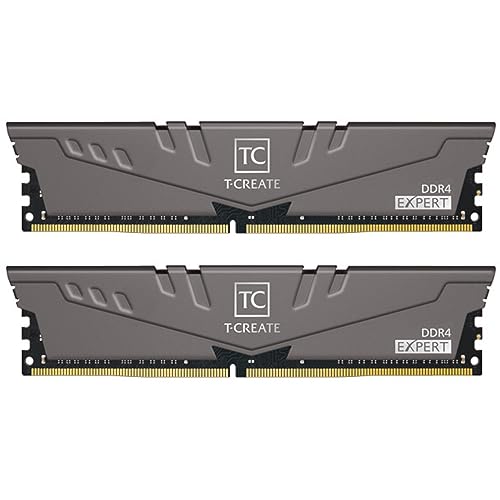
Builders running established DDR4 setups will find exceptional performance in the TEAMGROUP T-CREATE Expert overclocking 10L DDR4. Featuring a robust 10-layer PCB and high-temperature resistant capacitors, it delivers dependable stability at a sensible entry point. If you want to optimize other areas of your home workspace, consider reading our advice on Home & Living setups.
Power users requiring massive capacity alongside bleeding edge speed should consider the G.SKILL Trident Z5 Neo RGB Series DDR5 RAM 64GB configuration. This kit combines high memory density with premium binned silicon, handling complex 3D rendering and heavy multitasking effortlessly. Tailor your selection to your motherboard capabilities to enjoy seamless performance scaling.
FAQs
What makes Best Computer RAM for Overclocking different from standard memory kits?
Overclocking memory kits feature tightly binned silicon dies, multi-layer PCBs, and heavy aluminum heat spreaders designed to handle elevated operating voltages. Standard baseline memory relies on conservative JEDEC specifications with looser timings and minimal cooling. Overclocking modules provide unlocked profiles and superior signal trace routing to sustain aggressive speed thresholds.
How does CAS latency impact gaming frame times compared to raw megatransfers in 2026?
CAS latency dictates how quickly memory responds to instruction requests, directly stabilizing minimum 1% and 0.1% low frame times in CPU bound games. Raw transfer speed increases overall data throughput, which benefits high bandwidth workloads like video encoding and file extraction. Balancing both metrics provides the smoothest gaming experience without micro stuttering.
What is the difference between Intel XMP 3.0 and AMD EXPO overclocking profiles?
Intel XMP 3.0 provides automated tuning presets tailored for Intel Core processors, including support for custom user-defined profile saves. AMD EXPO is an open standard designed specifically to optimize sub-timings and Infinity Fabric synchronization on Ryzen platforms. Both standards simplify the memory overclocking process by configuring voltages and timings in a single BIOS click.
Why is a ten layer printed circuit board critical for stable high frequency memory overclocks?
A ten layer PCB adds extra electrical shielding and dedicated ground layers between high speed copper traces, significantly reducing signal interference and cross-talk. This enhanced structural integrity ensures reliable data transmission when pushing frequencies past factory thresholds. Just as structural planning matters when evaluating long term durability guides, robust PCB layering ensures hardware longevity.
Does enabling an overclocking profile void hardware warranties on modern platforms?
Technically, operating memory outside baseline JEDEC specifications is classified as overclocking by processor manufacturers. However, enabling certified XMP or EXPO profiles on compatible motherboards is standard practice and rarely affects practical warranty support. Extreme manual overvolting beyond safe thresholds carries higher hardware risk than using standard factory profiles.
What is the sweet spot frequency for AMD Ryzen processors when tuning desktop memory?
The optimal operating frequency for current AMD Ryzen processors is 6000MT/s with a tight CL30 latency profile. This configuration maintains an ideal 1:1 synchronization ratio between the memory controller clock and the unified memory clock. Pushing frequencies higher often forces the memory controller into a 1:2 divider mode, which introduces latency penalties.
How does high operating voltage affect the lifespan of modern DDR5 memory modules?
Operating DDR5 memory above 1.40V generates substantial thermal output and accelerates silicon electromigration over extended multi-year timeframes. Without adequate chassis airflow, sustained heat buildup can degrade memory stability and damage the onboard power management circuitry. Keeping voltages within manufacturer recommended boundaries protects your hardware investment.
Why do two memory sticks overclock more reliably than a four stick configuration?
Modern consumer motherboards utilize Daisy Chain memory trace routing that optimizes signal integrity specifically for two memory slots. Populating all four slots increases electrical trace reflections and places significant strain on the processor integrated memory controller. Dual-channel configurations with two matched sticks achieve higher frequencies and tighter sub-timings with greater consistency.
How do you test memory stability after manually tightening secondary timings?
Testing memory stability requires dedicated diagnostic utilities such as TestMem5, Karhu RAM Test, or MemTest86 run over several consecutive hours. These tools continuously write and verify intricate data patterns across memory addresses to detect parity errors and computational calculation faults. Passing comprehensive stress testing ensures your operating system will not suffer random crashes during daily productivity.
What role does the integrated memory controller on the processor play during memory tuning?
The integrated memory controller (IMC) inside the processor communicates directly with the RAM to coordinate data exchanges and command cycles. The silicon quality of your specific processor IMC determines the highest frequency and voltage thresholds your system can sustain. A superior memory kit cannot reach its full potential if the processor memory controller lacks sufficient electrical capability.






Write Your Review
No reviews yet. Be the first to share your experience!