

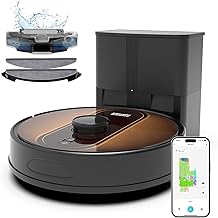
Robot Vacuum Mop 6000Pa LIDAR
As an Amazon Associate we earn from qualifying purchases. Product prices and availability are accurate as of the date/time indicated.
With pets shedding across hardwood and carpet in your busy suburban home, keeping floors clean often means daily bin emptying or chasing a stuck robot around toys. This 3-in-1 vacuum and mop with 6000Pa suction and LIDAR mapping handles it all-sweeping, vacuuming, and mopping in one go-while the self-emptying station goes 90 days without a refill. After a few days, you’ll notice it resuming right where it left off post-recharge, saving those quick touch-up sessions, though mapping your full layout takes an initial 20-minute scan. Schedule via app or Alexa, and just dock it every three months for hands-off results.
Who Is This Product For?
This robot vacuum and mop suits busy suburban families in homes around 1,500 to 2,500 square feet, especially those with pets and kids. Think mid-career parents juggling work and school runs, dealing with constant pet hair on mixed floors like hardwood, tile, and low-pile carpet. It’s for people tired of daily bin emptying or chasing stuck cheaper models around dog toys and furniture legs. Empty-nesters with shedding cats fit too, wanting low-effort floors without bending over for mopping after dinner.
Key Features & Benefits
90-Day Self-Emptying Dust Station
The dust collection station automatically pulls dirt from the robot’s bin into a large bag after each run, handling up to 90 days before needing a swap. In pet-heavy homes, this means docking it once every few months instead of dumping debris daily, freeing up evenings for family time rather than maintenance chores.
6000Pa Suction for Pet Hair and Debris
Strong suction grabs dust, crumbs, and embedded pet hair from hard floors, tile, and carpets in one go. It shines during shedding season or after meals, pulling up what manual sweeping misses without scattering it around, though it works best on low- to medium-pile rugs.
360° LiDAR Navigation and Multi-Floor Mapping
LIDAR scans rooms at 360 degrees to build detailed maps, navigating around obstacles and handling multiple floors. Set it loose in a cluttered living room with kids’ toys, and it methodically covers edges without bumping or getting trapped, saving time on rescues over weeks of use.
3-in-1 Sweep, Vacuum, and Mop Function
It sweeps, vacuums, and mops simultaneously with a 250ml dustbin and 310ml water tank, switching modes for carpet versus hard floors. After a rainy day with tracked-in mud, one pass leaves floors dry and dirt-free, cutting separate mopping trips from your routine.
App and Voice Control with Scheduling
Through the app or Alexa, set no-go zones, virtual walls, cleaning schedules, or target specific rooms. Working parents appreciate starting a run via voice before leaving the office, returning to done floors without rethinking layouts each time.
150-Minute Runtime with Auto-Recharge
Runs up to 150 minutes per charge, returning to dock when low and resuming exactly where it stopped. In larger homes, it tackles full cleans without partial jobs, though mapping refines paths over initial runs for smoother coverage.
What to Consider When Buying
Measure your home’s layout and floor types first-it’s effective on hard surfaces and carpets but may need zone tweaks for high-pile rugs or tight corners. Think about dock space; the self-empty unit takes a bit more room than basic models. Durability holds up with the 2-year warranty, but expect occasional brush tangles from long pet hair.
- Common mistake: Skipping floor prep like picking up cords, leading to early stuck incidents.
- Overlooking app setup time-initial mapping takes 20-30 minutes per floor.
- Ignoring bag costs; stock up for the 90-day cycle to avoid mid-month runs.
How to Choose the Right One
Start with your biggest pain: pet hair means prioritize suction and self-empty; multi-floor homes need solid mapping. Check runtime against square footage-150 minutes covers most under 2,500 sq ft. Use this checklist: Does it handle your floors? App compatibility with your setup? Warranty length? Test navigation videos for obstacle avoidance. If daily hands-off fits your schedule over manual control, it aligns.
Why This Is a Smart Choice
Over months, the self-empty and mapping reduce interruptions, turning weekly chores into background tasks. Families notice floors staying cleaner with less effort, especially post-dinner or pet walks. The auto-resume handles power dips without redoing rooms, and voice scheduling integrates into routines like morning coffee commands. It trades minor app tweaks for consistent results, backed by responsive support.
Care & Maintenance Tips
Run it daily for best pickup, as suction loosens debris gradually over repeated passes.
- Empty the 90-day bag every 2-3 months; replace when full to avoid clogs.
- Clean brushes weekly for pet hair buildup-takes 2 minutes with included tool.
- Refill water tank before mopping runs; wipe sensors if navigation drifts after dust layers.
- Update app maps after furniture moves; it adapts but initial rescans help.
- Avoid thick fringes on rugs-they can snag, so trim or zone them out.
FAQs
Q: How often do I need to empty the dust bag in a busy home with pets?
A: The self-emptying station holds enough for about 90 days of regular cleaning in most homes, automatically dumping debris from the robot’s bin after each run. In pet-heavy households with daily shedding, it might need a bag swap every 60-75 days depending on floor size and traffic. Users in 2,000 sq ft spaces report just checking the bag monthly at first, stretching longer as routines settle.
Q: Will it handle navigating around kids’ toys and dog beds without getting stuck?
A: The 360° LiDAR system scans and maps layouts quickly, creating detailed floor plans to avoid obstacles like toys or pet beds during runs. It supports no-go zones and virtual walls via the app, so you can block off messy play areas. In real use, it bumps gently into larger items but resumes paths efficiently, though very small objects under 1 inch might occasionally need manual pickup.
Q: Can I mop hardwood floors and vacuum carpets in the same cleaning session?
A: Yes, it switches seamlessly between vacuuming, sweeping, and mopping in one pass, lifting the mop pad on carpets to avoid wetting them. The 310ml water tank covers larger areas before refilling, and 6000Pa suction pulls up pet hair from both surfaces effectively. Expect slightly damp hard floors after mopping that dry quickly, with the robot handling mixed flooring in homes without issue.
Q: What happens if the battery dies mid-clean on a big house?
A: It runs up to 150 minutes per charge, then docks automatically to recharge before picking up exactly where it stopped. This works well for 1,500-2,500 sq ft homes, ensuring full coverage over multiple sessions if needed. Mornings often start with floors done overnight, as it resumes without missing spots around furniture.
Q: How does app control work for scheduling around my work hours?
A: Through the app, set daily or weekly schedules, select specific rooms, and draw no-mop zones for rugs-all from your phone. Alexa or Google Assistant lets you start or pause with voice commands like “clean the kitchen.” It maps multiple floors for upstairs/downstairs routines, saving time for busy parents who return to spotless entryways after long days.
Q: Compared to cheaper robots without self-empty, is the maintenance really less?
A: Yes, the 90-day bag means no daily bin emptying like basic models require, especially with pet hair buildup. The station prevents clogs during auto-dumps, but you still wipe the mop pad and sensors weekly for best results. Over months, this cuts hands-on time significantly, though initial mapping takes a full run to perfect multi-floor setups.






Write Your Review
No reviews yet. Be the first to share your experience!