

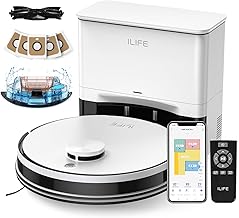
ILIFE A30 Pro Robot Vacuum Mop Self Empty 5000Pa
As an Amazon Associate we earn from qualifying purchases. Product prices and availability are accurate as of the date/time indicated.
With kids tracking in dirt after school or pets shedding on the carpet, evenings often mean grabbing the vacuum again. This robot vacuum and mop handles it all with 5000Pa suction across four modes and simultaneous vacuum-mop action on hard floors to medium-pile carpets, while the self-emptying station uses large dust bags for up to 60 days without manual emptying. After a few runs, you’ll notice it mapping your home via LiDAR for targeted cleaning and no-go zones set through the app, freeing up your routine-though it needs a 2.4GHz WiFi connection to get started.
Who Is This Product For?
This suits busy parents in suburban homes with kids and pets, where floors collect crumbs, dirt, and fur daily. It fits dual-income couples in 1,500-3,000 sq ft spaces mixing hardwood and medium-pile carpets, tired of weekly vacuum drags after dinner or muddy paw prints. People with erratic schedules-like nurses or remote workers-appreciate setting it to run while they’re out, tackling tracked-in mess without pulling them from family time or errands.
Key Features & Benefits
Self-Emptying Station with Dust Bags
The station automatically pulls dust and debris from the robot after each run into large bags, each lasting up to 60 days in typical use, with five bags provided for extended hands-off periods. In homes with pets or kids, this means checking the bin drops to once every couple months instead of after every clean, freeing up evenings from cloudy dust clouds.
LiDAR Navigation and Mapping
Using laser tech and mapping algorithms, it scans your home to create accurate layouts, plan routes, and respect no-go zones or virtual walls set via app. During the first few runs, it builds the map gradually, then handles multi-room cleans efficiently, avoiding furniture legs or kid toy piles on repeat uses.
5000Pa Suction in Four Modes
Suction adjusts from quiet 500Pa for light dust to max 5000Pa for embedded pet hair and debris, with a roller brush grabbing bits from hard floors to medium-pile carpets. On busier days with extra floor traffic, switching to strong or max pulls up more without multiple passes, though quieter mode keeps noise down during naps or work calls.
3-in-1 Vacuum, Sweep, and Mop
A combined 200ml dustbin and water tank lets it vacuum and mop at the same time on hard floors, or vacuum only by removing the mop holder. For quick post-meal refreshes, this cuts cleaning time since no tank swaps are needed, though it works best on non-carpeted areas for mopping.
App, Voice, and Remote Control
Connect via 2.4GHz WiFi to the app for scheduling, room selection, no-go zones, suction tweaks, and water levels; pair with Alexa or use the remote as backup. Setting weekly runs or targeting the kitchen before guests arrive becomes routine, with voice commands handy when hands are full cooking.
What to Consider When Buying
Think about your home layout, floor types, and how often you’ll empty bags despite the long capacity. Durability holds up for daily runs, but the robot’s size-around standard robot dimensions-might bump low furniture. Usability shines with app setup, though only 2.4GHz WiFi works, so check your router.
- Common mistake: Assuming it mops deep carpets well-stick to hard floors for that to avoid wet rugs.
- Overlooking bag replacement costs after the initial five run out.
- Ignoring setup time for initial mapping, which takes a couple full runs.
How to Choose the Right One
Start by measuring your space: under 3,000 sq ft with mixed floors? This covers it. List must-haves like self-emptying and pet hair pickup, then check if app controls match your WiFi. Use this checklist: Does it navigate via LiDAR? Handle medium carpets? Offer bag-based emptying for low maintenance? Test compatibility with your voice assistant. If pet messes or kid spills dominate, prioritize high suction and no-go zones. Narrow by reading on real coverage in similar homes.
Why This Is a Smart Choice
Over months, the self-empty bags mean far fewer trips to the trash, letting routines settle without constant oversight. Mapping improves with use, hitting spots consistently after setup. For pet owners, the suction reliably grabs fur from carpets without clogs in everyday scenarios. It trades minor app-only WiFi limits for practical time savings in real homes, building reliability through repeated cycles.
Care & Maintenance Tips
Run it regularly to keep brushes clear, as daily use prevents buildup better than sporadic deep cleans.
- Wipe the sensors weekly to maintain navigation accuracy, especially in dusty spots.
- Replace mop pads after 20-30 uses and rinse the tank to avoid residue smells.
- Empty the station bag when full-around 60 days-to prevent overflow on heavy clean weeks.
- Check the roller brush monthly for hair tangles, a quick untangle keeps suction strong.
- Update the app firmware periodically for smoother mapping over time.
FAQs
Q: How long can I go without changing the dust bag in the self-emptying station?
A: Each 2.5L dust bag holds debris for up to 8 weeks in a typical home, and with five bags included, that’s around 40 weeks total if you swap them out sequentially. In busier households with pets or kids tracking in dirt, you might need to replace one every 4-6 weeks depending on how often it runs. The station empties automatically after each cleaning job, so you just seal and toss the full bag when it’s time.
Q: What happens if I have toys or cables on the floor during a cleaning run?
A: Use the app to set no-go zones or virtual walls around those areas, and the LiDAR navigation will steer clear while mapping the rest of your home. It handles medium-pile carpets and hard floors well, but for clutter like kids’ toys, scheduling runs during nap time or after tidying up makes a noticeable difference in avoiding snags. The remote control works too if you’re not near your phone.
Q: Can it vacuum and mop at the same time on my mix of hardwood and rugs?
A: Yes, the 2-in-1 tank with 200ml dustbin and 200ml water lets it vacuum and mop simultaneously, cutting down cleaning time on hard floors transitioning to medium-pile carpets. Just remove the mop holder if you want vacuum-only on rugs to avoid any dampness. Adjust suction from Quiet mode for daily maintenance up to Max 5000Pa for deeper pet hair pickup.
Q: How does setup work for mapping my 2000 sq ft house with the app?
A: Connect to 2.4GHz WiFi via the ILIFEClean app, then let it do a full mapping run with LiDAR to create an accurate home layout for room selection and schedules. It supports Alexa for voice commands once mapped. Expect the first couple runs to refine edges around furniture as it learns your space.
Q: What’s involved in maintaining the robot between self-empty cycles?
A: Wipe the sensors and roller brush every week or so if pet hair builds up, and empty the onboard dustbin manually only if it fills before docking. The self-empty station handles most debris automatically into the bag, but rinsing the mop pad after mopping sessions keeps it fresh. Over time, brushes may show wear from heavy carpet use, so check them monthly.
Q: Compared to cheaper bagless robot vacuums, what’s the real difference after a month?
A: Without bags, you’d empty a cloudy bin weekly, but this model’s station keeps things contained for 60 days or more per bag in average use, freeing up evenings from that chore. Suction holds steady across four modes for pet hair on carpets, though it needs 110V outlets nearby for the station. App controls for zones add precision that basic models often lack.
Q: Will it run quietly enough overnight in a house with light sleepers?
A: Switch to Quiet mode at 500Pa suction for softer operation during scheduled night runs, which works fine for hard floors without waking anyone upstairs. On Max mode for carpets, it’s noticeably louder like a standard upright vacuum, so daytime use fits better there. Navigation stays efficient even at lower power.






Write Your Review
No reviews yet. Be the first to share your experience!