Quick Answer
The best touch lamps make the sensor easy to find in darkness, provide a useful brightness sequence, and work with the exact bulb or integrated LED specified by the manufacturer. Before choosing one, confirm which surface responds to touch, whether the lamp can turn off directly, what happens after a power interruption, and whether bedding, pets, or routine cleaning may activate it accidentally.
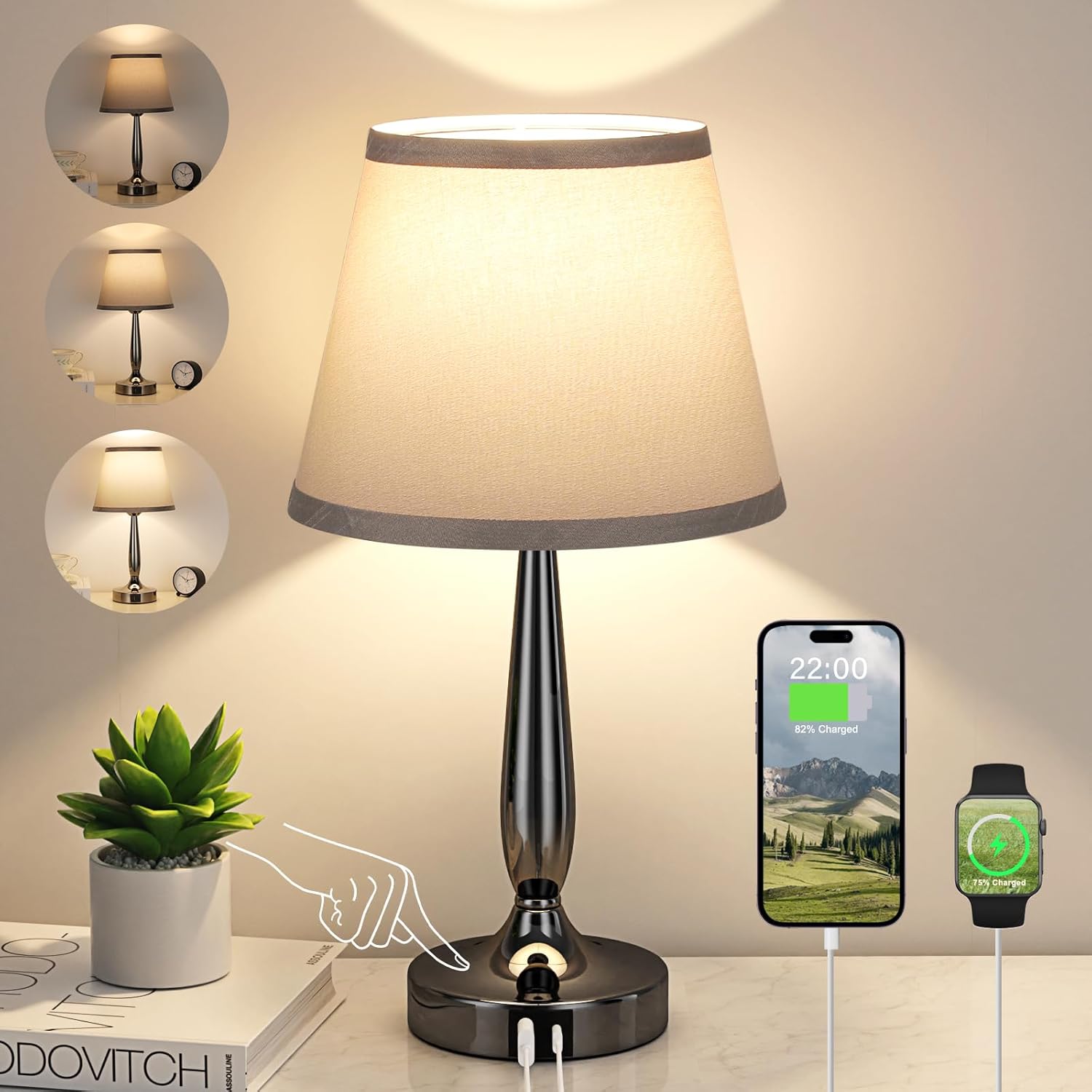
The Nusogon Touch Table Lamp is a simple starting point because its listing combines three-way dimming, an included LED bulb, and a three-second quick-shutoff function. For a work surface, compare the JKSWT LED Desk Lamp with touch controls, several color modes, memory, and USB charging. The O’Bright Ember Cordless Table Lamp offers rechargeable portability with a replaceable E26 LED bulb.
Choose the best touch lamps by testing the intended reach, table footprint, shade height, glare angle, charging-cable route, and control logic rather than choosing only by appearance.




Top Picks at a Glance
- Best Simple Quick-Off Lamp: Nusogon Touch Table Lamp. A small shaded lamp with three-way dimming, included bulb, and a listed three-second shutoff gesture.
- Best Touch Desk Lamp: JKSWT LED Desk Lamp. An adjustable black desk light with five color modes, USB charging, touch control, and memory.
- Best Compact USB-C Lamp: Kakanuo Touch Table Lamp. A small three-way bedside lamp with USB-C charging and an included LED bulb.
- Best Tall Charging Pair: CINSARY Silver Table Lamp Set. Two brushed-nickel lamps with USB-A, USB-C, AC outlets, and three-way touch dimming.
- Best Linen-Shade Pair: EJIAXIN Touch Lamp Set. A pair with round fabric shades, included bulbs, and USB-C plus USB-A ports.
- Best Cordless Replaceable-Bulb Lamp: O’Bright Ember. A rechargeable black table lamp with touch dimming, Type-C charging, and an E26 LED bulb.
- Best Small Glass-Shade Lamp: Seealle Touch Table Lamp. A compact three-way lamp with a white glass shade and included LED bulb.
- Best Rechargeable Color Lamp: THAUSDAS Touch Night Light. A portable multicolor format with five brightness levels, several lighting modes, timers, and USB charging.
How to Choose the Best Touch Lamps
Begin with the situation in which the lamp will be touched. A bedside user may need a broad sensor that is easy to locate without sitting up. A desk user may prefer a clearly marked panel that will not react when papers touch the base. A nursery or living-room lamp should be reachable without leaning over a child, chair arm, drink, or fragile object.
The best touch lamps fit the user’s natural hand movement. Sit or lie in the normal position and reach toward the proposed lamp location. Check whether the hand lands on the sensor without contacting a hot bulb area, shade, charging cable, or glass component. People with limited hand movement may benefit from a larger touch zone, but individual accessibility needs vary.
Measure the table as well as the lamp. The base must share space with a phone, book, clock, medication, or computer without sitting near the edge. If bedside space is limited, compare the proportions of nightstands for small bedrooms before choosing a tall lamp with charging accessories.
How Touch Controls Work
Many lamps use a capacitive sensor that detects a change when a person touches a conductive base, stem, or marked control area. The entire metal body may respond, or only one button may be active. The product instructions should identify the touch zone; decorative metal parts are not always controls.
Sensor performance depends on the lamp’s design, power supply, surface condition, and environment. A lamp may behave differently when disconnected, connected through an incompatible accessory, or touched while someone is electrically isolated by thick gloves. Do not modify grounding, wiring, plugs, or internal sensor components to change sensitivity.
Touch control is convenient because it avoids searching for a small rotary or inline switch. It is not necessarily silent, universal, or failure-proof. Some models make a confirmation sound, illuminate a status indicator, or require a deliberate press rather than a light tap. Review the exact control sequence before purchase.
Three-Way Dimming, Stepless Control, and Quick Shutoff
The best touch lamps commonly offer three fixed levels. Repeated touches may cycle through low, medium, high, and off. This sequence is predictable, but turning off from low may require several taps. A direct-off gesture, dedicated button, or long press can reduce cycling if it works consistently for the user.
Stepless dimming allows finer adjustment, often by holding a control. It can produce a more comfortable reading level but may be slower to repeat. Several preset levels are easier for users who want the same brightness every night. Check whether the lamp starts at low or resumes its previous level.
Memory may operate only while the lamp remains connected to power. After an outage or wall-switch interruption, the lamp may return off, restart at a default level, or forget the last setting. This behavior matters in bedrooms and shared rooms where a bright restart would be disruptive.
Brightness and Color Temperature
The best touch lamps should provide useful light at the page, keyboard, or room surface rather than merely appear bright at the shade. Listed lumens can help compare output, but shade fabric, glass opacity, beam angle, distance, and surrounding wall colors affect usable illumination.
Low brightness is valuable for nighttime navigation, while medium or high settings may support reading or desk work. A small decorative lamp can have three levels and still lack the spread needed for sustained tasks. Layer it with broader room light rather than operating one source at an uncomfortable maximum.
Selectable color temperatures change the appearance of white light. Warm settings tend to look softer, while neutral or cool settings can increase perceived contrast. Personal preference and the task matter more than one universal setting. Avoid claims that a particular lamp guarantees sleep quality, eye protection, or medical benefits.
Shades, Glare, and Lamp Height
The best touch lamps must hide the bulb or bright LED from normal eye positions. At a bedside, check the view while lying down and sitting up. On an end table, check every nearby chair. A lamp that looks comfortable while standing may expose the bulb directly to a seated user.
Fabric and linen shades diffuse light and create a broad glow, but darker or thicker material reduces task output. White glass can spread decorative light while producing reflections and requiring careful handling. Open or compact shades may direct more light downward but reveal more of the bulb.
Shade height should relate to the mattress, sofa arm, desktop, and user posture. A guide to the best bedside lamps can help with bedside geometry, while touch behavior remains a separate decision. Always use the measurements of the actual lamp and furniture.
Bulb Compatibility and Integrated LEDs
The best touch lamps with replaceable sockets may require a dimmable bulb that is compatible with the touch circuit. An included bulb provides a known starting configuration. When replacing it, match the listed base, shape, wattage, voltage, and dimming requirements rather than assuming any LED bulb will cycle correctly.
A non-dimmable bulb may flicker, fail to change levels, remain partly lit, or place stress on incompatible electronics. Smart bulbs also contain their own control circuitry and may not work correctly when a lamp varies power for three-way touch dimming. Follow both the lamp and bulb instructions.
Integrated LED lamps can provide slim shapes, multiple color modes, and electronic memory. Their light source and driver may not be user replaceable. If either fails, the whole lamp may require service or replacement. Compare warranty and serviceability without treating rated life as guaranteed operating time.
USB Ports and AC Outlets
The best touch lamps with USB-A, USB-C, or an AC outlet can reduce separate adapters, but port presence does not reveal charging speed. Check voltage, current, supported protocols, shared-output limits, and whether charging works when the light is off. Current specifications may differ among ports on the same lamp.
An AC outlet built into a lamp has a stated maximum load and is not a substitute for an unrestricted power strip. Do not connect heaters, cooking appliances, or other high-power equipment. Keep plugs accessible and stop using the outlet if it becomes loose, hot, discolored, or damaged.
Plan cable direction before placing the lamp. Charging cords should not pull the base, cross the touch surface, rub the shade, or hang into a walkway. A phone connected at night needs a stable resting place; a bedside caddy can help when the table is crowded.
Cordless and Rechargeable Touch Lamps
The best touch lamps for portable use trade continuous wall power for battery runtime. A cordless lamp can move between a bedroom, dining area, patio allowed by the listing, or temporary work surface without trailing a cord. It still needs a safe charging location and regular recharging.
Runtime claims depend on brightness, color mode, battery condition, temperature, and charging history. Maximum brightness usually drains a battery faster than a low setting. Confirm whether the lamp can operate while charging and whether the battery is replaceable or permanently installed.
Use the specified charger and cable. Do not charge a lamp on bedding, near water, or where heat cannot dissipate. Stop use for swelling, unusual heat, odor, leakage, damaged ports, or a casing that separates. Battery service should follow manufacturer instructions.
Placement, Stability, and Accidental Activation
The best touch lamps should remain stable when tapped repeatedly. A wide or weighted base can help, but height, shade weight, cable pull, surface level, and objects around the lamp also affect tipping. Place glass-shade models where elbows, doors, pets, and loose blankets are unlikely to strike them.
Bedding, jewelry, metal objects, damp cloths, pets, or moving the lamp may trigger some touch zones. Keep the sensitive area clear and learn which portions respond. If unexplained activation continues, check the instructions, power connection, bulb compatibility, and visible damage rather than opening the lamp.
For desk placement, separate the touch control from papers and accessories. A lamp on one of the best vanity desks should not activate every time cosmetics or tools touch its base. Position cords away from drawers and hinged mirrors.
Cleaning and Electrical Warning Signs
Unplug a corded lamp before cleaning or changing a bulb, and allow all parts to cool. Use a dry or manufacturer-approved method for metal touch surfaces, fabric shades, glass, and integrated control panels. Never spray cleaner directly into a socket, USB port, outlet, switch, or seam.
Residue and moisture can interfere with touch response. Clean gently without abrasive pads that damage conductive finishes or control markings. Reconnect only after every part is dry and correctly assembled.
Stop using a lamp that flickers unexpectedly, shocks the user, smells hot, makes crackling sounds, exposes wiring, has a damaged plug, or activates unpredictably after basic compatibility checks. Electrical diagnosis and internal repair should be handled according to manufacturer guidance or by a qualified professional.
How We Tested & Evaluated
This guide does not claim hands-on sensor, brightness, charging, battery, or electrical testing. To compare the best touch lamps, we reviewed current Amazon results obtained through Crawlbase and verified product identities. We evaluated visible listing factors including touch-zone format, three-way or multi-level dimming, quick shutoff, memory, color modes, shade type, included bulbs, integrated LEDs, USB-A, USB-C, AC outlets, rechargeable operation, timers, and table footprint.
Use-case labels describe configurations rather than independently measured performance. Nusogon represents simple quick-off control; JKSWT desk use; Kakanuo compact USB-C charging; CINSARY a tall charging pair; EJIAXIN a linen-shade pair; O’Bright cordless use with an E26 bulb; Seealle a small glass shade; and THAUSDAS rechargeable color light. Confirm current dimensions, touch instructions, bulb requirements, output, electrical ratings, battery information, certification, warranty, and care on the live listing.
Common Mistakes to Avoid
Before ordering the best touch lamps, avoid these common control and compatibility mistakes:
- Assuming the whole lamp is touch-sensitive: Confirm the exact sensor area and required gesture.
- Ignoring the shutoff sequence: Check whether off requires cycling, holding, or a separate control.
- Installing any LED bulb: Match the socket, wattage, shape, and dimmer compatibility.
- Buying by port type alone: Verify actual USB output, protocols, and shared limits.
- Letting cables pull the lamp: Route charging cords with slack and a stable device location.
- Overlooking power-loss behavior: Check restart brightness and memory limitations.
- Placing the sensor under clutter: Keep bedding, papers, and accessories away from the touch zone.
- Cleaning while powered: Unplug, cool, and keep moisture out of electrical parts.
Buying Checklist
The best touch lamps should pass this checklist before purchase:
- Define bedside, desk, reading, nursery, living-room, or portable use.
- Confirm touch-zone location, sensitivity, control sequence, and direct-off behavior.
- Compare minimum and maximum brightness, dimming steps, color temperature, and memory.
- Check shade height, bulb visibility, glare, diffusion, and table footprint.
- Verify included or replacement bulb type, wattage, and touch-dimmer compatibility.
- Review USB and outlet ratings, port location, charging behavior, and cable route.
- For cordless lamps, compare charging method, runtime conditions, and battery serviceability.
- Check base stability, cleaning instructions, warranty, and electrical warning signs.
FAQ
How does a touch lamp detect a hand?
Many designs use a capacitive sensor connected to a conductive surface or control panel. Touch changes the sensed electrical condition and the circuit changes brightness or power according to its programmed sequence.
Do the best touch lamps need special bulbs?
Some require compatible dimmable bulbs, while integrated LED models do not use a replaceable bulb. Follow the exact socket, wattage, shape, and dimming requirements stated for the lamp.
Why does a touch lamp turn on by itself?
Possible causes include contact with bedding or objects, moisture, incompatible bulbs, unstable power, or damaged electronics. Clear the touch area and follow troubleshooting instructions; stop use for heat, shocks, odor, or damage.
Can a three-way lamp turn off without cycling?
It depends on the model. Some cycle through every level, while others offer a long press, timed gesture, dedicated off control, remote, or memory behavior. Verify the actual instructions.
Do USB ports work when the lamp is off?
Many do, but this is model-specific. Check the listing and manual for off-state charging, port output, shared limits, and whether the lamp must remain connected to wall power.
Are rechargeable touch lamps practical?
They are useful where cords are inconvenient, provided their runtime, charging time, output, and battery care match the routine. Higher brightness usually reduces runtime, and every lamp needs a safe charging plan.
Final Takeaway
The best touch lamps combine an easy-to-reach sensor with predictable dimming, compatible lighting components, comfortable glare control, and a stable location. Learn the exact touch and shutoff sequence, verify bulbs and charging ratings, plan for power interruptions, and keep a manual or physical fallback when available. Route cords safely, recharge cordless models as directed, clean only when unplugged, and stop using any lamp that shows electrical damage or abnormal heat.